What Is ALPR? Automatic License Plate Recognition
ALPR, also called, uses cameras, OCR and AI to read vehicle plates in a fraction of a second. This guide explains how it works, where it is used and why it raises privacy questions, then shows how to blur licence plates in your own videos before you publish them.
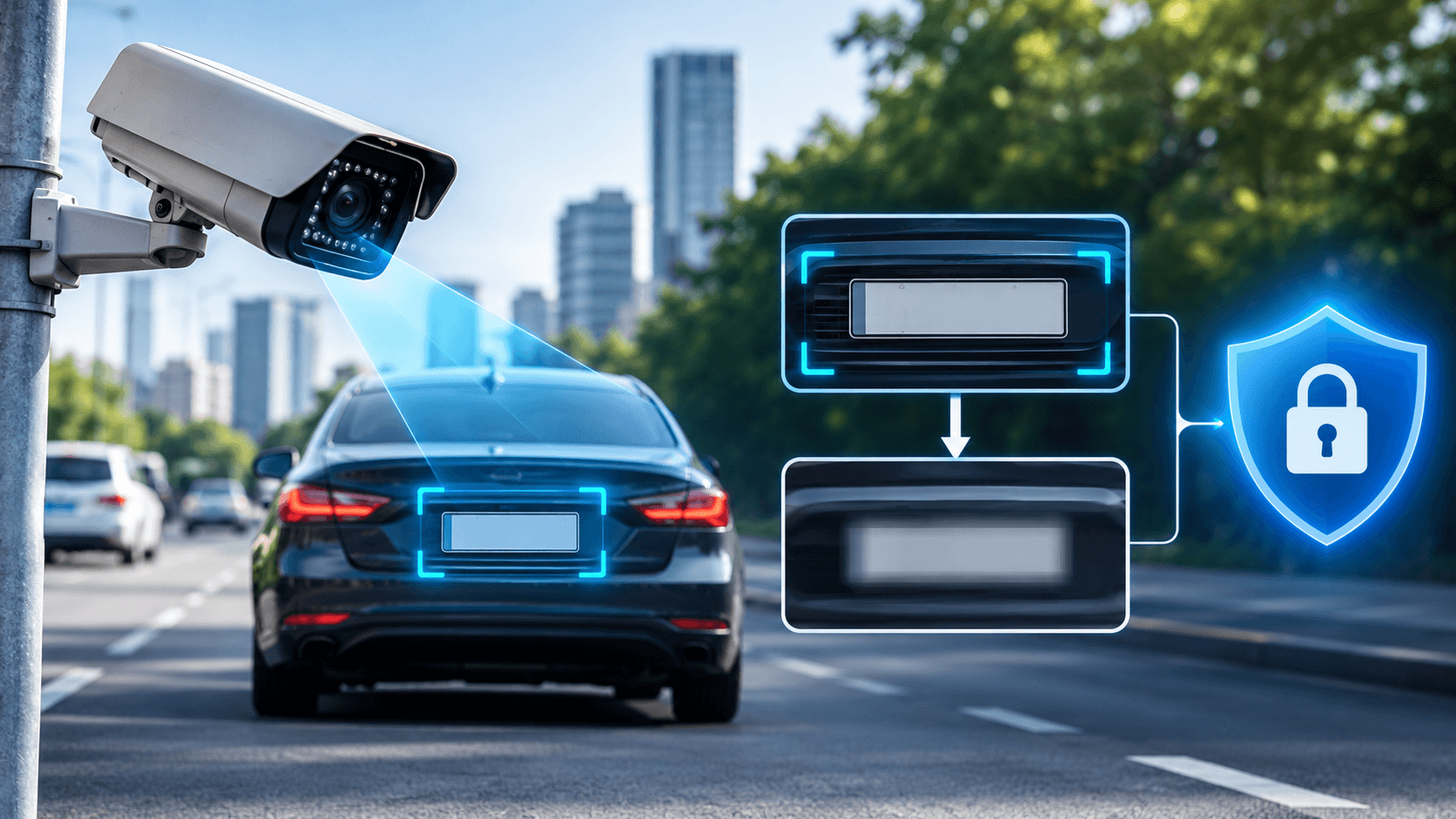
You have probably driven past an ALPR camera today without noticing it. ALPR (Automatic License Plate Recognition), also known as ANPR (Automatic Number Plate Recognition), is a camera technology that uses optical character recognition (OCR) and artificial intelligence to read vehicle registration plates from images or video streams. It turns a photo of a plate into searchable text in a fraction of a second, which is why it is now used for policing, parking, tolling and building access.
That speed is exactly why it matters for privacy. Every plate read can be stored with a place and a time, and the same kind of software can read plates in videos that ordinary people publish online. In this guide we explain what ALPR is, how it works, where it is used and what the concerns are. Then we show how BGBlur helps you protect privacy by detecting plates with AI and applying a licence plate blur before your footage goes public.
What Is ALPR (Automatic License Plate Recognition)?
ALPR is a computer-driven camera system that automatically reads vehicle license plates. Instead of a person typing in a plate number, the system captures an image, finds the plate, reads the characters with OCR and outputs the result as text. That text can then be checked against a list, logged in a database or used to trigger an action.
Traditional cameras only record pictures. ALPR adds the ability to understand what is in the picture, so a plate becomes a searchable data point. Modern systems pair high-speed cameras with AI so they can work on moving traffic, at night and across many lanes at once.
ALPR vs ANPR vs LPR: Are They Different?
No. The names describe the same idea and mostly reflect region:
- ALPR (automatic license plate recognition) is common in the United States
- ANPR (automatic number plate recognition) is common in the UK and Europe
- LPR (license plate recognition) is a shorter generic term
You will also see plate readers described as ALPRs when the camera hardware is the focus. For this article we use them interchangeably.
How Does ALPR Work, Step by Step?
An ALPR system captures a vehicle, reads the plate with OCR, compares the result to a database and then acts or stores it. The exact setup varies, but most systems follow the same chain:
- Capture: Cameras photograph passing vehicles from fixed spots such as poles, gantries and overpasses, or from a moving vehicle.
- Extraction: OCR software reads the characters on the plate from the image.
- Comparison: The plate text is checked against a database, such as a list of stolen vehicles, outstanding warrants or permitted cars.
- Action: A match can trigger a response, for example alerting officers, opening a gate or recording a toll charge.
- Storage: Images and data may be kept for later analysis or as evidence.
- Analytics: More advanced systems look for patterns in how vehicles move over time.
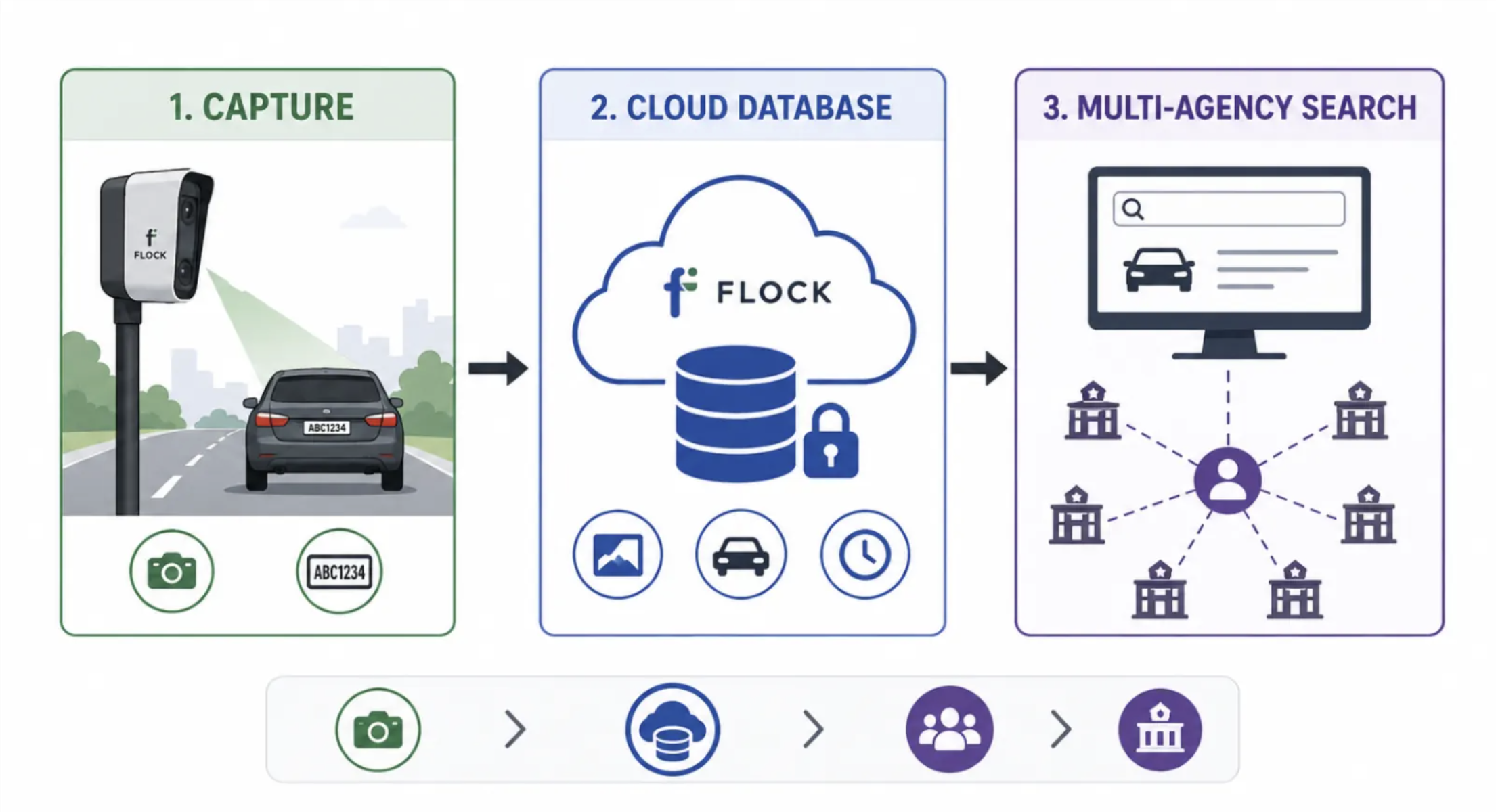
What Does an ALPR System Record?
Beyond the plate itself, a system typically records the location, date and time of each read and uploads it to a central server. Authorised users with the right login can then search that record. This is the part that raises privacy questions, because a single read says little, but thousands of reads can show a vehicle's routine.
What Are the Different Types of ALPR Systems?
ALPR cameras are either fixed or mobile. Fixed units watch one place all the time, while mobile units travel and read plates as they go.
| Type | Where it sits | Typical use |
|---|---|---|
| Fixed ALPR | Poles, gantries, overpasses, gates, car park entrances | Tolling, parking, access control, traffic monitoring |
| Mobile ALPR | Mounted on a moving vehicle | Patrol coverage, parking enforcement, wide-area scanning |
Some people also run plate recognition on recorded video rather than live cameras. That is the same OCR idea applied after the fact, which is why a plate that is visible in a published video is not as anonymous as it looks. Our explainers on what Flock cameras are and Flock Safety cameras and your license plate privacy show how fixed networks work in practice.
Where Is ALPR Used Today?
ALPR is used anywhere a vehicle needs to be identified quickly. The main applications are:
Parking and Access Control
Car parks use plate reads to open barriers, bill by time and manage permits without tickets. Gated communities and company sites use the same idea to admit approved vehicles.
Tolling and Traffic Control
Toll systems read plates to charge drivers without stopping them. Traffic teams use reads to measure flow and enforce rules.
Law Enforcement and Threat Detection
Police use plate reads to flag stolen vehicles and wanted persons, and to search where a vehicle was seen. This is also the use that attracts the most debate, as shown in our coverage of the ALPR warrant requirement argument from EFF.
Traffic Enforcement
Plate recognition supports speed, bus-lane and low-emission zone enforcement, linking an offence to a registered vehicle.
What Are the Benefits of ALPR?
ALPR makes vehicle identification faster, cheaper and more consistent than manual checks. Supporters point to several advantages:
- Speed: Plates are read in a fraction of a second, even on moving traffic.
- Automation: Gates, tolls and alerts work without staff on site.
- Crime prevention: Police forces have widely adopted ALPR as a way to prevent and identify crime.
- Efficiency: Parking and traffic operators save time and reduce paperwork.
- Evidence: Time-stamped records can support investigations.
These benefits are real, and they are the reason ALPR keeps spreading. They also explain why the debate is about safeguards and limits, not whether the technology works.
Is ALPR a Privacy Risk?
It can be, because ALPR can track movements without people knowing. Each read adds to a record of where a vehicle was, and combined records can reveal home, work, habits and associations. Critics warn that broad deployment could lead to a surveillance society, and many jurisdictions are introducing legislation to restrict or limit its use.
What Are the Main Privacy Concerns?
- Tracking over time: Many small reads add up to a movement history.
- Scope creep: Data collected for one purpose may be reused for another.
- Access and misuse: Anyone with login access could search records.
- Retention: How long data is kept is set by the operator and local law, and it varies widely.
- Weak oversight: Some systems have little public reporting or audit.
What Is Happening in Courts and Councils?
The legal picture is moving fast. Recent BGBlur coverage includes the California ALPR privacy lawsuit wave hitting businesses, a Kansas ALPR lawsuit asking if a plate is a GPS tracker and why some cities are cancelling Flock cameras.
Can You Stop ALPR Cameras From Reading Your Plate?
Not on public roads, and covering your real plate is usually illegal. Roadside cameras read the plate you are legally required to display. Devices sold to hide or distort plates are restricted in many places, so read License Plate Concealer Devices: Are They Legal? before you buy anything.
What you can control is the footage you publish. A readable plate in a dashcam clip, a street vlog or a car-sale video can be read by anyone, including automated tools that run OCR on uploaded video. That is where a licence plate blur protects you.
Why Should You Blur License Plates in Videos You Post?
Because a readable plate can identify an owner, reveal a location and be harvested by software. The same OCR that powers ALPR can scan public videos, so your upload can become another data source if plates are visible. People who publish video regularly blur plates for several reasons:
- Plates can link a vehicle to a person or address
- Footage shows where a car was at a specific time
- Under GDPR and similar laws, a readable plate can count as personal data
- Brands and platforms may ask for plates to be hidden in monetised content
For deeper reading, see Why You Need to Blur License Plates in Videos, Can They Post My License Plate on Social Media? and License Plates in Monetized Videos: Legal Guide. Creators working across borders can also check the UAE PDPL guide to blurring faces and plates.
How Does BGBlur Help Protect Privacy With ALPR-Style Detection?
BGBlur uses AI to find license plates in your video and blur them automatically. It applies the same kind of detection that makes ALPR possible, but points it at protecting people instead of identifying them. Rather than you hunting for plates frame by frame, the AI detects them, tracks them as the camera and cars move, and applies the blur.
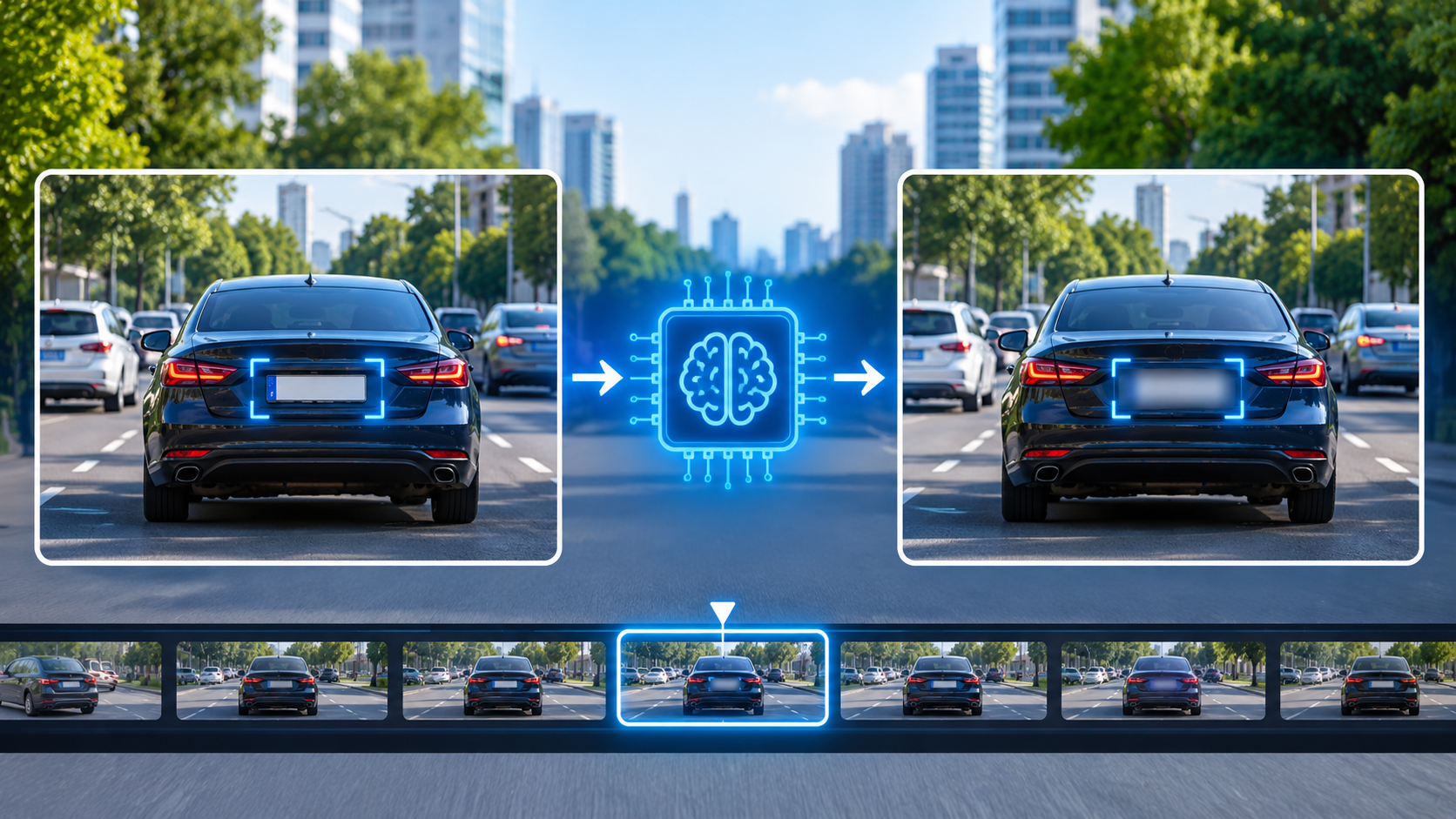
Automatic Plate Detection and Tracking
BGBlur's Blur License Plate feature auto-detects plates and follows them through the clip, so a moving car stays covered from the first frame to the last. This is what makes it practical for long dashcam and street footage. Read how it works in BGBlur AI License Plate Blur for Video Privacy Protection.
Blur Number Plate in Video, in Your Browser, With No Watermark
BGBlur runs in the browser, so there is nothing to install, and standard exports carry no BGBlur logo. You can blur video with no watermark on phone, screen-capture, interview and dashcam clips. Uploaded videos are deleted within 24 hours.
Faces, Plates and Other Details in One Pass
Street footage rarely contains only plates. Use Blur Faces in Videos for people and Blur Anything for house numbers, screens and documents. Filming a lot? Bulk Video Blur handles batches.
Redaction When Blur Is Not Enough
If a plate must never be recoverable, use Redact License Plate to cover it with a solid box. Our guide to license plate redaction explains when to choose each approach.
How to Blur Number Plate in Video With BGBlur (Step by Step)
Upload, review the AI detections, then export. The same simple flow answers both how to blur number plate in video and how to blur licence plate footage on any device.
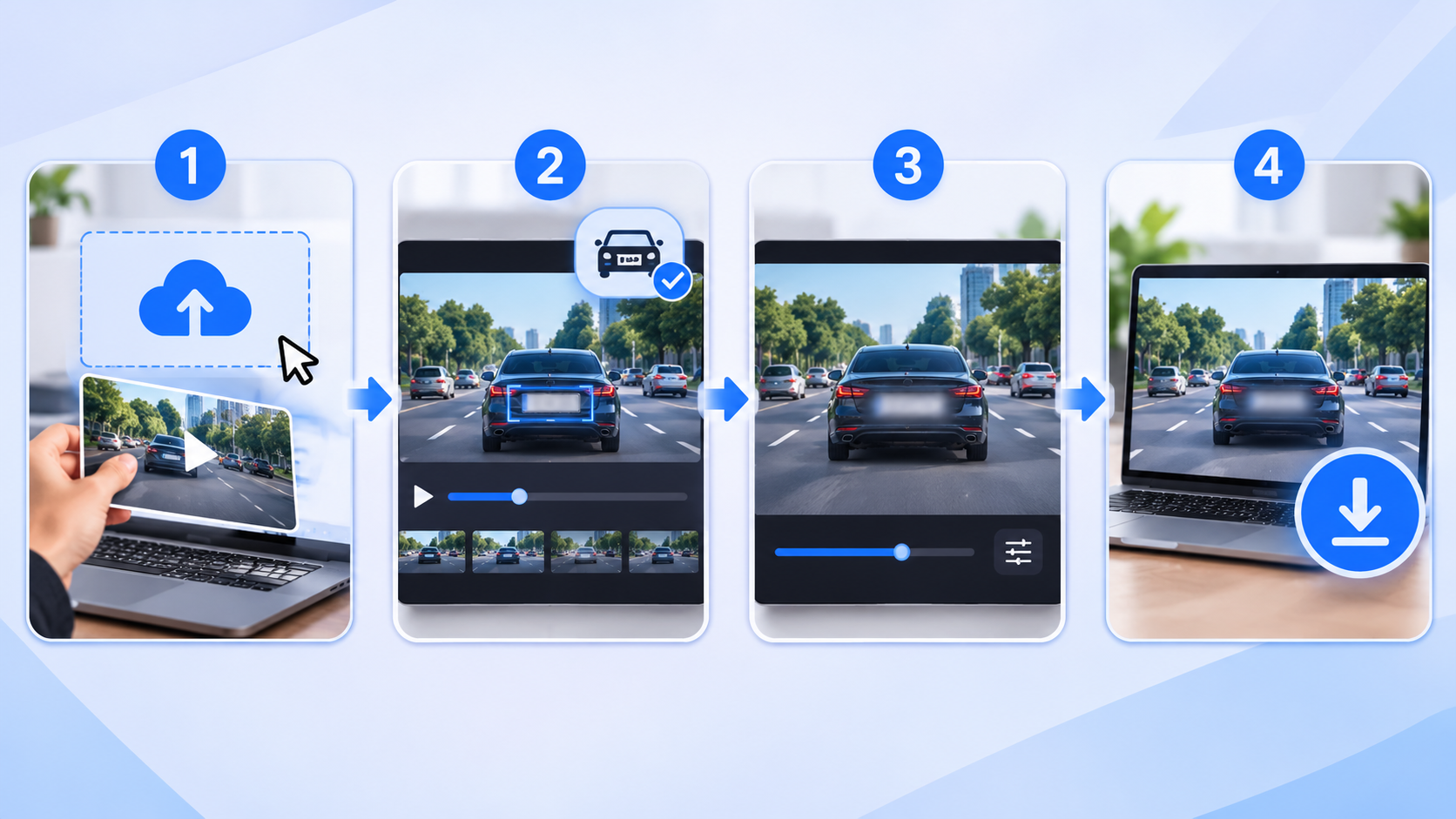
Step 1: Upload Your Video
Open BGBlur in your browser and drag in your clip. MP4, MOV and M4V files are supported, and dashcam, phone and screen-recorded footage all work.
Step 2: Blur Licence Plate Details Automatically
Choose license plate blur and let the AI find every plate. It tracks each one through the video, so you do not need to edit frame by frame.
Step 3: Review and Adjust
Check the preview. Add anything the AI missed, remove anything you want left sharp, and raise the blur strength if a plate looks readable. Brief appearances at the edge of the frame are the easiest to miss.
Step 4: Export Without a Watermark
Export as MP4, MOV or WebM and publish. If you only need a quick fix on a single clip, the free path covers standard-length videos.
Honest Limitations
Blurring your own footage does not stop roadside ALPR cameras from reading real plates, and it does not remove audio, reflections or other identifiers left in the clip. Weak blur can sometimes be reversed, which we explain in why weak blur fails under GDPR. Always review the final video before you post.
Licence Plate Blur, Redaction or Replacement: Which Is Best?
Blur for natural-looking creative video, redact for evidence and legal use, replace when you need the shot to look untouched.
| Method | What it does | Best for |
|---|---|---|
| Blur | Softens the plate so characters cannot be read | Vlogs, travel, dashcam clips, social posts |
| Redaction | Covers the plate with a solid box | Legal, public-records and evidence footage |
| Synthetic replacement | Swaps in a fake plate | Footage that must look natural; see DNAT license plate replacement |
Whichever you choose, use a setting strong enough that the text is unreadable at full resolution.
Who Needs to Blur Licence Plates in Video?
Anyone who films vehicles and shares the result.
Dashcam owners and motovloggers: Road footage captures dozens of plates per trip. See How to Blur Faces and License Plates in Dashcam Videos and Is Motovlogging Legal?.
Real estate agents: Property tours often show neighbours' cars. Read How to Blur License Plates in Real Estate Video.
Content creators and journalists: Street scenes include strangers' vehicles, so blurring plates protects people who are not part of the story.
Businesses and fleets: Security and CCTV clips often need plates hidden before sharing. See Top 10 Tools for Security and CCTV Processing.
Design and marketing teams: Need to blur plates in a still image or Canva project? Try Blur License Plates in Canva.
Pro Tips for Blurring License Plates
- Check the whole video, not just the opening. Plates often appear briefly at the edges.
- Use a strong blur setting. If you can read it when paused, so can software.
- Cover reflections and mirrors. Plates can appear in glass and shiny paint.
- Blur faces at the same time. Drivers and passers-by are identifiable too.
- Keep your original file private. Publish only the blurred export.
- Use redaction for sensitive footage. Evidence and public-records clips deserve a solid cover.
- Re-watch the export before posting, ideally on a larger screen.
Conclusion: ALPR Is Powerful, and Your Footage Is Your Responsibility
ALPR, or ANPR, turns every plate in view into searchable data. That makes parking, tolling and policing faster, and it also creates records of where vehicles go. The technology is not going away, but the rules around retention, access and warrants are still being written in courts and city councils.
You cannot control roadside cameras. You can control what you publish. If you film in traffic, on the street or from a dashcam, blur number plates in your video before you post. BGBlur's AI plate detection finds plates, tracks them through the clip and applies a licence plate blur in your browser, with no watermark on standard exports. Open BGBlur, upload a clip and blur license plate in video in a few clicks.
Related Articles
- Why People Blur License Plates and How to Do It Right: the reasons behind plate blurring
- Blur License Plates and Faces in Videos: protecting people and vehicles together
- How to Blur Dashcam Video for Privacy and Compliance: a universal dashcam workflow
- Rideshare Dashcam Privacy: Flock Mobile ALPR Plan: when dashcams meet ALPR
- Flock Contract Cancelled: What Happens to Plate Data: what happens to stored reads
- Blur Faces and Plates in Video, but Keep the Location: privacy without losing context
- How to Censor a Video Online: Complete Privacy Guide: all the ways to hide sensitive details
- Doorbell Camera GDPR: Bystander Footage Guide: another camera that films passers-by
This article is general information, not legal advice.