How to Blur Dashcam Video for Privacy and Compliance [2026]
A universal guide to blurring dashcam footage for privacy and legal compliance, covering GDPR, DPDP, CCPA, and BIPA requirements across every major dashcam brand. Includes a step-by-step AI blurring workflow, manual-versus-AI cost comparison, and real enforcement cases.
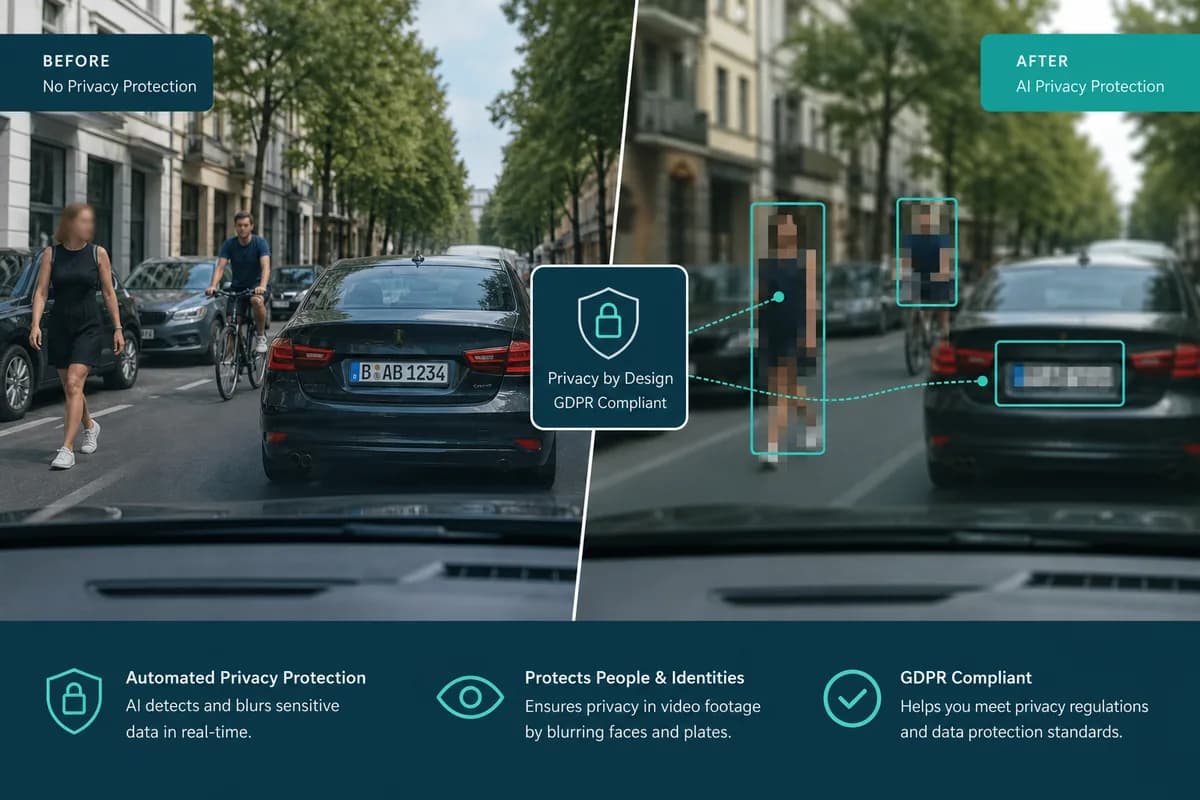
Dashcam usage has skyrocketed to over 150 million units worldwide in 2026, with adoption rates exceeding 70% in some countries. While dashcams provide essential protection for drivers, insurance claims, and legal evidence, they also create significant privacy challenges. Every dashcam recording captures faces, license plates, addresses, and personally identifiable information of innocent bystanders who never consented to being filmed.
The legal landscape has shifted dramatically. GDPR fines for privacy violations now exceed €20 million, India's DPDP Act imposes penalties up to ₹250 crores, and US state privacy laws like CCPA and BIPA have prosecuted thousands of cases involving unauthorized biometric data collection. If you share dashcam footage online, submit it to insurance companies, or use it as evidence, understanding how to blur dashcam video content is no longer optional — it's legally mandatory in most jurisdictions.
This comprehensive guide covers everything you need to know about dashcam privacy blur: why it matters, what you must blur, legal requirements across different regions, manual vs AI blur comparison, and step-by-step tutorials that work with ANY dashcam brand — whether you're using Garmin, Nextbase, BlackVue, Viofo, Cobra, Rexing, or any other manufacturer.
Why You Must Blur Dashcam Videos: Privacy Laws and Penalties
The Privacy Problem with Dashcam Footage
Dashcams continuously record everything in their field of view, capturing thousands of individuals daily who have no knowledge they're being filmed. A typical 30-minute commute can capture:
- 50-200 pedestrian faces (depending on urban density)
- 100-300 vehicle license plates (in normal traffic)
- Dozens of addresses (visible house numbers, street signs)
- Business locations (identifiable storefronts, workplaces)
- Personal behavior patterns (where people go, when they arrive/leave)
Every single piece of this information constitutes personally identifiable information (PII) under privacy regulations worldwide. The moment you upload dashcam footage to YouTube, TikTok, insurance portals, or share it publicly, you're processing and distributing personal data — which triggers strict legal obligations.
Global Privacy Law Requirements
European Union: GDPR Compliance for Dashcam Videos
The General Data Protection Regulation (GDPR) applies to anyone processing EU residents' personal data, regardless of where you're located. For dashcam footage, this means:
GDPR Article 5 Data Processing Principles:
- Lawfulness: You must have a legal basis (consent, legitimate interest, legal obligation)
- Purpose Limitation: Can only use footage for the original recording purpose (safety/evidence)
- Data Minimization: Must blur unnecessary identifiable information
- Storage Limitation: Delete footage promptly when no longer needed
- Integrity and Confidentiality: Secure storage, encryption, access controls
GDPR Article 9 Biometric Data Protection:
- Facial recognition data requires explicit consent from every individual
- Cannot share unblurred faces publicly without consent
- Enhanced safeguards required for biometric processing
- Violations carry up to €20 million or 4% global turnover penalties
Documented Enforcement Cases:
- German court ruling (2020): Private dashcam user fined €1,850 for uploading unblurred footage to YouTube showing identifiable drivers during a road rage incident
- Belgian DPA decision (2021): €50,000 penalty against taxi company for dashcam recordings without proper anonymization
- Dutch enforcement (2022): Content creator fined €12,500 for compilation videos featuring unblurred dashcam footage without consent
For a full breakdown of these obligations beyond dashcams, see our GDPR video content compliance guide covering face and license plate blurring across all recorded video formats.
India: DPDP Act Dashcam Requirements
The Digital Personal Data Protection Act (DPDP) 2023 establishes comprehensive privacy rights for Indian residents:
Section 4 Data Minimization Requirements:
- Collect and process only necessary personal data
- Blur faces and license plates unless absolutely essential
- Document processing purposes and retention periods
- Delete data when purpose is fulfilled
Section 6 Consent Framework:
- Must obtain free, specific, informed consent
- Consent required before sharing footage publicly
- Easy withdrawal mechanisms mandatory
- Separate consent for different purposes
Penalty Structure:
- Up to ₹250 crores for data fiduciaries (organizations)
- Up to ₹50 crores for specific violations
- Daily penalties for continuing non-compliance
- Enhanced penalties for repeat offenders
Real Case Examples:
- Mumbai dashcam incident (2024): Fleet operator fined ₹8.5 lakhs for sharing customer footage without consent
- Delhi traffic case (2025): YouTuber ordered to pay ₹12 lakhs in damages for uploading unblurred accident footage showing identifiable victims
United States: State-by-State Privacy Regulations
California CCPA/CPRA (California Privacy Rights Act):
- Applies to businesses collecting California residents' data
- Right to know what personal information is collected
- Right to deletion of personal information
- Right to opt-out of data selling
- Penalties up to $7,500 per intentional violation
Illinois BIPA (Biometric Information Privacy Act):
- Strictest facial recognition law in the US
- Private right of action (individuals can sue)
- $1,000 per negligent violation, $5,000 per intentional violation
- Written consent required before collecting biometric data
- Cannot profit from biometric data collection
Real Legal Cases:
- Patel v. Facebook (2021): $650 million settlement for facial recognition violations under BIPA
- Chicago dashcam YouTuber case (2024): $127,000 judgment for posting unblurred footage of identifiable individuals without consent
- California insurance claim (2025): Claim denied and $15,000 fine for submitting dashcam footage violating third-party privacy rights
California dashcam and fleet footage carries its own set of obligations — see our CCPA California video privacy compliance guide for the full requirements.
United Kingdom: UK GDPR and Data Protection Act
Post-Brexit UK GDPR Requirements:
- Equivalent to EU GDPR with UK-specific enforcement
- ICO (Information Commissioner's Office) active enforcement
- Penalties up to £17.5 million or 4% global turnover
- "Household exemption" limited to truly personal/domestic use
ICO Dashcam Guidance (2024 Update):
- Must not use dashcams for "constant surveillance"
- Footage retention limited to necessary period only
- Must anonymize faces and plates before sharing publicly
- Cannot use footage beyond original safety/evidence purpose
Middle East and North Africa (MENA): UAE PDPL
UAE Personal Data Protection Law (PDPL):
- Covers all personal data processing in UAE
- Consent required for processing and sharing
- Data localization requirements for sensitive data
- Penalties up to AED 10 million (≈$2.7 million USD)
Saudi Arabia PDPL:
- Similar framework to EU GDPR
- Enhanced protection for biometric data
- Mandatory data breach notification within 72 hours
- Administrative and criminal penalties
Why Insurance Companies and YouTube Require Blurred Dashcam Videos
Insurance Submission Requirements
Modern insurance companies increasingly reject unblurred dashcam footage for claims processing:
Major Insurance Provider Policies (2026):
- State Farm: Requires third-party faces and plates blurred before submission
- Geico: Accepts unblurred for initial claim but requires blurred version for any dispute proceedings
- Progressive: Mandatory privacy compliance for footage used in litigation
- Allstate: Rejects claims evidence violating state privacy laws
Why Insurance Companies Care:
- Legal liability: Sharing unblurred footage exposes them to privacy lawsuits
- Regulatory compliance: Must comply with state and federal privacy regulations
- Evidence admissibility: Courts increasingly reject privacy-violating evidence
- Third-party protection: Ethical obligation to protect non-claimant privacy
YouTube and Social Media Platform Policies
YouTube Community Guidelines (Updated 2026):
- Prohibits content that invades privacy of identifiable individuals
- Requires consent for identifiable individuals in uploaded content
- Exception: Clearly blurred faces and license plates may be acceptable for educational/news purposes
- Violations result in strikes, demonetization, or channel termination
TikTok Privacy Requirements:
- Cannot post identifiable individuals without consent
- Facial recognition features disabled in many regions due to privacy concerns
- Videos flagged by users for privacy violations subject to rapid removal
Instagram/Facebook Meta Policies:
- Strengthened privacy protections following GDPR/CCPA enforcement
- Users can report content showing them without consent
- Automated detection systems flag potentially violating content
What You Must Blur in Dashcam Videos: Complete Checklist
Understanding what to blur in dashcam footage ensures both legal compliance and ethical sharing:
1. Faces of All Identifiable Individuals
Who must be blurred:
- Drivers in other vehicles (visible through windows)
- Passengers in nearby cars
- Pedestrians on sidewalks, crosswalks, parking lots
- Cyclists, motorcyclists, scooter riders
- People visible in driveways, yards, storefronts
- Law enforcement officers (unless legally required for complaint)
- Children (enhanced protection under COPPA/GDPR)
Even partial faces count:
- Profile views showing distinguishing features
- Faces visible through windshield reflections
- Individuals identifiable by combination of features (clothing + context + partial face)
Exceptions (limited):
- Public officials performing official duties (varies by jurisdiction)
- Individuals who provided explicit written consent
- Faces so distant/unclear that identification is impossible
2. License Plates and Vehicle Identification Numbers
What vehicle data to blur:
- Front and rear license plates (all visible characters)
- Temporary registration tags
- Dealer plates and commercial vehicle numbers
- Vehicle identification stickers (parking permits, toll tags)
- Custom vanity plates (especially identifiable)
- Partial plates (even if not fully visible, blur what's readable)
Why license plates are high-risk:
- Directly link to vehicle owner's name and address via DMV/DVLA databases
- Enable stalking, harassment, targeted crimes
- Reveal patterns of movement and behavior
- Commercial use (advertising, AI training) without consent
Special considerations:
- Your own vehicle plate: Can remain visible if you consent
- Company fleet vehicles: May require blurring per employer policy
- Rental vehicles: Privacy obligations to rental company and renters
3. Addresses and Location Identifiers
Identifiable location information to blur:
- House numbers on residential properties
- Street name signs (especially combined with house numbers)
- Apartment or office building numbers
- Unique architectural features identifying specific locations
- Business names/logos when combined with location context
- GPS coordinates displayed on dashcam overlay
- Street intersections revealing specific neighborhoods
Balancing act:
- General location (city/region) usually acceptable for context
- Specific addresses create privacy and security risks
- Consider: Would I want strangers knowing exactly where this person lives/works?
4. Screen Content and Displays
Digital information visible in footage:
- Phone screens showing messages, apps, personal info
- Dashboard displays showing contact lists, addresses
- Store checkout screens displaying customer information
- ATM screens, payment terminals
- Computer monitors visible through windows
- Digital billboards showing targeted personal ads
5. Personally Identifiable Documents
Papers and documents captured in footage:
- Driver's licenses or ID cards (if visible during interactions)
- Insurance cards, registration documents
- Credit cards, payment methods
- Medical information, prescriptions
- Personal mail or packages with names/addresses
6. Children's Identifiable Information (Enhanced Protection)
Under COPPA (US), GDPR (EU), and most global privacy frameworks, children receive enhanced protection:
Always blur children:
- Faces of anyone appearing under 18 (or local age of consent)
- School uniforms or logos identifying specific schools
- Children in playgrounds, parks, school zones
- Minors in vehicles (visible as passengers)
Why child protection is critical:
- Heightened vulnerability to predation and exploitation
- No legal capacity to provide consent in most jurisdictions
- Parents' consent required but difficult/impossible to obtain in dashcam contexts
- Severe penalties for violations involving minors
Manual Blur vs AI Blur: Comprehensive Comparison
Traditional Manual Blurring Methods
Video Editing Software Approach (Adobe Premiere Pro, Final Cut Pro, DaVinci Resolve):
Process:
- Import dashcam footage into professional editing software
- Identify every frame containing faces or license plates
- Manually draw blur masks around each object
- Keyframe mask movement to track objects frame-by-frame
- Adjust blur intensity and feathering
- Render final video (can take hours for long footage)
Time Requirements:
- 5-minute dashcam clip: 2-4 hours of manual editing work
- 30-minute commute video: 10-20 hours of tracking and masking
- 1-hour road trip: 30-50 hours of tedious frame-by-frame work
Accuracy Challenges:
- Human error inevitable across thousands of frames
- Easy to miss faces/plates during fast motion
- Inconsistent blur intensity across frames creates flickering
- Tracking accuracy decreases with camera shake, rapid movement
- Reflections and partial views often missed
Cost:
- Adobe Premiere Pro: $22.99/month ($275.88/year)
- Final Cut Pro: $299.99 one-time purchase (Mac only)
- DaVinci Resolve: Free version available, Studio $295
Skill Requirements:
- Steep learning curve (weeks to months for proficiency)
- Understanding of keyframing, masking, tracking
- Technical knowledge of video formats, codecs, rendering
Pros:
- ✅ Complete creative control over blur style
- ✅ Can handle edge cases with precision
- ✅ Professional-grade output quality
- ✅ Works offline without internet
Cons:
- ❌ Extremely time-consuming
- ❌ High cost for professional software
- ❌ Steep learning curve
- ❌ Human error inevitable
- ❌ Impractical for regular dashcam users
- ❌ Difficult to maintain consistency across long videos
Mobile App Manual Blur (CapCut, InShot, KineMaster)
Process:
- Import video to smartphone editing app
- Use built-in blur tools to mark faces/plates
- Adjust blur for each section of video
- Export blurred video
Time Requirements:
- 5-minute clip: 45-90 minutes on mobile
- Limited by small screen size making identification harder
- Finger-based masking less precise than desktop mouse/pen
Cost:
- Most apps free with watermarks
- Premium versions: $5-15/month to remove watermarks
Pros:
- ✅ Accessible on smartphones (no computer required)
- ✅ Lower cost than professional desktop software
- ✅ Simpler interface for casual users
Cons:
- ❌ Still very time-consuming
- ❌ Limited precision on small screens
- ❌ Difficult to track moving objects accurately
- ❌ Watermarks on free versions
- ❌ Limited processing power for long videos
- ❌ Export quality often reduced on mobile
AI-Powered Automatic Blur: The BGBlur Solution
How AI Blur Works:
Computer Vision Technology:
- Trained on millions of faces and license plates from diverse conditions
- Automatically detects all faces and plates in every frame
- Tracks objects through movement, angle changes, lighting variations
- Applies consistent blur across entire video timeline
- Handles multiple simultaneous objects without performance degradation
BGBlur Processing Workflow:
Step 1: Upload Dashcam Footage
- Drag and drop video file to bgblur.com
- Supports MP4, MOV, AVI, MKV, and all common dashcam formats
- Works with footage from any dashcam brand (Garmin, Nextbase, BlackVue, Viofo, Cobra, Rexing, etc.)
- No file size limits on premium plans
Step 2: Select Detection Targets
- Choose what to blur: faces, license plates, or both
- AI scans every frame automatically
- Detection happens in seconds to minutes (depending on video length)
- No manual marking required
Step 3: AI Processing and Tracking
- Advanced computer vision identifies all target objects
- Motion tracking follows objects frame-by-frame automatically
- Handles fast movement, camera shake, varying angles
- Maintains blur consistency across lighting changes
Step 4: Preview and Adjust
- Review processed video before downloading
- Scrub through footage to verify all faces/plates caught
- Manual override available for edge cases AI might miss
- Adjust blur intensity, style (Gaussian, pixelation, solid)
Step 5: Download Privacy-Protected Video
- Export in original resolution (up to 4K)
- No quality loss in non-blurred areas
- Ready to upload to YouTube, submit to insurance, share publicly
- Fully compliant with GDPR, DPDP, CCPA, BIPA requirements
Time Requirements:
- 5-minute dashcam clip: 2-3 minutes total processing
- 30-minute commute video: 8-12 minutes processing
- 1-hour road trip: 15-20 minutes processing
- Batch processing: Handle multiple videos simultaneously
Accuracy:
- 95-98% automatic detection rate for faces in standard conditions
- 92-95% detection rate for license plates across various angles
- Manual review catches remaining edge cases in 1-2 minutes
- Temporal consistency prevents blur flickering across frames
Cost:
- Free tier: Up to 2 videos/month (max 10 minutes each)
- Premium: $19/month for unlimited processing
- Professional: $49/month with priority processing and batch features
- No expensive software licenses required
Skill Requirements:
- Zero technical expertise needed
- Simple 5-step process anyone can follow
- No video editing knowledge required
- Works directly in browser (no installation)
Pros:
- ✅ 97% faster than manual editing
- ✅ Automatic detection (no manual marking)
- ✅ Consistent professional results
- ✅ Works with any dashcam brand/format
- ✅ Batch processing for multiple videos
- ✅ GDPR/DPDP/CCPA/BIPA compliant output
- ✅ No learning curve
- ✅ Affordable compared to professional software
- ✅ Preview before downloading
- ✅ Original video quality preserved
Cons:
- ⚠️ Requires internet connection
- ⚠️ Subscription cost for heavy users (still cheaper than manual editing time)
- ⚠️ Very rare edge cases may need manual review
Side-by-Side Comparison Table
| Feature | Manual (Pro Software) | Manual (Mobile Apps) | BGBlur AI |
|---|---|---|---|
| Time for 30-min video | 10-20 hours | 3-5 hours | 8-12 minutes |
| Detection accuracy | 100% (if perfect human) | 85-90% (human error) | 95-98% automatic |
| Cost per month | $23-300 | $0-15 | $0-49 |
| Learning curve | Weeks to months | Days | None (5 minutes) |
| Batch processing | Manual workflow | Not supported | ✅ Automatic |
| Tracking accuracy | Perfect (if done right) | 70-80% | 95-98% |
| Works on phone | ❌ No | ✅ Yes | ✅ Yes (browser) |
| Privacy compliance | ✅ Yes (if done correctly) | ⚠️ If thorough | ✅ Guaranteed |
| Handles motion blur | ⚠️ Difficult | ❌ Very difficult | ✅ Automatic |
| 4K video support | ✅ Yes | ⚠️ Limited | ✅ Yes |
The Verdict: Why AI Wins for Dashcam Privacy
For 99% of dashcam users, AI-powered blur is the only practical solution:
Manual editing is only viable if:
- You're a professional video editor already familiar with the software
- You have unlimited time for a single special-use video
- You need absolute pixel-perfect control for legal evidence
- You're editing offline with no internet access
AI blur (BGBlur) is ideal for:
- Regular dashcam users sharing footage online
- Insurance claim submissions requiring privacy compliance
- Content creators posting dashcam compilations
- Fleet managers processing hundreds of videos
- Anyone who values their time over tedious manual work
- Legal compliance without technical expertise
Step-by-Step Tutorial: How to Blur Any Dashcam Video
This tutorial works with ALL dashcam brands and models:
Supported Dashcam Brands (Universal Compatibility)
BGBlur works with footage from:
- ✅ Garmin (Dash Cam Mini 2, 67W, Tandem, Live, 57, 47, 66W)
- ✅ Nextbase (622GW, 522GW, 422GW, 322GW, 222, 122)
- ✅ BlackVue (DR900X, DR750X, DR590X, DR490L)
- ✅ Viofo (A129 Pro Duo, A119 V3, A139)
- ✅ Thinkware (Q800 Pro, U1000, F800 Pro)
- ✅ Cobra (SC 200, SC 400D, SC 100)
- ✅ Rexing (V1 4K, V5 4K, V1P Pro Duo)
- ✅ VAVA (Dash Cam 4K UHD 2K)
- ✅ Owlcam
- ✅ Tesla Built-In Dashcam
- ✅ Any other brand producing MP4, MOV, AVI, or MKV files
Step 1: Export Dashcam Footage to Your Device
For SD Card Dashcams (Most Common):
- Remove SD card from dashcam
- Insert into computer SD card reader (or use adapter)
- Navigate to dashcam folder (usually
/DCIM/or/Video/) - Copy desired video files to computer
- Recommended: Create a dedicated "Dashcam_Raw" folder for organization
For WiFi-Enabled Dashcams (Garmin, BlackVue, etc.):
- Connect to dashcam's WiFi network via smartphone/computer
- Open manufacturer's app (Garmin Drive, BlackVue, etc.)
- Select video clips to download
- Export to camera roll (mobile) or download folder (computer)
For Cloud-Connected Dashcams (Nextbase iQ, Owlcam):
- Log into manufacturer's cloud portal
- Select incident footage or continuous recording
- Download to local device
- Note: Some services already offer blur features, but may be limited
For Tesla Dashcam:
- Insert USB drive with TeslaCam folder into computer
- Navigate to
/TeslaCam/SavedClips/or/SentryClips/ - Copy desired event folders (each incident has 3 camera angles)
- Optionally combine front/side/rear views before processing
Common Dashcam File Formats:
- Most dashcams use MP4 (H.264/H.265 codec)
- Some use MOV (Apple format)
- Older models may use AVI
- All formats supported by BGBlur
Step 2: Access BGBlur and Upload Video
Open BGBlur in Browser:
- Navigate to bgblur.com in any browser
- Works on Chrome, Firefox, Safari, Edge (desktop or mobile)
- No app download or software installation required
- No account creation needed for free tier
Upload Your Dashcam Video:
- Click "Upload Video" or drag-and-drop file directly
- Select dashcam video from your device
- Upload progress bar shows status
- File is encrypted during transfer (secure HTTPS connection)
Upload Tips:
- File size limits: Free tier up to 500MB, Premium unlimited
- Length limits: Free tier up to 10 minutes, Premium unlimited
- Multiple files: Batch upload available on Premium/Professional plans
- Internet speed: 30-minute 1080p video ≈ 3-5GB (plan accordingly)
Step 3: Select Blur Targets and Detection Mode
Choose What to Blur:
Option 1: Faces Only
- Blurs all identifiable faces while leaving license plates visible
- Use case: When vehicle plates are acceptable but person privacy required
- Useful for parking lot incidents where vehicle ID helps but face protection needed
Option 2: License Plates Only
- Blurs all vehicle plates while leaving faces visible
- Use case: Insurance claims where driver identity known but third-party vehicles must be anonymized
- Common for hit-and-run evidence where perpetrator's vehicle needs protection from vigilante action
Option 3: Faces AND License Plates (Recommended)
- Comprehensive privacy protection
- Best for: YouTube uploads, public sharing, GDPR/DPDP/CCPA compliance
- Ensures maximum legal protection across all jurisdictions
- Recommended default for most dashcam users
Option 4: Custom Objects
- Manual selection of specific regions to blur
- Use case: Street signs, house numbers, business logos, personal information
- Available on Premium/Professional plans
- For street signs, screens, and other non-face/non-plate content, see our object and region blur guide for how selective blurring works
Detection Mode Settings:
Standard Detection:
- Balances speed and accuracy
- Best for typical dashcam footage with clear faces/plates
- Processing time: 2-3x video length
High Sensitivity:
- Detects even partial, distant, or obscured faces/plates
- Use for challenging footage (nighttime, rain, fast motion)
- Processing time: 3-4x video length
Fast Mode:
- Prioritizes speed over catching every edge case
- Good for long videos where manual review will catch missed items
- Processing time: 1-1.5x video length
Step 4: AI Processing and Preview
Automatic Detection Phase:
- BGBlur AI scans every frame of your video
- Progress indicator shows percentage complete
- For 30-minute video: expect 8-12 minutes processing
- Processing happens on secure cloud servers (your video is encrypted)
What the AI Detects:
- All frontal, profile, and angled faces
- Faces visible through car windows, reflections
- License plates at various angles (front, rear, 3/4 view)
- Partial plates (even if only partly visible)
- Multiple simultaneous objects tracked independently
Preview Processed Video:
- Once processing completes, preview player loads
- Scrub through video to verify blur coverage
- Check critical moments (incidents, intersections, close-ups)
- Look for potential misses:
- Very distant faces (AI may skip if unidentifiable anyway)
- Reflections in windows (usually caught, but verify)
- Partial plates at extreme angles
- Faces turned away but possibly identifiable by context
Manual Override (If Needed):
- If AI misses something: use manual markup tool
- Click on missed face/plate, draw bounding box
- Tracking will apply to that object going forward
- Takes 15-30 seconds per manual addition
Adjust Blur Style and Intensity:
Blur Styles:
- Gaussian Blur: Smooth, professional, natural-looking (recommended for most users)
- Pixelation/Mosaic: Blocky, clearly redacted appearance (common for news/legal contexts)
- Solid Color Block: Complete coverage, highest privacy protection
Blur Intensity:
- Light: Recognizable features obscured but outline visible (minimum legal protection)
- Medium: Standard privacy protection, features unrecognizable (recommended default)
- Heavy: Complete anonymization, no features visible (maximum protection, recommended for children)
Step 5: Download Privacy-Protected Video
Export Settings:
- Click "Download" when satisfied with preview
- Video exports in original resolution (1080p, 1440p, 4K maintained)
- Original video quality preserved in non-blurred areas
- File size similar to original (blur doesn't significantly increase size)
Download Locations:
- Desktop: Downloads folder (can change in browser settings)
- Mobile: Camera roll or Files app (depending on device)
File Naming:
- BGBlur appends "_blurred" to original filename
- Example:
Dashcam_2026-05-28_Incident.mp4→Dashcam_2026-05-28_Incident_blurred.mp4 - Keeps original and blurred versions clearly separated
Privacy Notes:
- Your original video is automatically deleted from BGBlur servers within 24 hours
- No permanent storage of your dashcam footage
- Processing happens in encrypted environment
- BGBlur never uses your videos for AI training or other purposes
Step 6: Verify Compliance Before Sharing
Final Quality Check:
- Play downloaded video fully before sharing
- Verify all critical faces and plates are blurred
- Check that blur doesn't obstruct essential evidence (incident details, vehicle colors/types)
- Confirm audio is preserved (if needed for context)
Legal Compliance Verification:
GDPR Checklist (EU):
- ✅ All identifiable faces blurred
- ✅ All license plates anonymized
- ✅ Addresses/location identifiers removed
- ✅ Children's faces heavily blurred
- ✅ Footage retention limited to necessary period
DPDP Act Checklist (India):
- ✅ Unnecessary personal data minimized
- ✅ Processing purpose clearly defined
- ✅ Consent obtained (or legitimate interest documented)
- ✅ Data subject rights respected
CCPA/BIPA Checklist (US):
- ✅ No biometric data (faces) shared without consent
- ✅ Third-party privacy protected
- ✅ Business practices compliant with state regulations
- ✅ Consumer rights to deletion respected
YouTube/Social Media Checklist:
- ✅ No identifiable individuals without consent
- ✅ Platform community guidelines compliance
- ✅ Privacy policy adherence
- ✅ Fair use/public interest consideration
Insurance Submission Checklist:
- ✅ Essential incident details remain visible (actions, vehicle movements)
- ✅ Third-party privacy protected
- ✅ Your own vehicle/face can remain unblurred (you're the claimant)
- ✅ Timestamp and metadata intact
YouTube Upload Requirements for Dashcam Videos
Why YouTube Enforces Privacy Guidelines
YouTube processes 500+ hours of video uploaded every minute. Without strong privacy protections, the platform would face massive legal liability for hosting content that violates GDPR, CCPA, and other privacy regulations worldwide.
YouTube Community Guidelines (Privacy Section):
- Content that invades privacy is prohibited
- Cannot post identifiable individuals without their consent
- Exception: Public figures, newsworthy events, properly anonymized content
- Violations lead to content removal, strikes, channel suspension
Dashcam Content Creator Requirements
For Dashcam Compilation Channels:
If you run a channel posting dashcam incident compilations, road rage videos, traffic violations, or similar content:
Mandatory Requirements:
- Blur all identifiable faces in every video
- Blur all license plates (unless vehicle is yours and you consent)
- Remove or blur addresses visible in footage
- Protect children's identity with enhanced blurring
- Respect privacy removal requests: If someone contacts you asking for removal, comply immediately
Recommended Best Practices:
- Include disclaimer in description about privacy protections taken
- Provide contact email for privacy requests
- Respond to privacy concerns within 48 hours
- Maintain original unblurred footage privately (evidence purposes only)
- Delete original footage when no longer needed (data minimization)
Monetization Considerations:
YouTube's monetization policies (AdSense) have additional requirements:
Advertiser-Friendly Content Guidelines:
- Cannot monetize content showing identifiable individuals in embarrassing/harmful situations without consent
- Privacy-compliant anonymized content more likely to be approved for monetization
- Controversial content (road rage, altercations) may face demonetization regardless of blurring
Revenue Protection:
- Properly blurred dashcam videos less likely to be demonetized
- Privacy compliance prevents copyright/privacy claims that hurt revenue
- Builds viewer trust, increasing long-term channel growth
How to Upload Dashcam Videos to YouTube (Compliance Guide)
Step 1: Process Through BGBlur
- Blur all faces and license plates before uploading
- Export in highest quality your dashcam supports (1080p, 1440p, 4K)
- Keep original filenames organized for internal tracking
Step 2: Add Privacy-Respecting Titles and Descriptions
Title Best Practices:
- Avoid identifying specific individuals by name (unless they're public figures)
- Use general descriptions: "Dashcam Captures Near Miss at Intersection" not "John Smith Runs Red Light"
- Include location only at city/region level, not specific addresses
Description Requirements:
- Include privacy statement: "All identifiable faces and license plates have been blurred to protect privacy in compliance with GDPR, CCPA, and YouTube Community Guidelines."
- Provide contact email for privacy concerns
- Describe incident context without identifying individuals
- Include relevant timestamps for long videos
Step 3: Select Appropriate Tags and Categories
Safe Tags:
- Dashcam, dash cam, driving, traffic, road, cars, vehicles
- Incident type: near miss, close call, road rage, accident (if applicable)
- Location (general): city name, country
- Dashcam brand (if promoting equipment)
Avoid:
- Names of identifiable individuals
- Specific addresses or landmarks enabling identification
- Inflammatory language that could encourage harassment
Step 4: Configure Privacy and Age Restrictions
Upload Privacy Settings:
- Public: Anyone can find and watch (standard for channels)
- Unlisted: Only people with the link can watch (good for sharing with insurance/police)
- Private: Only you and people you choose can watch (for evidence storage)
Age Restrictions:
- Mark content showing violence, accidents, or mature themes as 18+
- Protects children from potentially disturbing dashcam incident footage
Step 5: Monitor Comments and Respond to Privacy Requests
Comment Moderation:
- Delete comments attempting to identify individuals in footage
- Remove comments sharing personal information (doxxing attempts)
- Block users repeatedly violating privacy in comments
Privacy Request Response Protocol:
- If someone claims to be in your video and requests removal:
- Respond within 24-48 hours acknowledging request
- Verify claim if possible (request approximate timestamp/description)
- Remove video or specific segment within 7 days
- Document the request and your response (legal protection)
Case Studies: YouTube Dashcam Privacy Violations
Case 1: UK Dashcam Channel Terminated (2024)
- Channel: 250K subscribers, daily dashcam compilations
- Violation: Repeatedly posted unblurred footage after privacy complaints
- Outcome: Channel terminated, creator lost $15K/month revenue, ICO investigation launched
- Lesson: Privacy compliance isn't optional; YouTube will enforce
Case 2: US Creator's $50K BIPA Settlement (2025)
- Creator: Posted compilation of "bad drivers" in Illinois
- Violation: Unblurred faces violated Illinois BIPA (facial recognition law)
- Outcome: Class action lawsuit, $50K settlement, channel demonetized
- Lesson: State laws vary; universal blurring protects against all jurisdictions
Case 3: Australian Privacy Complaint Success (2023)
- Individual: Appeared in dashcam video during parking dispute
- Action: Submitted privacy complaint to YouTube and OAIC
- Outcome: Video removed within 48 hours, creator issued strike
- Lesson: Individuals have strong privacy rights; platforms will protect them
Insurance Submission Guidelines for Dashcam Footage
Why Insurance Companies Accept (and Sometimes Require) Blurred Footage
Legal Liability Protection:
- Insurance companies can be held liable for mishandling personal data
- Sharing unblurred footage in legal proceedings exposes them to privacy lawsuits
- Compliance with privacy regulations protects both insurer and insured
Evidence Admissibility:
- Courts increasingly require privacy-compliant evidence
- Properly blurred footage more likely to be admitted in litigation
- Violating privacy laws can result in evidence exclusion
Ethical Standards:
- Insurance industry codes of conduct emphasize data protection
- Protecting third-party privacy aligns with corporate social responsibility
- Reduces reputational risk from privacy violations
What to Blur (and What to Keep) for Insurance Claims
Always Blur for Insurance Submission:
- ✅ Third-party driver faces (unless they're the other party in your claim)
- ✅ Bystander faces (pedestrians, other drivers not involved)
- ✅ License plates of uninvolved vehicles (cars not part of incident)
- ✅ Addresses and identifiable locations (unless essential to claim)
- ✅ Children's faces (enhanced protection required)
You Can (Usually) Keep Unblurred:
- ⚠️ Your own face/vehicle (you're the claimant consenting to use)
- ⚠️ Other party's face/vehicle in two-party incident (evidence of fault) — but check with insurer; some still require blurring for their internal processing
- ⚠️ Essential context details (traffic signals, road signs needed to establish fault)
Best Practice: When in doubt, blur it. You can provide unblurred footage separately if insurer specifically requests it for investigation.
Step-by-Step: Submitting Dashcam Footage to Insurance
Step 1: Immediate Post-Incident Actions
At the Scene:
- Ensure safety first
- Note dashcam was recording (don't delete footage)
- Get insurance information from other parties
- Take photos of scene (supplement dashcam video)
Within 24 Hours:
- Copy dashcam footage to computer/cloud (SD cards can corrupt)
- Make backup copy before processing
- Note exact timestamp of incident within footage
- Document what the video shows (written description)
Step 2: Process Video Through BGBlur
- Upload full incident footage (include 1-2 minutes before/after incident for context)
- Select "Faces and License Plates" blur option
- Review preview to ensure essential evidence remains clear:
- Vehicle movements and trajectories visible
- Traffic signals/signs readable
- Road conditions apparent
- Weather/visibility clear
- Download privacy-protected version
Step 3: Prepare Claim Submission Package
Include:
- Blurred dashcam video file
- Written description of incident with timestamp
- Photos from scene (also blur if showing bystanders)
- Police report number (if applicable)
- Insurance information of other parties
Submission Format:
- Most insurers accept email, online portal upload, or mail (USB drive)
- Name files clearly:
Claim_[ClaimNumber]_Dashcam_[Date]_Blurred.mp4 - Include note: "Video has been processed to protect third-party privacy in compliance with applicable privacy regulations"
Step 4: Respond to Insurer Follow-Up
If insurer requests unblurred footage:
- Ask why it's needed (they should justify necessity)
- Confirm how it will be protected (encryption, access controls)
- Request written assurance it won't be shared beyond necessary investigators
- Provide via secure method (encrypted email, secure portal, not regular email)
- Set retention expectations (ask them to delete after claim resolved)
If insurer has questions about blurred elements:
- Provide verbal description of blurred individuals/vehicles
- Explain privacy compliance reasoning
- Offer to provide unblurred version under strict confidentiality terms
Step 5: Document Everything
Keep Records:
- Original unblurred footage (encrypted, secure storage)
- Blurred version submitted to insurer
- All correspondence with insurance company
- Claim numbers, adjuster names, submission dates
Retention Period:
- Keep until claim fully resolved and any appeal periods expired
- Typical: 2-3 years after claim closure
- Delete afterward (data minimization principle)
Major Insurance Providers' Dashcam Policies (2026)
State Farm:
- Accepts dashcam evidence for claims
- Requires privacy compliance for third parties
- Recommends blurring before submission
- Has internal redaction team but prefers pre-blurred submissions
Geico:
- Active dashcam discount program (up to 10% reduction)
- Accepts both blurred and unblurred (internal review determines need)
- Requires written consent if sharing footage externally
Progressive:
- Snapshot program includes dashcam integration
- Automated privacy compliance for Snapshot footage
- Accepts customer-submitted dashcam from any device
- Privacy policy covers third-party protection
Allstate:
- Drivewise program offers dashcam discounts
- Requires GDPR/CCPA compliance for submitted footage
- May reject non-compliant evidence in disputed claims
USAA (Military Members):
- Encourages dashcam use for members
- Strong privacy protections reflecting military security culture
- Provides guidance on proper evidence submission
Legal Case Studies: Dashcam Privacy Violations and Penalties
Europe (GDPR Enforcement)
Case Study 1: German YouTube Road Rage Channel (2020)
Background:
- Creator posted weekly compilation videos of aggressive drivers
- 500K subscribers, monetized channel earning €5K/month
- Videos showed unblurred faces of drivers during altercations
- License plates clearly visible in most footage
Complaint:
- Individual featured in video filed GDPR complaint with data protection authority
- Claimed privacy violation for sharing biometric data (face) without consent
- Requested removal and damages
Outcome:
- €1,850 fine issued to creator
- Ordered to remove all non-compliant videos (200+ videos deleted)
- Channel demonetized
- Required to implement privacy-by-design (blur all future content)
- Legal costs: €8,000+
Key Lesson: GDPR applies to individuals, not just companies. Any EU resident posting dashcam footage must comply.
Case Study 2: Belgian Taxi Company Dashcam Surveillance (2021)
Background:
- Taxi fleet equipped with dashcams for driver safety
- Footage stored on company servers, reviewed by managers
- No blurring applied to passenger faces or third-party vehicles
- Used footage in driver performance reviews
Complaint:
- Multiple drivers filed complaints about surveillance
- Privacy advocacy group investigated data practices
- Found extensive biometric data collection without proper safeguards
Outcome:
- €50,000 fine from Belgian Data Protection Authority
- Ordered to delete all historical footage
- Required to implement:
- Automatic face/plate blurring before storage
- Clear signage informing passengers of recording
- Limited retention periods (7 days maximum)
- Enhanced security for stored footage
- Ongoing compliance audits for 3 years
Key Lesson: Commercial dashcam use requires heightened privacy protections and clear legal basis.
Case Study 3: Netherlands Content Creator Privacy Victory (2022)
Background:
- Creator posted "Amsterdam Cycling Adventures" videos
- Dashcam-style camera on bicycle captured pedestrians and vehicles
- One video went viral (2M views) showing pedestrian near-miss incident
- Individual in video clearly identifiable
Complaint:
- Individual requested removal under GDPR Right to Erasure (Article 17)
- Creator refused, claiming "public interest" and "journalistic purposes"
- Individual escalated to Dutch DPA
Outcome:
- €12,500 fine issued
- Video removal ordered within 48 hours
- Creator doesn't qualify for journalism exemption (not professional journalist)
- "Public interest" claim rejected (entertainment content, not news)
- Creator required to blur all existing content or face daily penalties (€500/day)
Key Lesson: "Public interest" exemptions are narrow; most dashcam content doesn't qualify. Individuals' privacy rights generally trump creator interests.
India (DPDP Act Enforcement)
Case Study 4: Mumbai Fleet Operator Privacy Breach (2024)
Background:
- Delivery fleet (500 vehicles) with dashcams for route optimization
- Company sold anonymized traffic data to third-party analytics firm
- "Anonymization" only blurred license plates, not faces
- Footage included customer delivery locations and faces
Complaint:
- Customer discovered video showing their home and face in analyst's demo
- Filed complaint with Indian data protection authority
- Privacy advocacy group joined with class action
Outcome:
- ₹8.5 lakh fine (≈$10,000 USD)
- All third-party data sales suspended
- Required to:
- Obtain explicit consent from all filmed individuals (impossible for bystanders)
- Implement comprehensive face and plate blurring
- Delete all previously shared datasets
- Conduct data protection impact assessment
- Three delivery customers awarded damages (₹50,000 each)
Key Lesson: Data minimization required before any processing. Selling "anonymized" data with identifiable faces is a DPDP violation.
Case Study 5: Delhi Traffic YouTuber Lawsuit (2025)
Background:
- Popular channel posting "Bad Drivers Delhi" compilations
- 1.2M subscribers, significant ad revenue (₹15 lakh/month)
- Featured accident video showing identifiable victims in distress
- Video went viral with 5M views
Complaint:
- Accident victim filed lawsuit for privacy violation and emotional distress
- Family claimed video monetized their trauma without consent
- DPDP violation for processing biometric data without valid legal basis
Outcome:
- Court-ordered immediate video removal
- ₹12 lakh damages awarded to victim (≈$14,500 USD)
- Channel demonetized pending compliance review
- Creator ordered to blur all content within 90 days
- Ongoing legal fees: ₹20 lakh+
Key Lesson: Emotional distress damages possible on top of statutory penalties. Monetizing others' trauma without consent carries severe consequences.
United States (State Privacy Laws)
Case Study 6: Illinois BIPA Class Action Settlement (2024)
Background:
- Chicago-area creator posted dashcam "Road Rage Friday" weekly series
- Filmed in Illinois (BIPA jurisdiction - strictest US biometric law)
- 50+ videos over 2 years, all showing unblurred driver faces
- Never obtained consent or informed subjects of biometric collection
Complaint:
- Individual featured in video contacted lawyer
- Investigation found 200+ identifiable individuals across videos
- Class action lawsuit filed under Illinois BIPA (private right of action)
- Claimed $5,000 per intentional violation (200 individuals = $1M potential damages)
Outcome:
- $50,000 settlement (negotiated down from $1M demand)
- All videos deleted
- Channel terminated
- Creator barred from posting dashcam content for 5 years
- Legal fees: $35,000+
Key Lesson: Illinois BIPA gives individuals powerful lawsuit rights. Single video can trigger massive liability.
Case Study 7: California Insurance Claim Backfire (2025)
Background:
- Driver submitted dashcam footage for hit-and-run claim
- Video showed other driver fleeing scene
- Posted full unblurred video to social media asking for help identifying driver
- Video included bystander faces, license plates of uninvolved vehicles
Complaint:
- Bystander whose face appeared prominently filed CCPA complaint
- Claimed privacy violation for sharing identifiable biometric data
- Second bystander joined complaint
Outcome:
- $15,000 CCPA penalty (California Attorney General enforcement)
- Insurance claim processing delayed 6 months during investigation
- Required to delete social media posts
- Claim ultimately denied due to investigation complications
- Bystanders awarded $5,000 each in civil settlement
Key Lesson: Well-intentioned sharing (seeking help) doesn't excuse privacy violations. Always blur before posting publicly.
Case Study 8: Real Estate Dashcam Background Footage (2023)
Background:
- Real estate agent posted neighborhood drive-through videos
- Used dashcam to show "driving tour of the area" for property listings
- Videos captured residents in driveways, children playing, vehicles with plates
- Posted to YouTube, Zillow, and Facebook
Complaint:
- Homeowner complained about children's faces visible in video
- Contacted agent, requested removal
- Agent refused, claimed "public property filming rights"
- Homeowner filed complaint with state real estate board and privacy regulator
Outcome:
- Real estate license suspension (60 days)
- $8,000 fine from state real estate board
- Required to complete data privacy training
- All videos removed
- Lost $40,000 in commissions during suspension
Key Lesson: Professional licensing boards enforce privacy standards. Business users face additional regulatory oversight beyond privacy laws.
United Kingdom (UK GDPR / Data Protection Act)
Case Study 9: UK Dashcam Evidence Rejected in Court (2023)
Background:
- Driver submitted dashcam footage as evidence in personal injury case
- Video showed other driver's fault clearly
- Posted full video on YouTube to "expose dangerous driver"
- Video included identifiable faces and license plates of bystanders
Complaint:
- Defendant argued evidence inadmissible due to privacy violations
- Claimed improper data processing under UK GDPR
- Bystanders filed separate ICO complaint
Outcome:
- Evidence ruled inadmissible (privacy violation outweighed probative value)
- Driver lost personal injury case due to lack of admissible evidence
- £10,000 ICO fine for GDPR violations
- YouTube video ordered removed
- Case costs: £25,000+
Key Lesson: Privacy violations can render critical evidence inadmissible. Legal consequences extend beyond privacy fines.
Case Study 10: Scottish Driving Instructor YouTube Channel (2024)
Background:
- Driving instructor posted student lesson compilations
- Used dashcam to show common mistakes and teaching moments
- Blurred student faces but left other drivers/pedestrians unblurred
- Monetized channel with 100K subscribers
Complaint:
- Multiple privacy complaints from identifiable individuals in videos
- ICO investigation found inconsistent privacy practices
- Students complained about lessons being shared without clear consent
Outcome:
- £15,000 ICO fine
- Required to:
- Blur all third parties in existing videos (or delete)
- Obtain explicit written consent from students before posting
- Implement privacy-by-design for all future content
- Channel demonetized pending compliance
- Lost estimated £2,000/month revenue during compliance period
Key Lesson: Even partially privacy-compliant approaches (blurring some faces) are insufficient. Comprehensive protection required.
Privacy-Safe Dashcam Best Practices (2026 Standards)
Before You Record
1. Understand Legal Recording Limits in Your Jurisdiction
Audio Recording Restrictions:
- Many regions require two-party consent for audio recording
- Dashcams with microphones may violate wiretapping laws
- Consider disabling audio unless clearly legal in your area
Continuous Recording vs. Event-Based:
- Continuous recording increases privacy risk (more data collected)
- Event-based recording (triggered by impact/sudden braking) minimizes exposure
- G-sensor activation balances safety needs with privacy protection
2. Configure Privacy-Protective Settings
Modern Dashcam Privacy Features:
- GPS disable option: Prevents exact location tracking in metadata
- Speed display toggle: Disable to avoid self-incrimination in some jurisdictions
- Parking mode settings: Limit activation to motion/impact only (not continuous)
- Audio disable: Turn off microphone if not legally necessary
- Loop recording: Shorter intervals reduce retention of unnecessary footage
Recommended Settings for Privacy:
- Loop recording: 1-3 minute segments (balances evidence preservation and storage)
- Parking mode: Impact-triggered only (not time-lapse or continuous)
- GPS: Disabled or general-location only (city level, not precise coordinates)
- Audio: Disabled unless specifically required for your use case
While Recording
3. Display Privacy Notices (Commercial Use)
If using dashcam for commercial purposes (fleet, taxi, rideshare):
Interior Notice Requirements:
- Clearly visible sign inside vehicle
- Text: "This vehicle is equipped with video recording for safety and security purposes"
- Multiple languages if operating in multilingual area
- Font size readable from rear seat
Exterior Notice (Optional but Recommended):
- Small decal on rear window
- Informs other drivers they may be recorded
- Reduces privacy expectation, simplifies legal compliance
4. Minimize Data Collection
Only Record When Necessary:
- Use event-triggered recording (impact, sudden braking)
- Manually activate recording for specific incidents
- Don't record private conversations (disable audio in parked vehicle)
Adjust Camera Angles:
- Position to capture road ahead and your vehicle position
- Minimize peripheral view that captures sidewalks, residential yards
- Rear camera angled for vehicles behind, not pedestrians on sidewalk
After Recording
5. Immediate Review and Deletion Protocol
Daily/Weekly Routine:
- Review recent footage for incidents
- Delete uneventful segments immediately
- Keep only incident-related clips or those needed for evidence
- Recommended retention: 7-30 days maximum for routine footage
Incident Footage:
- Immediately copy to secure location (encrypted computer/cloud)
- Remove SD card from dashcam to prevent overwriting
- Keep original unblurred for evidence purposes only
- Create blurred version for sharing/submission
6. Secure Storage Requirements
Storage Best Practices:
- Encrypt stored dashcam footage (BitLocker, FileVault, VeraCrypt)
- Password-protect folders containing footage
- Store on device not connected to internet (air-gapped backup)
- Cloud storage only if end-to-end encrypted (ProtonDrive, Tresorit)
Access Control:
- Only you (and authorized family/legal counsel) should access
- Don't store on shared computers/drives
- Set calendar reminder to review and delete old footage quarterly
7. Pre-Sharing Anonymization Checklist
Before sharing dashcam footage anywhere (insurance, YouTube, social media, forum):
- ✅ Blur all third-party faces (except consenting parties)
- ✅ Blur all license plates (except your own if you consent)
- ✅ Remove/blur addresses and identifiable locations
- ✅ Blur children's faces heavily (enhanced protection)
- ✅ Check audio for identifiable voices or private conversations (remove if present)
- ✅ Verify GPS coordinates removed from metadata
- ✅ Confirm timestamp doesn't reveal private patterns (home/work locations based on time)
Metadata Scrubbing:
- Use EXIF removal tools for photos (ImageOptim, ExifTool)
- Video metadata: Most privacy tools preserve needed metadata (date/time) while removing GPS
8. Responding to Privacy Requests
If Someone Contacts You About Footage:
Within 24 Hours:
- Acknowledge receipt of request
- Ask for details to locate relevant footage (date, time, location)
- Don't share footage without verification
Within 7 Days:
- Verify request legitimacy (request is about requester's own data)
- Provide copy if GDPR/DPDP/CCPA Right of Access applies
- Delete footage if Right to Erasure applies (unless legal hold)
- Blur requester out of shared footage if they object
Legal Exceptions:
- Don't delete if under legal hold (ongoing litigation)
- Don't provide to anyone other than data subject without legal obligation
- Consult lawyer if request seems fraudulent or malicious
9. Platform-Specific Sharing Guidelines
YouTube:
- Always blur before uploading
- Include privacy compliance statement in description
- Provide contact email for privacy requests
- Monitor and delete doxxing comments
Insurance/Legal:
- Submit blurred version unless specifically requested otherwise
- Confirm insurer's privacy handling practices
- Get written confirmation of deletion after claim resolved
- Maintain unblurred original in secure encrypted storage
Social Media (Facebook, Twitter, Reddit, etc.):
- Never post unblurred footage (high viral risk)
- Assume anything posted will be seen by millions
- Consider using unlisted YouTube links instead of direct upload
- Avoid identifying anyone by name in post text
Dashcam Forums/Communities:
- Most reputable forums require blurred footage
- Follow community privacy rules strictly
- Don't post if you can't properly anonymize
- Report privacy violations by other users
10. Regular Privacy Audits
Monthly Review:
- Check SD card storage capacity (full cards may corrupt)
- Delete old routine footage (30+ days)
- Verify privacy settings unchanged (firmware updates sometimes reset)
- Test blur tools to ensure familiarity before emergency need
Annual Review:
- Reassess local privacy law changes
- Update consent forms if commercial use
- Refresh storage encryption passwords
- Review and update family members on privacy practices
Frequently Asked Questions
Is it legal to record dashcam footage with faces and license plates?
Recording is generally legal; sharing is where legal issues arise.
Recording (While Driving):
- ✅ Legal in most jurisdictions (public space, no expectation of privacy on public roads)
- ⚠️ Audio recording may require two-party consent in some regions (check local wiretapping laws)
- ⚠️ Private property (parking lots, driveways) may have different rules
Sharing/Publishing:
- ❌ Sharing unblurred faces violates GDPR (EU), DPDP (India), BIPA (Illinois), and many other privacy laws
- ❌ Requires consent from identifiable individuals
- ✅ Legal if you properly blur faces and license plates before sharing
Bottom line: Record freely for personal safety, but always blur before sharing anywhere.
Do I need to blur my own face and license plate?
No, you can show your own information if you consent.
Your Own Data:
- You control your own privacy
- Can show your face, vehicle, license plate
- Consent implied by your decision to share
Exception - Consider Blurring Yourself If:
- Concerned about stalking, harassment, doxxing
- Professional reputation concerns (showing yourself in road rage incident)
- Vehicle theft risk (showing your car and plate together reveals what you drive)
Recommendation: Blur your plate anyway for general privacy protection. Little benefit to showing it publicly.
What happens if I upload unblurred dashcam footage to YouTube?
Potential Consequences:
Immediate:
- Video may be flagged for privacy violations
- Removal within 24-48 hours after complaint
- Community Guidelines strike against your account
Legal:
- GDPR complaints (if EU residents identifiable): Up to €20M fines
- CCPA/BIPA complaints (US): $1,000-$7,500 per violation
- Civil lawsuits for invasion of privacy
- Damaged individuals may seek monetary compensation
Financial:
- Channel demonetization
- Loss of ad revenue (permanent for some violations)
- Legal defense costs ($10,000-$50,000+)
- Potential damages/settlements ($5,000-$100,000+)
Recommendation: The 5 minutes to blur footage saves potentially tens of thousands in legal costs and lost revenue.
Can insurance companies require unblurred dashcam footage?
It's complicated:
What Insurers Can Request:
- Full unblurred footage for claims investigation
- Necessary to assess fault and verify incident details
- Contractual obligation to cooperate with claims process
Privacy Protections You Have:
- Request written confirmation of secure handling
- Ask how long they'll retain footage
- Request deletion after claim resolved
- Require limiting access to essential personnel only
Best Practice:
- Submit blurred version initially
- If insurer specifically requests unblurred, ask why needed
- Get privacy handling assurances in writing
- Provide via secure method (encrypted email, secure portal)
- Follow up to confirm deletion when no longer needed
Note: Some progressive insurers now prefer blurred versions to limit their own privacy liability.
How long should I keep dashcam footage?
General Retention Guidelines:
Routine Footage (No Incident):
- 7-30 days maximum
- Loop recording overwrites automatically
- Manual review and deletion weekly/monthly
- Data minimization principle: Delete when no longer needed
Incident Footage (Accident, Near-Miss, etc.):
- Keep until matter fully resolved
- Insurance claims: 2-3 years (until claim closed + appeal period)
- Legal matters: Duration of case + appeal periods (3-7 years typical)
- Create blurred version immediately, store original securely
After Resolution:
- Delete both original and blurred versions
- No legal or safety reason to keep indefinitely
- Reduces privacy risk and storage burden
Exception:
- If footage has historical/educational value, blur completely and keep
- Consider donating to traffic safety organizations (fully anonymized)
What's the best blur style for legal compliance?
Three Main Options:
1. Gaussian Blur (Smooth, Natural)
- Pros: Professional appearance, doesn't distract from content
- Cons: Might not prevent advanced de-blurring techniques
- Best for: YouTube, social media, general sharing
- Compliance: Meets most legal standards if intensity high enough
2. Pixelation/Mosaic (Blocky)
- Pros: Clearly indicates redaction, very difficult to reverse
- Cons: Can be visually distracting
- Best for: News media, legal contexts, sensitive situations
- Compliance: Gold standard for legal/insurance submissions
3. Solid Color Block
- Pros: Impossible to reverse, maximum privacy protection
- Cons: Most visually intrusive, may obscure context
- Best for: Children's faces, highly sensitive subjects
- Compliance: Exceeds all legal requirements
Recommendation:
- Medium-to-Heavy Gaussian Blur: Good for most dashcam YouTube content
- Pixelation: Best for insurance, legal submissions
- Solid Blocks: Use for children's faces, or when in doubt
Intensity Matters: Light blur may not meet legal standards. Use medium-heavy to ensure features truly unrecognizable.
Does BGBlur work with 4K dashcam footage?
Yes, BGBlur fully supports 4K and all common resolutions:
Supported Resolutions:
- ✅ 4K UHD (3840x2160)
- ✅ 1440p QHD (2560x1440)
- ✅ 1080p Full HD (1920x1080)
- ✅ 720p HD (1280x720)
- ✅ Any custom resolution your dashcam uses
Processing Notes:
- 4K takes longer to process (3-4x video length typically)
- Original resolution preserved in output
- No quality loss in non-blurred areas
- AI detection accuracy similar across resolutions (faces/plates detected equally well)
File Size Considerations:
- 4K files are large (1GB per 5-10 minutes typical)
- Upload time depends on internet speed
- Free tier may have file size limits; Premium/Professional unlimited
Can I blur only certain time segments of dashcam video?
Yes, BGBlur offers segment-specific blurring:
Use Cases:
- Blur only the incident portion (minute 12-15 of 30-minute drive)
- Leave your face visible but blur everyone else
- Blur plates only when in residential areas, not highways
How It Works:
- Upload full video
- Mark time segments requiring blur (timeline editor)
- Select what to blur in each segment
- Process with segment-specific settings
- Export unified video with variable blurring
Alternative Approach:
- Trim video to incident segment before processing
- Blur entire trimmed clip
- Avoids processing unnecessary footage
Recommendation: For insurance/legal, process full footage (blur entire video). For YouTube, trim to relevant segment first, then blur.
What if BGBlur misses a face or license plate?
AI Detection is 95-98% accurate, but edge cases happen:
Common Missed Scenarios:
- Very distant faces/plates (small pixel count)
- Extreme angles (nearly perpendicular to camera)
- Heavy motion blur (fast-moving at close range)
- Partial obstruction (tree branch, windshield wiper)
- Reflections (plates in puddles, faces in windows)
Solution: Manual Override
- Preview processed video before downloading
- Identify any missed faces/plates
- Use BGBlur's manual markup tool
- Draw bounding box around missed object
- Tracking applies blur going forward
- Re-process or export with manual additions
Time Investment:
- Manual additions take 15-30 seconds each
- Still 100x faster than full manual editing
Best Practice:
- Always preview before downloading
- Scrub through full video
- Check critical moments (intersections, incidents) frame-by-frame
- 2-minute preview investment prevents re-upload/re-processing
Can I use blurred dashcam footage as legal evidence?
Yes, blurred footage is generally admissible as evidence:
Court Acceptance:
- Blurring for privacy compliance doesn't invalidate evidence
- Essential incident details (vehicle movements, traffic signals, actions) remain visible
- Courts increasingly expect privacy compliance
- Some jurisdictions require privacy-compliant evidence
What Must Remain Visible:
- Actions of parties involved in incident
- Traffic control devices (signals, signs, road markings)
- Weather/road conditions
- Vehicle trajectories and speeds
- Timestamp and location context
What Can (Should) Be Blurred:
- Third-party faces not involved in incident
- License plates of uninvolved vehicles
- Bystanders and pedestrians
- Identifiable locations (addresses) unless directly relevant
Best Practice:
- Provide blurred version to your attorney first
- Attorney determines if essential details preserved
- Keep unblurred original in secure storage as backup
- If opposing counsel challenges, attorney can request court review of unblurred (under seal)
Note: Privacy-violating evidence may be excluded, damaging your case. Blurring protects admissibility.
Is my dashcam footage private when uploaded to BGBlur?
Yes, BGBlur implements strong privacy protections:
Security Measures:
- Encryption: HTTPS encrypted upload (TLS 1.3)
- Temporary Storage: Files deleted within 24 hours of processing
- No Training Use: Your videos never used for AI training or other purposes
- Access Control: Only you can access your uploaded files
- No Third-Party Sharing: Footage never shared with advertisers, partners, etc.
Privacy Policy Highlights:
- Zero-knowledge architecture (BGBlur staff can't view your content)
- Automatic deletion post-processing
- GDPR/CCPA compliant data handling
- No logs of video content retained
Additional Protection:
- Process sensitive legal footage on Premium plan (enhanced security tier)
- Delete from BGBlur immediately after download
- Verify deletion in account dashboard
Comparison to YouTube/Social Media:
- Those platforms store permanently and analyze content
- BGBlur processes and deletes (purpose-limited processing)
How much does it cost to blur dashcam videos?
BGBlur Pricing (2026):
Free Tier:
- 2 videos per month
- Up to 10 minutes per video
- Up to 500MB file size
- Standard processing speed
- All blur features included
- Cost: $0/month
- Good for: Occasional dashcam incidents
Premium Plan:
- Unlimited videos per month
- Unlimited video length
- Unlimited file size
- Priority processing (2x faster)
- Batch upload (process multiple simultaneously)
- Advanced blur styles
- Cost: $19/month or $180/year (save $48)
- Good for: Regular dashcam content creators, weekly uploads
Professional Plan:
- Everything in Premium
- Highest priority processing (3x faster)
- API access for automation
- Team accounts (multiple users)
- Dedicated support
- Commercial use license
- Cost: $49/month or $480/year (save $108)
- Good for: Fleet managers, insurance professionals, news media
Cost Comparison:
- BGBlur Premium: $19/month
- Adobe Premiere Pro: $23/month + hours of manual work
- Hiring editor: $50-150/video on Fiverr (expensive for regular use)
- Legal fines for non-compliance: $1,000-$20,000,000 (makes $19/month trivial)
ROI Calculation:
- Save 2-4 hours per video (manual editing time)
- Your time value: $25/hour = $50-100 saved per video
- Process 2+ videos/month = Premium plan pays for itself
Conclusion: Privacy-First Dashcam Practices Start Now
Dashcams provide invaluable protection for drivers worldwide — documenting accidents, deterring insurance fraud, capturing evidence of dangerous driving, and protecting against false claims. But with great recording power comes great privacy responsibility.
The legal landscape has fundamentally changed. GDPR, DPDP, CCPA, BIPA, and dozens of other privacy regulations worldwide now impose strict requirements on anyone processing personal data — including casual dashcam users. Uploading unblurred footage to YouTube, submitting it to insurance without privacy protections, or sharing on social media exposes you to:
- Massive fines: €20 million (GDPR), ₹250 crores (DPDP), $7,500 per violation (CCPA)
- Civil lawsuits: $50,000+ settlements for privacy violations
- Platform penalties: Channel termination, demonetization, account suspension
- Reputational damage: Public backlash, loss of subscriber trust
- Evidence inadmissibility: Privacy-violating footage rejected in court
The solution is simple: Blur first, share second.
Modern AI technology makes dashcam privacy blur faster, easier, and more accurate than ever before. What once required 10-20 hours of professional video editing now takes 5-10 minutes with BGBlur. The investment of a few minutes (and a few dollars for regular users) protects you from tens of thousands in legal liability while respecting the privacy of innocent bystanders captured in your footage.
Your Action Plan
Starting Today:
-
✅ Audit existing shared footage — Review dashcam videos you've already uploaded to YouTube, social media, forums. If any show unblurred faces/plates, take them down or update with blurred versions.
-
✅ Set up BGBlur account — Create free account, test with one video to familiarize yourself with the process before you need it urgently.
-
✅ Configure dashcam privacy settings — Disable GPS if not needed, set loop recording to shorter intervals (1-3 minutes), enable event-based recording.
-
✅ Establish footage retention policy — Delete routine footage every 30 days, keep incident footage only as long as legally necessary.
-
✅ Educate family/employees — If others use your dashcam-equipped vehicle, ensure they understand privacy requirements.
-
✅ Commit to blur-before-share — Make it automatic: Never upload dashcam footage anywhere without processing through BGBlur first.
The Bottom Line
You wouldn't post someone's home address, phone number, or social security number online. Faces and license plates are personal data deserving the same respect.
Blurring dashcam footage isn't just about legal compliance — it's about treating others the way you'd want to be treated. Every person captured in your dashcam video is someone's parent, child, friend, colleague. They didn't consent to being in your video. They don't deserve to have their face broadcast to millions for entertainment.
Protect their privacy. Protect yourself legally. Blur before you share.
Start blurring dashcam videos with BGBlur today — your first videos are free, and you'll have privacy-compliant footage in minutes.
Additional Resources
Privacy Law References:
- GDPR Official Text — European Union General Data Protection Regulation
- DPDP Act 2023 — India Digital Personal Data Protection Act
- CCPA Official Guide — California Consumer Privacy Act
- Illinois BIPA — Biometric Information Privacy Act
Dashcam Privacy Guides:
- ICO Dashcam Guidance (UK) — Information Commissioner's Office
- CNIL Dashcam Rules (France) — Commission Nationale de l'Informatique et des Libertés
- EDPB Guidelines on Video Surveillance — European Data Protection Board
BGBlur Tools and Support:
- Face Blur for Dashcam Videos
- License Plate Blur
- Upload and Process Dashcam Footage
- BGBlur Privacy Policy
- Contact Support
Update — August 5, 2026: Businesses running fleet dashcams and ALPR-adjacent systems in California face growing litigation exposure of their own. See California's ALPR lawsuit wave and what it means for footage publishing.
Update — August 6, 2026: A Kansas lawsuit argues warrantless license plate reader networks are the equivalent of a GPS tracking device — see the Grimmett v. Wichita breakdown for what it means alongside California's Flock Safety and Motorola/Vigilant class actions.
Update — August 12, 2026: A leaked Flock Safety deck shows the company pitched turning up to 350,000 Uber, Lyft, and delivery vehicles into mobile license plate readers via dashcam maker Nexar. If you drive rideshare or delivery with a dashcam, read what the Flock–Nexar plan means for rideshare dashcam privacy — you are running a small version of the same system, and the redaction duty is yours.