License plate blur in street & dashcam footage
See plates tracked through traffic and parking scenes—readable registration text removed while the story stays geographic.
Motovlogs, news B-roll, and real-estate drive-throughs all need the environment without legible plates. This demo uses the same license-plate.mp4 asset as fleet examples but focuses on street-level publishing.
Hide license plates in street and dashcam-style video
Ideal before YouTube uploads, client location tours, and news packages with parked vehicles in frame.
Upload ride-along or street footage
Import clips where plates appear in motion—reflections and night contrast included.
Run license plate blur
Detectors follow each plate through frames so you are not animating rectangles in an NLE.
Spot-check glare and export
Scrub night and rain timestamps, then export MP4 for publish or archive.

Why plates matter in public video
Registration text can identify owners or fleets. Automated plate blur reduces GDPR and local privacy risk when you publish parking lots, intersections, and dealership lots—without blurring the entire frame.

Motion that breaks manual masks
Hand-keyframed mosaics fail when vehicles accelerate, turn, or reflect streetlights. BGBlur tracks plate bounding boxes so motovloggers finish uploads the same day they shot.

Pair with face blur on mixed scenes
Crowd shots at intersections often need both bystander faces and plates. Run plate mode, then face blur, in one export path instead of two separate desktop apps.
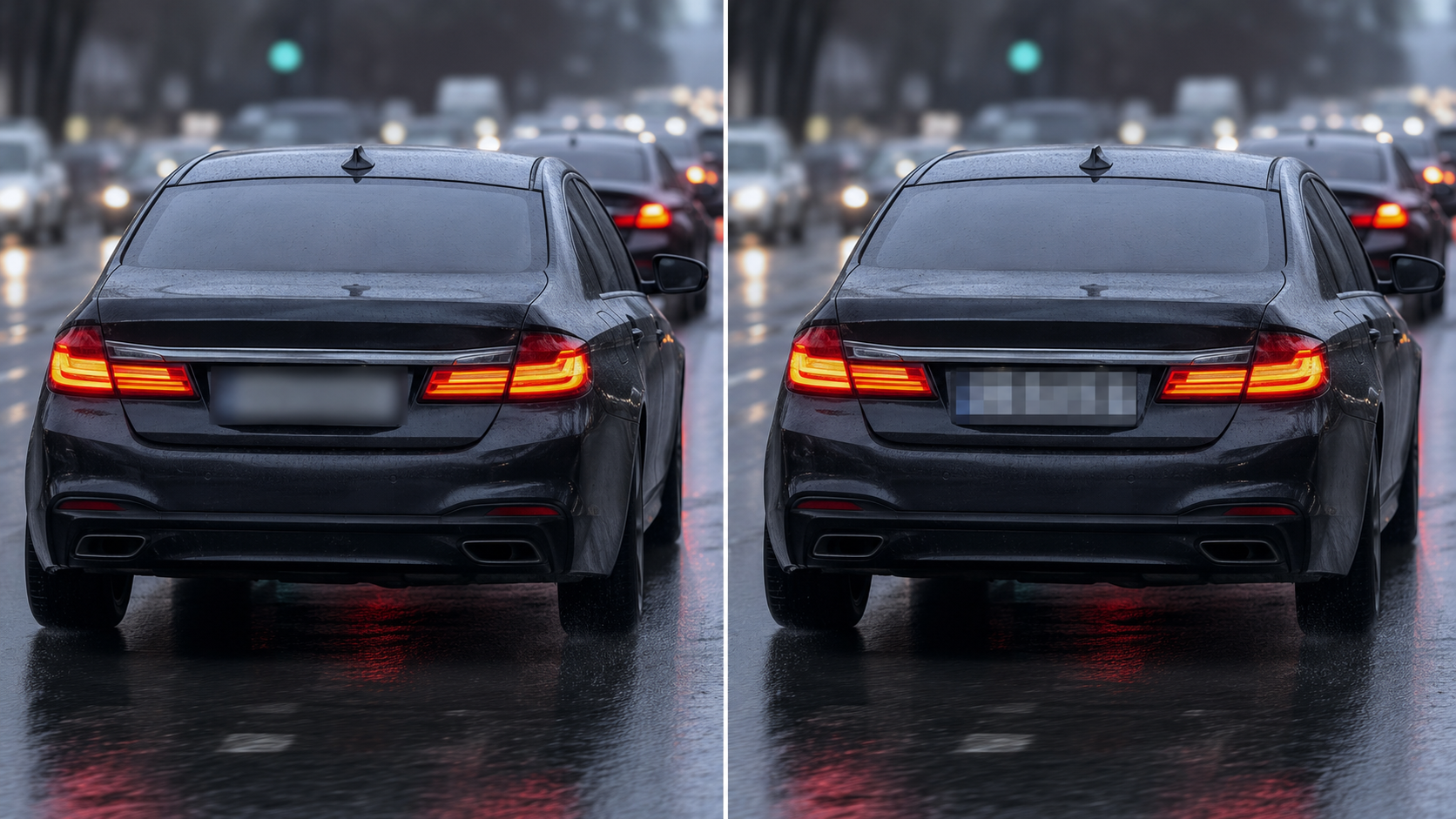
Blur vs pixelate on plates
Gaussian blur keeps cinematic motion blur on wheels and pavement; pixelation reads more aggressive for compliance archives. Pick the look your legal team expects before wide distribution.
Use cases
- Motovlogging and cycling cameras
- Real-estate drive-through tours
- News b-roll near parked vehicles
Who it's for
- Moto & auto creators
- Local news stringers
- Fleet and ops teams publishing training video
More video blur examples
Explore similar scenarios with the same demo clips and step-by-step guidance.
Fleet & dashcam compliance-style blur
Reduce incidental personal data in driver footage—helpful for sharing clips internally or in marketing.
Blur anything: logos, text & custom regions
Target arbitrary areas—logos on hoodies, on-screen addresses, signage—with precise AI-assisted selection.
Face blur in talking-head video
Automatic face detection and blur for interviews, podcasts, and vlogs—motion-tracked so identities stay protected.
Vlogger & street interview privacy
Keep bystanders and non-consenting faces out of frame legally and ethically—optimized for fast turn edits.
Frequently asked questions
- Does plate blur work at night or in rain?
- Detection quality depends on contrast and motion blur; always spot-check difficult frames—BGBlur is built to reduce manual work, not replace human review for every edge case.
- Can I blur only some plates?
- Selective workflows depend on editor controls; many teams blur all detected plates for consistent policy.
- Is this different from pixelating?
- Blur and pixelation are both obscuring techniques; blur often looks more natural in cinematic footage while still removing readability.
Ready to try this on your footage?
Upload MP4, MOV, or M4V and apply the same blur modes shown in this example.
Try BGBlur free