How to Blur License Plates in Real Estate Video [2026]
Real estate agents publishing walkthroughs on Zillow, Instagram, and TikTok routinely capture license plates, neighbor faces, and personal belongings without noticing. This guide walks agents, tenants, and neighborhood tour creators through a repeatable pre-publish privacy workflow.
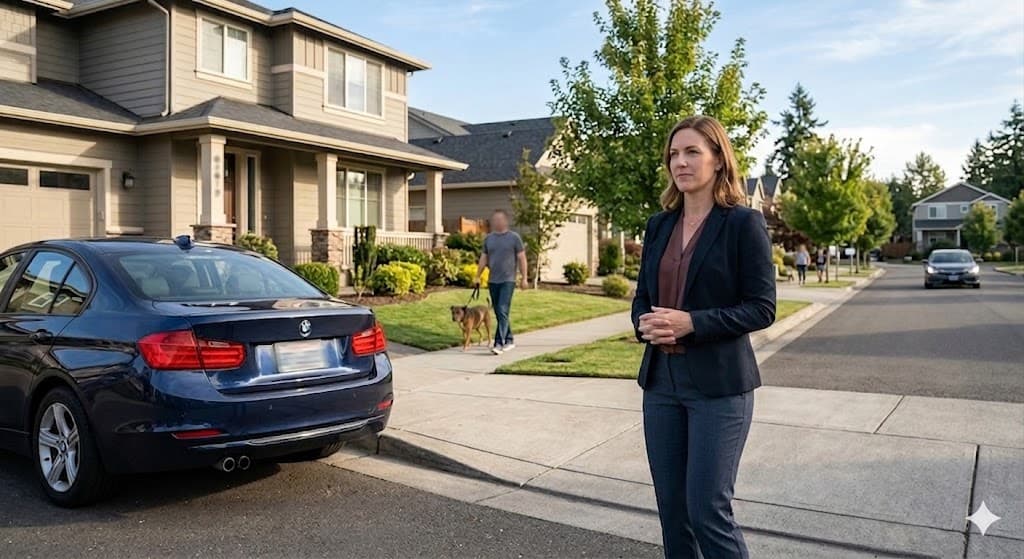
A Greek property company published a listing photo on its website with a car parked outside the house. The license plate was clearly visible. Under GDPR, that plate counted as personal data — and the company faced real legal consequences.
That is not a hypothetical warning. It is a documented case of what happens when real estate video privacy is treated as an afterthought instead of a production step.
Today, agents post walkthroughs on Zillow, Instagram Reels, and TikTok. Tenants discover their belongings in listing photos. Neighborhood tour creators film entire streets. Every one of these formats captures license plates, neighbor faces, parked cars, and personal identifying details — often without anyone noticing until it is too late.
This guide shows you exactly how to blur license plates in real estate video, how to remove faces from property video, and how to protect privacy in property listing photos and walkthroughs before you publish.
Why Real Estate Video Privacy Is a Legal Problem, Not Just a Courtesy
Real estate content looks harmless. You are showcasing a kitchen, a backyard, a street view. But cameras capture far more than the listing itself.
Kiplinger and other consumer finance outlets have reported that agents posting property photos and walkthrough videos on listing sites often expose family photos, personal belongings, and license plates of cars parked outside — all clearly visible without blurring. In some U.S. states, that exposure creates real liability, not just awkward neighbor conversations.
And the content model has changed. According to reporting from associations including the MetroTex Association of REALTORS, some agents now book showings not primarily to walk a buyer through a home, but to film properties they believe will perform on TikTok and Instagram — complete with music, transitions, and neighborhood B-roll. Those videos capture the block, parked cars, passers-by, and adjacent properties. Real estate walkthrough video privacy is no longer optional for high-volume creators.
What Gets Exposed in a Typical Property Video
| Captured element | Privacy risk |
|---|---|
| Street-parked cars | License plates link to owners via DMV records |
| Driveway vehicles | Same plate risk + identifies who lives there |
| Windows and mirrors | Reflect neighbors, plates, and street activity |
| Open house footage | Visitors who never consented to filming |
| Interior shots | Family photos, mail, documents, children's rooms |
| Drone flyovers | Entire neighborhood visible at once |
| Neighborhood tours | House numbers, faces, cars, daily routines |
If you publish without processing, you are not just marketing a property. You are publishing other people's identifying data.
Three Audiences Who Need Real Estate Video Privacy Tools
Audience 1: Real Estate Agents Filming Property Walkthroughs
Agents are the highest-volume creators in this space. A single active agent may shoot dozens of listing videos per year — exterior establishing shots, interior walkthroughs, drone clips, and social cutdowns.
Every exterior shot risks capturing:
- Neighbors in yards or driveways
- Pedestrians walking past
- Cars on the street and in adjacent driveways
- House numbers on neighboring properties
You need to blur neighbors faces in property video, blur cars in real estate video, and blur license plates real estate listing content before it hits MLS portals or social feeds. Manual editing in Premiere or CapCut works once. It does not scale across twenty listings a month. For a broader look at redaction tools built for repeat professional use, see our best video redaction software for business comparison.
BGBlur's real estate video privacy tool is built for this repeat workflow: upload a walkthrough, auto-detect plates and faces, export a compliant version in minutes.
Audience 2: Tenants and Homeowners Who Discover They Are Exposed
This audience is often overlooked — until they see themselves online.
Tenants and owners frequently discover that listing photos and videos show:
- Personal family photos on walls
- Mail and documents on counters
- Children's bedrooms and toys
- Their own vehicles and license plates in driveways
- Unique belongings that identify them
Even when sellers consent to marketing, current residents may not have agreed to have their identity broadcast on Zillow or Instagram. Privacy in property listing photos is a shared responsibility between agent and client — and blurring is the fastest fix when re-shooting is not possible.
If you are a homeowner reviewing your agent's draft media, ask: Can anyone identify me, my family, or my car from this footage? If yes, request blurring before publication.
Audience 3: Neighborhood Tour Creators on YouTube and TikTok
Lifestyle real estate content — "best streets in Austin," "hidden gem neighborhoods," "day in the life of a luxury agent" — films public space at scale. That means:
- Rows of parked cars with visible plates
- Residents walking dogs
- Deliveries, school pickups, daily routines
- House numbers and architectural details tied to specific addresses
These creators need the same protections as listing agents, often across longer, more cinematic edits. GDPR real estate listing video rules apply in Europe even when the creator is filming "the vibe" rather than a formal MLS listing.
How to Blur License Plates in Real Estate Video: Step by Step
Whether you are an agent, homeowner, or creator, the workflow is the same.
Step 1: Audit Before You Publish
Watch your raw footage at full resolution and mark:
- Every visible license plate (yours, the seller's, neighbors', street parking)
- Every face (passers-by, neighbors, open house guests, reflection faces)
- Every identifying interior detail you do not have explicit permission to show
- House numbers on adjacent properties in neighborhood B-roll
Most agents skip this step because plates look "small" on a phone screen. Regulators and privacy lawyers do not skip it.
Step 2: Use AI Detection Instead of Manual Masking
Manual keyframe masking breaks down on walkthrough footage because:
- The camera moves constantly
- Cars enter and leave frame
- People walk through establishing shots
- Reflections shift in windows and glass doors
AI license plate detection and face tracking follow objects frame by frame. That is why tools like BGBlur outperform manual blur for real estate walkthrough video privacy at scale. The same motion-tracking approach is what makes it practical for dashcam footage with faces and license plates, where the camera never stops moving.
Step 3: Blur Plates, Faces, and Sensitive Objects
Process in this priority order:
- License plates — highest legal sensitivity in EU/UK and increasingly in U.S. state privacy law
- Non-consenting faces — neighbors, pedestrians, background people
- Personal belongings — photos, documents, unique identifiers in occupied homes
- Adjacent property identifiers — when neighborhood context is not essential
Step 4: Export Platform-Safe Versions
Create separate exports if needed:
- MLS / Zillow version — maximum privacy, conservative blur
- Social cutdown — same privacy standard, vertical crop
- Client-only preview — can remain unblurred for internal review only
Never assume one unprocessed master file is safe for every channel.
Step 5: Build Blur Into Your Listing Workflow
Treat privacy blur like color correction — non-negotiable for every publish:
- Shoot walkthrough
- Edit pacing and music
- Run BGBlur for plates and faces
- Client approval
- Publish
Agents who batch five walkthroughs on a Friday afternoon can process all five in one session. That is the difference between privacy as a bottleneck and privacy as a habit.
GDPR, U.S. State Law, and Real Estate Listing Video
The Greek Property Case (Why This Matters in Europe)
The Greek property company case is the perfect opening example because it removes ambiguity. This was not a surveillance scandal or a viral prank video. It was a normal listing photo. A visible plate was enough to trigger GDPR enforcement logic: vehicle registration data can identify a person.
GDPR real estate listing video compliance therefore requires:
- Lawful basis for processing personal data (often consent or legitimate interest with balancing test)
- Data minimization — do not publish identifiable plates if blur achieves the same marketing goal
- Ability to respond to erasure requests if someone appears in footage
European agents publishing on Instagram, YouTube, or cross-border portals should assume GDPR video content rules apply — see our full GDPR video content compliance guide for the underlying legal basis and enforcement examples.
United States Considerations
U.S. law varies by state, but the direction is clear:
- California (CCPA/CPRA) treats certain identifiers as personal information — see our CCPA California video privacy guide for what qualifies
- Neighbor complaints can escalate to civil claims even where public filming is generally permitted
- MLS boards and brokerages increasingly publish privacy guidance for listing media
Blurring is cheaper than litigation and faster than reshooting.
Real-World Scenarios: What to Blur in Each Shot Type
Exterior Establishing Shot
Blur: all visible license plates, faces on sidewalks, readable house numbers on neighbors' homes if not essential.
Driveway and Garage Reveal
Blur: seller vehicles, visitor cars, plates reflected in garage door windows.
Interior Walkthrough (Occupied Home)
Blur: family photos, diplomas with names, mail piles, children's faces, screens showing notifications.
Drone Orbit
Blur: entire street plate inventory — drone shots capture more plates in 30 seconds than a ground walkthrough captures in ten minutes.
Open House Recap Video
Blur: every visitor face unless you have signed model releases on file.
Neighborhood Lifestyle B-Roll
Blur: plates, faces, delivery labels, school signage with identifiable groups.
How BGBlur Helps Real Estate Professionals Stay Compliant
Real estate video privacy with BGBlur is designed for agents and creators who publish frequently:
- Automatic license plate detection across walkthroughs and drone footage
- Face blur for neighbors, pedestrians, and open house guests
- Motion tracking so blur stays locked as the camera moves
- Browser-based workflow — no heavy NLE required for privacy passes
- Batch-friendly processing for agents with multiple active listings
Real estate is one of the highest commercial-value audiences for privacy tooling: recurring need, professional budget, and measurable legal exposure. Agents who blur every listing build trust with sellers, neighbors, and brokerages — and avoid becoming the next cautionary headline. For a wider toolkit comparison, see our top 10 tools for real estate video content.
FAQ: Real Estate Video Privacy
Do I need to blur license plates in real estate videos?
Yes — in most professional publishing contexts. Plates are treated as personal or identifying data in the EU under GDPR, create neighbor complaints in the U.S., and expose agents to liability when listings capture vehicles without owner consent. How to blur license plates in real estate video should be standard pre-publish practice.
Can I show cars in listing videos without showing plates?
Absolutely. Cars add context and scale. Blurring plates preserves the shot while removing identifying data. That is the ideal compromise for real estate video privacy.
How do I blur neighbors faces in property video quickly?
Use AI face detection rather than manual masks. Walkthrough footage moves too fast for frame-by-frame editing. Upload to BGBlur, detect faces automatically, and export.
What about tenant privacy in occupied listings?
Tenants may not have agreed to public marketing of their personal space. Blur personal photos, children's items, documents, and identifying belongings. Discuss media scope in lease and listing agreements.
Does GDPR apply to U.S. agents posting on Instagram?
If your content processes data of EU residents or you market to EU buyers, GDPR real estate listing video obligations may apply. Global platforms mean global exposure — blurring is the safest default.
Is blurring enough for GDPR compliance?
Blurring is a critical technical measure for anonymization, but compliance also depends on lawful basis, notices, retention, and erasure processes. Blur removes the most common visible trigger in listing media.
Conclusion: Professional Listings Require Professional Privacy
Real estate video privacy is not a niche concern for paranoid lawyers. It is a production standard for anyone publishing property media in 2026.
The Greek listing case proved that a single visible plate in a photo can have legal consequences. Today's agents publish video at scale across MLS, Zillow, TikTok, and Instagram — capturing neighbors, cars, and personal life at every angle.
How to remove faces from property video and how to blur license plates in real estate video takes minutes with the right tool. The cost of skipping that step — neighbor complaints, tenant disputes, regulatory scrutiny — is far higher.
Start with BGBlur's real estate video privacy feature and make blur part of every walkthrough you publish.