Top 10 Tools for Dashcam Creators in 2026: Privacy Guide
The essential 2026 toolkit for dashcam content creators, covering automatic license plate and face blur, video compression, thumbnail design, and legal requirements by region.
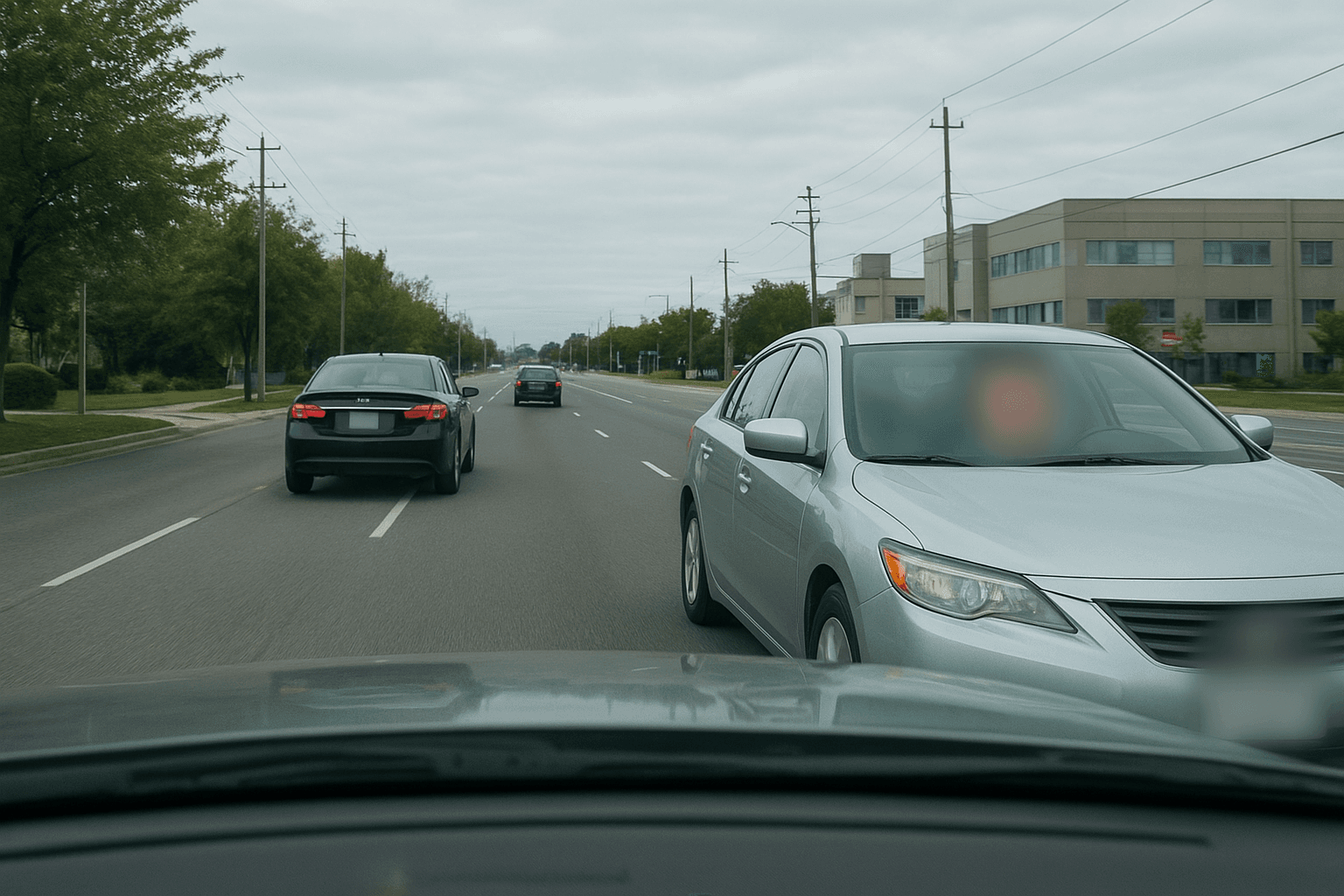
Dashcam content has exploded in popularity—from road rage compilations and accident documentation to scenic driving videos and trucking vlogs. Channels dedicated to dashcam footage attract millions of views, and the genre continues to grow as more drivers install cameras.
But publishing dashcam footage comes with serious legal requirements. License plates, faces of other drivers, and sometimes sensitive location information must be protected before publishing. This guide covers the essential tools every dashcam content creator needs in 2026.
Why Dashcam Creators Need Specialized Tools
Dashcam content presents unique challenges:
- License Plate Privacy: Publishing visible plates can violate privacy laws
- Face Identification: Other drivers and pedestrians need protection
- Volume of Footage: Hours of driving produces massive files
- Quality Preservation: Blur must look professional, not amateur
- Platform Compliance: YouTube and others may remove unblurred content
The right tools address all these challenges while maintaining the engaging quality that attracts viewers.
1. BGBlur - Best License Plate and Face Blur Tool
Website: bgblur.com
Why It's #1: BGBlur offers AI-powered detection of both license plates and faces—the two primary privacy concerns in dashcam footage. It's purpose-built for exactly this use case.
Key Features
- Automatic License Plate Detection: AI identifies plates across all angles and lighting conditions
- Face Detection: Identifies drivers, passengers, and pedestrians
- Motion Tracking: Blur follows moving vehicles and people
- Batch Processing: Process hours of footage efficiently
- Multiple Blur Styles: Professional-looking blur options
- Quality Preservation: No degradation of underlying footage
Dashcam-Specific Applications
Road Incident Videos: Blur all plates except those directly involved (with appropriate context).
Compilation Videos: Process entire compilations with consistent blur across all clips.
Parking Lot Footage: Blur plates of uninvolved vehicles in your parking recordings.
Pedestrian Protection: Automatically blur faces of bystanders captured during drives.
International Compliance: Different countries have different privacy requirements—BGBlur handles them all.
Legal Protection
Many jurisdictions require consent before publishing identifiable information. BGBlur provides the protection you need to publish confidently without legal risk. For a deeper walkthrough of this exact workflow, see our guide to blurring faces and license plates in dashcam videos.
2. DaVinci Resolve - Best Professional Video Editor
Website: blackmagicdesign.com/products/davinciresolve
Hollywood-grade editing for free.
Key Features
- Multi-Track Timeline: Combine multiple camera angles
- Color Correction: Fix dashcam exposure issues
- Audio Processing: Clean up road noise and wind
- Speed Control: Slow-motion for key moments
- Text Overlays: Add context and timestamps
- 4K+ Support: Handle high-resolution dashcam footage
Dashcam Editing Workflow
- Import raw dashcam files
- Create rough cut of interesting moments
- Color correct inconsistent exposure
- Add text overlays for context
- Process audio for clarity
- Export for blur processing
- Run through BGBlur
- Final export for upload
Pricing
Free version includes most features. Studio version $295 one-time.
3. HandBrake - Best Video Compression Tool
Website: handbrake.fr
Dashcam footage creates massive files. HandBrake makes them manageable.
Key Features
- Efficient Compression: Reduce file sizes dramatically
- Quality Preservation: Minimal visual degradation
- Batch Conversion: Process multiple files overnight
- Format Options: Convert to any required format
- Preset Library: Optimized settings for different platforms
Why Compression Matters
Raw dashcam footage can be 1GB+ per hour. HandBrake reduces this to uploadable sizes while maintaining visual quality—essential before BGBlur processing.
Pricing
Completely free and open source.
4. Epidemic Sound - Best Royalty-Free Music
Website: epidemicsound.com
Background music that won't get your videos claimed.
Key Features
- Driving Playlists: Curated for road content
- Mood-Based Search: Match video energy
- Full Commercial License: YouTube-safe
- Sound Effects: Crash sounds, horn honks, etc.
- Regular Updates: Fresh music constantly
Music Strategy
Different content needs different music:
- Scenic drives: Relaxing, atmospheric
- Road rage compilations: Tense, dramatic
- Fail compilations: Comedic, energetic
- Educational content: Neutral, unobtrusive
Pricing
Creator plan from $9/month.
5. Blackvue/Thinkware Cloud - Best Dashcam Ecosystem
Website: blackvue.com / thinkware.com
Premium dashcam systems with cloud integration.
Key Features
- 4K Recording: Maximum detail capture
- Dual Channel: Front and rear recording
- Cloud Upload: Automatic footage backup
- GPS Integration: Location and speed data
- Parking Mode: Capture incidents while parked
- Impact Detection: Automatic incident flagging
Investment Consideration
Quality dashcams capture better footage, leading to better content. The investment pays off in viewer retention and content quality.
Investment
Premium systems: $300-$600.
6. GPS Visualizer - Best Route Mapping Tool
Website: gpsvisualizer.com
Add professional route maps to your videos.
Key Features
- GPS Track Import: Works with dashcam GPS data
- Customizable Maps: Various map styles
- Elevation Profiles: Show terrain changes
- Speed Overlays: Display velocity data
- Animation Export: Moving map graphics
Content Enhancement
Route visualizations add professional polish and context to driving videos, especially for road trip and scenic content.
Pricing
Free with donation encouraged.
7. Canva - Best Thumbnail Creator
Website: canva.com
Eye-catching thumbnails that drive clicks.
Key Features
- Template Library: Dashcam-specific designs
- Text Effects: Bold, readable titles
- Image Enhancement: Make captures pop
- Consistent Branding: Build recognition
- Quick Creation: Rapid thumbnail production
Thumbnail Strategy for Dashcam Content
- Show the dramatic moment clearly
- Use bold text describing the incident
- Include arrows or circles highlighting action
- Create urgency and curiosity
Pricing
Free tier available. Pro at $12.99/month.
8. TubeBuddy - Best YouTube Optimization
Website: tubebuddy.com
Maximize discovery of your dashcam content.
Key Features
- Keyword Research: Find what viewers search
- Tag Optimization: Improve video metadata
- Competitor Analysis: Learn from top channels
- Thumbnail A/B Testing: Find best performers
- Publishing Scheduler: Optimal upload timing
Dashcam SEO Keywords
Optimize for searches like:
- "Road rage [location]"
- "Dashcam [incident type]"
- "Bad drivers [city/state]"
- "Car crash compilation"
Pricing
Free version available. Pro from $9/month.
9. OBS Studio - Best Screen Recording
Website: obsproject.com
Record commentary and create reaction content.
Key Features
- Screen Capture: Record your editing process
- Facecam Integration: Add commentary videos
- Audio Mixing: Separate audio tracks
- Scene Switching: Professional production
- Streaming Ready: If you go live
Commentary Content
Adding your analysis to dashcam footage creates unique, engaging content that stands out from pure compilation channels.
Pricing
Completely free and open source.
10. Notion - Best Content Organization
Website: notion.so
Manage your footage library and content pipeline.
Key Features
- Footage Database: Track all captured incidents
- Upload Status: Monitor what's been processed
- Content Calendar: Plan release schedule
- Performance Tracking: Log video analytics
- Idea Storage: Save future video concepts
Organization System
Create databases tracking:
- Raw footage inventory
- Blur processing status
- Upload schedule
- Video performance metrics
- Subscriber milestones
Pricing
Free for personal use.
Dashcam Content Strategy
Content Types That Perform
- Road Rage Compilations: High engagement, frequent uploads
- Close Call Compilations: Near-misses and saves
- Crash Compilations: (with appropriate sensitivity)
- Bad Driver Highlights: Location-specific content
- Scenic Drives: Relaxing, ASMR-style content
- Trucking Vlogs: Day-in-the-life trucking content
- Educational Analysis: Breaking down incidents
Platform Considerations
YouTube: Long-form compilations, ad revenue potential TikTok: Quick clips, viral potential Instagram Reels: Short, dramatic moments Facebook: Older demographic, high sharing
Legal Requirements by Region
United States
- No federal requirement to blur plates
- Some states have stricter privacy laws
- Best practice: blur all plates
European Union (GDPR)
- License plates are personal data
- Faces absolutely require blurring
- Heavy fines for non-compliance
- See our GDPR video content compliance guide for the full legal breakdown
United Kingdom
- Similar to EU requirements
- ICO can investigate complaints
- Blur plates and faces
Australia
- Privacy Act considerations
- State variations exist
- Blur recommended
Bottom Line: BGBlur protects you globally regardless of specific requirements.
Privacy Workflow for Dashcam Content
Standard Process
- Import footage from dashcam
- Review and select interesting clips
- Rough edit in DaVinci Resolve
- Process through BGBlur for plate/face blur
- Final edit with text, music, effects
- Compress with HandBrake if needed
- Create thumbnail in Canva
- Optimize SEO with TubeBuddy
- Upload and publish
Batch Processing Tips
For compilation creators handling large volumes:
- Organize footage by date/location
- Process blur in batches overnight
- Create template projects for consistency
- Build a library of processed clips
Monetization for Dashcam Channels
Revenue Streams
- YouTube AdSense (primary)
- Sponsorships (dashcam brands, insurance)
- Affiliate marketing (camera equipment)
- Licensing footage to news/media
- Merchandise (for larger channels)
Growth Strategy
Consistency beats virality. Regular uploads build subscriber base more reliably than hoping for viral hits.
Frequently Asked Questions
Do I legally need to blur license plates in dashcam videos? It depends on jurisdiction. The US has no federal requirement, though some states have stricter privacy laws. The EU treats license plates as personal data under GDPR, so blurring is effectively required for footage involving identifiable EU residents.
What is the best tool to automatically blur license plates in dashcam footage? BGBlur is purpose-built for this—its AI detects license plates across angles and lighting conditions and applies motion-tracked blur that follows moving vehicles through the frame.
Do I need to blur faces of other drivers and pedestrians in dashcam video? Yes, in most cases. Faces are personal data under GDPR and similar laws, and platforms like YouTube can remove content showing identifiable bystanders without consent.
How do I compress large dashcam files before uploading for blur processing? Use HandBrake, a free, open-source compressor with batch conversion and platform-specific presets, since raw dashcam footage can run 1GB+ per hour.
Can I monetize dashcam compilation videos on YouTube if I blur plates and faces? Yes. Blurring identifying details does not affect AdSense eligibility, and it reduces the risk of takedowns or claims tied to privacy complaints.
What's the difference between blurring plates for privacy versus for an active incident report? For general compilation content, blur all plates not central to the story. For incident documentation shared with insurance or law enforcement, keep the relevant plate visible while blurring uninvolved vehicles and bystanders.
How does BGBlur compare to manually blurring plates in an editor like DaVinci Resolve? Manual masking requires frame-by-frame keyframing for every moving vehicle, which doesn't scale. BGBlur's AI detection and motion tracking automate that process into a batch job you can queue overnight.
Final Thoughts
Dashcam content offers genuine opportunity—the genre continues growing, and quality channels can build substantial audiences. But legal compliance isn't optional.
Start with BGBlur as your foundation—it handles the most critical privacy requirements. Build your editing skills with DaVinci Resolve, and systematically develop your production workflow. If you're also managing footage from body cams or security systems, our top 10 body cam and law enforcement video tools guide covers a related workflow.
The channels that succeed long-term prioritize privacy compliance alongside content quality.
Update — August 12, 2026: A leaked Flock Safety sales deck proposed turning up to 350,000 Uber, Lyft, and delivery dashcams into a roaming license plate reader network. If your channel is built on dashcam footage, see what the Flock–Nexar rideshare ALPR plan means for creators and why automatic plate and face blur belongs in every upload workflow.
Ready to create compliant dashcam content? Start with BGBlur for automatic license plate and face blur, then build out your complete production toolkit.