Blur Faces and License Plates in Dashcam Videos [2026]
A complete workflow for blurring faces and license plates in dashcam footage before sharing it online or submitting it as insurance or legal evidence. Covers AI motion tracking, state and country variations, and insurance claim handling.
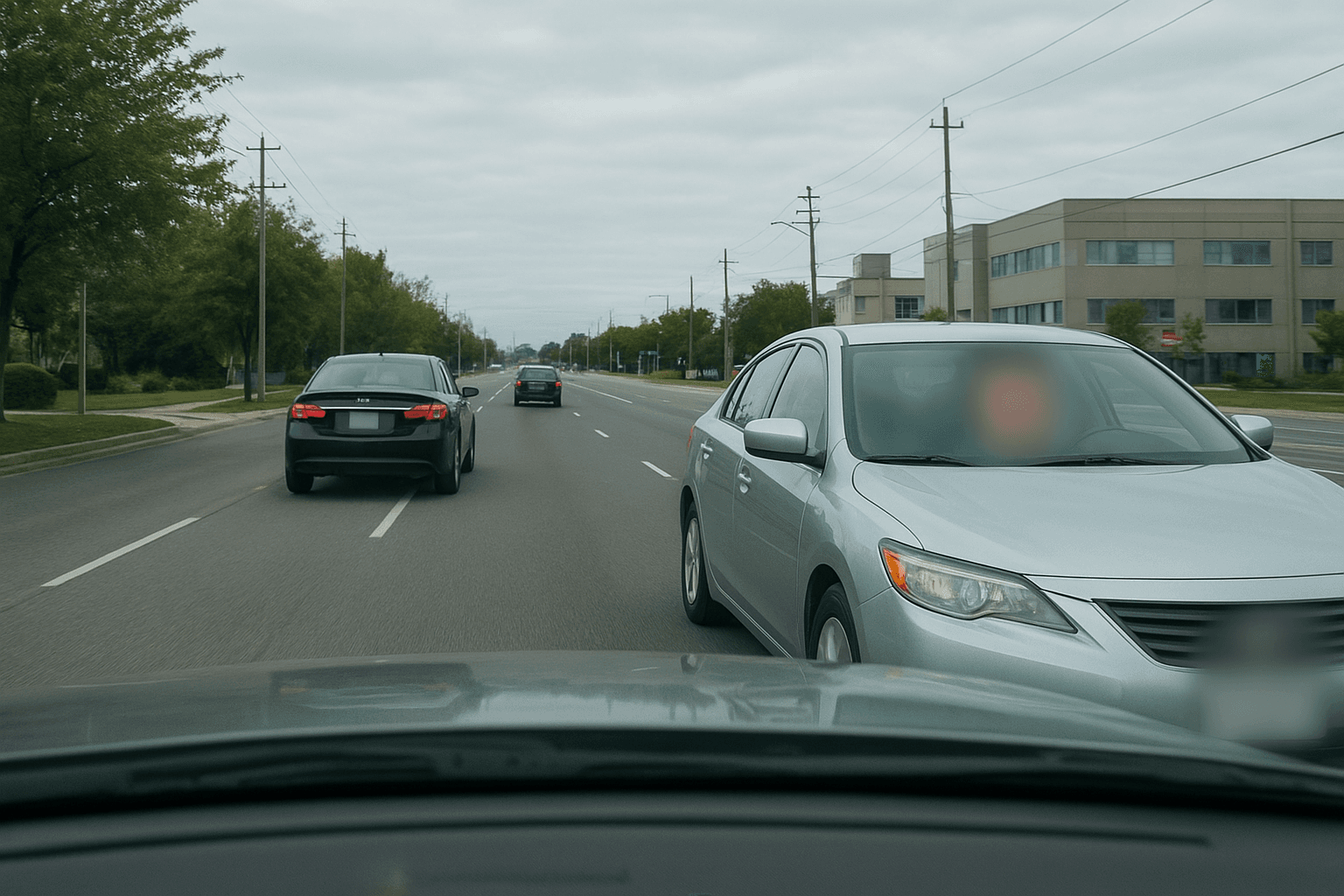
In today's world of dashcam videos, protecting privacy is crucial. Whether you're sharing footage online or submitting it as evidence, knowing how to blur face of dashcam video content is essential. This guide will show you the easiest methods to blur faces and license plates, ensuring privacy while maintaining video quality.
Why You Need to Blur Faces and License Plates in Dashcam Videos
Privacy laws worldwide require protecting individuals' identities in public recordings. When you blur face in video content, especially dashcam footage, you're not only following legal requirements but also showing respect for others' privacy. License plate blur is equally important, as these identifiers can reveal personal information about vehicle owners.
Best Tools to Blur Face of Dashcam Video Online
1. Online Video Blur Tools
Several face blur tool options are available online that require no software installation. These platforms use AI technology to automatically detect and blur faces in your dashcam videos. Simply upload your footage, and the tool handles the rest.
2. Why BGBlur Stands Out
Among all available options, BGBlur emerges as the best comprehensive solution for privacy protection. This powerful tool excels at detecting and blurring faces, license plates, and backgrounds simultaneously. With BGBlur, you can achieve professional-grade pixelated blur effects without technical expertise. The platform's AI-powered detection ensures that every face and license plate in your dashcam videos is automatically identified and protected.
3. Desktop Software Solutions
For more control over your blur effects, desktop applications offer advanced features. These programs let you:
- Track moving faces automatically
- Choose between pixel blur and other blur effects
- Process multiple videos in batch
Step-by-Step Guide: How to Blur Moving Face in Video
Using BGBlur for Perfect Results
BGBlur simplifies the entire process of adding face blur to your dashcam footage:
- Upload Your Video: Access BGBlur's intuitive interface and upload your dashcam videos
- Auto-Detection: BGBlur's advanced AI instantly identifies all faces and license plate blur requirements
- Select Blur Type: Choose between various blur styles, including the popular pixelated effect
- Preview and Adjust: Review the automated blurring and make any necessary adjustments
- Export: Download your privacy-protected video in high quality
Manual Blurring Techniques
When you need precise control to censor face in video content, BGBlur also offers manual tools:
- Frame-by-frame editing capabilities
- Custom license plate blur cover options
Advanced Features for Professional Results
Background Blurring with BGBlur
What sets BGBlur apart is its ability to blur background online while maintaining focus on important elements. This makes it ideal for creating professional video blur background effects. The platform's sophisticated algorithms ensure smooth, natural-looking results whether you're blurring faces, license plates, or entire backgrounds.
Making Your Background Blurry While Keeping Subjects Clear
BGBlur's intelligent selection tools allow you to make background blurry while preserving sharp details where needed. This dual functionality makes it perfect for both privacy protection and aesthetic enhancement of your blur background on video content.
Common Challenges and Solutions
Tracking Moving Objects
The biggest challenge in dashcam footage is tracking faces and license plates that move quickly. BGBlur's motion tracking technology excels at following subjects throughout the video, ensuring consistent privacy protection even in fast-moving dashcam videos.
Maintaining Video Quality
When you blur face of dashcam video content using BGBlur, the platform maintains exceptional quality by:
- Preserving original resolution
- Offering adjustable blur intensity
- Supporting all major video formats
- Providing fast processing without quality loss
Why BGBlur is the Ultimate Solution
BGBlur combines all essential features into one powerful platform:
- Automatic Detection: Instantly identifies faces and license plates
- Multiple Blur Options: From subtle gaussian to strong pixel blur
- Batch Processing: Handle multiple dashcam videos simultaneously
- Cloud-Based: No software installation required
- Fast Processing: Get results in minutes, not hours
Legal Considerations: How Dashcam Blurring Rules Vary by Region
Different regions have varying requirements for privacy protection in public recordings, and dashcam footage sits in a legal gray area because it's captured passively from a moving vehicle rather than deliberately filmed.
European Union (GDPR): License plates and faces both qualify as personal data under GDPR when they can identify an individual. If you plan to post dashcam footage publicly — YouTube compilations, TikTok clips, insurance disputes shared on social media — EU guidance treats unblurred plates and faces as processing of personal data that requires a lawful basis. Germany and the Netherlands have gone further, restricting continuous dashcam recording itself, not just publication, because of BDSG and AVG interpretations of surveillance law. Our GDPR video compliance guide covers the full legal basis requirements.
United States: There's no single federal dashcam privacy law, and rules vary meaningfully by state. Most states permit dashcam recording in public without consent (one-party consent for audio in the majority of states), but a handful — including California, Illinois, and Massachusetts — impose two-party consent requirements for audio that can complicate dashcam footage that captures conversations through an open window. Posting footage publicly doesn't trigger the same restrictions as recording, but many platforms' community guidelines still expect faces to be blurred out of courtesy, particularly for minors caught on camera.
United Kingdom and Australia: Both apply GDPR-equivalent frameworks (UK GDPR and the Australian Privacy Act) to dashcam footage shared publicly, with the same practical guidance: blur plates and faces before uploading anywhere the footage could reach a wide audience.
Best practice regardless of jurisdiction: Treat any dashcam clip you intend to publish — whether for a YouTube channel, a dashcam-fail compilation, or a public dispute over a collision — as requiring face and plate blurring by default. Keep the original file unblurred and unmodified for any situation where you might need to prove the footage hasn't been altered.
Insurance Claims and Legal Evidence: When Not to Blur
It's worth stating clearly: do not blur dashcam footage before submitting it to your insurance company, the police, or a court. Adjusters and investigators need to see the unredacted plate to identify the other vehicle, and an unblurred face can matter for eyewitness identification in a hit-and-run or dispute over fault. Submitting pre-blurred footage as evidence can weaken your claim or even raise questions about tampering.
The correct workflow is to keep two versions of the same clip:
- Original, unblurred footage — stored securely and submitted directly to your insurer, the police, or your attorney exactly as recorded by your dashcam.
- Blurred copy — created afterward with BGBlur, used only if you intend to post the incident publicly (a warning to other drivers, a community group post, a YouTube upload) once the claim or investigation no longer needs the original.
Many insurers now accept dashcam footage as primary evidence in fault determination, and some usage-based insurance programs even request it directly. Because of this, resist the urge to redact footage "just in case" before you've spoken with your insurer — ask what they need first, and only blur the version meant for public consumption.
How to Blur Faces and License Plates, Step by Step
Step 1: Upload Your Dashcam Footage
Navigate to the Upload page at bgblur.com to begin the process. Click the Select Video button or drag your file directly into the designated upload zone. Ensure your video file is in a standard format like MP4 or MOV for the fastest processing.
Step 2: Select Your Privacy Presets
Choose the specific privacy mode from the Detection Mode menu on the sidebar. Our AI will automatically scan the footage to identify all relevant faces and license plates. Select the Blur License Plate option if your primary goal is to hide vehicle identifiers.
Step 3: Review the AI Detection
Wait for the system to finish the initial scan and then click Preview Detection. The AI will overlay colored bounding boxes around every detected face and plate in the video. Check these boxes to ensure the tool hasn't missed any small or distant objects.
Step 4: Adjust Blur Intensity Settings
Fine-tune your privacy levels by interacting with the Blur Strength slider. This allows you to decide how much detail is obscured within the detected areas. Use a higher intensity setting if you need to ensure total anonymity for sensitive footage.
Step 5: Process and Download Video
Click the Process Video button to start the final rendering phase. The bgblur.com engine will apply the permanent masks to your video while maintaining high resolution. Once the progress bar reaches 100%, click Download to save your privacy-protected video to your device.
Conclusion
Protecting privacy in dashcam videos doesn't have to be complicated. With BGBlur as your face blur tool, you can easily blur faces and license plates while maintaining video quality. This comprehensive platform offers automatic detection, smooth tracking, and professional results for all your privacy protection needs. Whether you need to video blur faces, license plates, or backgrounds, BGBlur provides the perfect all-in-one solution. Start protecting privacy in your dashcam videos today with BGBlur's simple yet powerful blurring capabilities.
Update — August 4, 2026: Dashcam frame rate directly affects how reliably faces and plates can be tracked for blurring — see how many frames per second the human eye can see for why higher-fps footage tracks more accurately, and what "redacted" actually means for the legal definition behind this kind of footage redaction.
Update — September 10, 2026: Blurring a plate in footage you publish is legal everywhere — physically hiding one on the road with a flipper or cover generally isn't. See our breakdown of license plate concealer device laws and fines by country for the distinction.