Face Swap Videos in Seconds with BGBlur — AI Face Swap for Video and Images, Tips for Realistic Results, Free and Paid Tools, Quick Browser Workflow, Export and Privacy
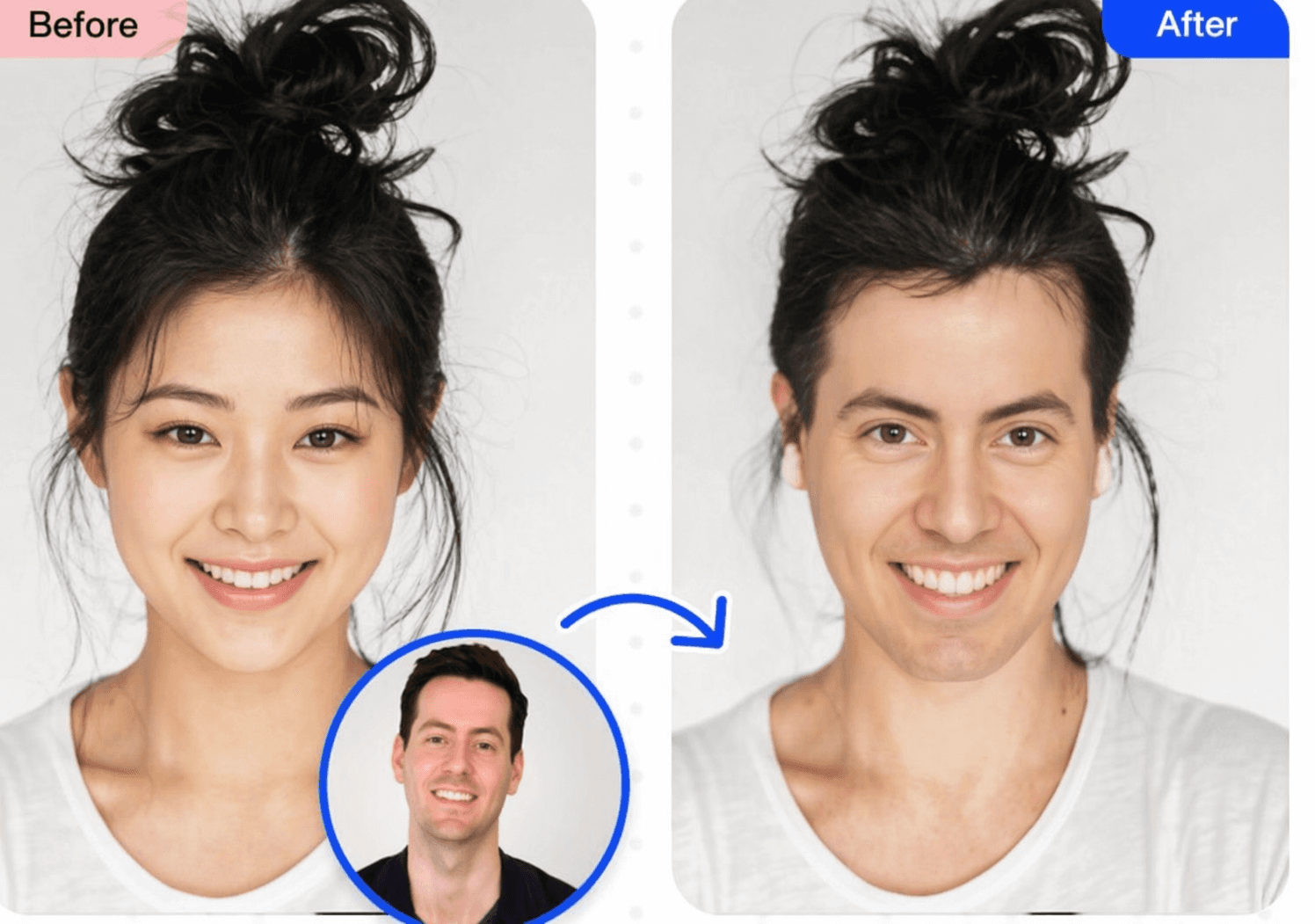
Face swap technology has completely changed the way people create and share content online. A few years ago, pulling off a convincing face swap required professional software, hours of editing, and a solid understanding of visual effects. Today, AI has flipped the script entirely. Whether you want to do a quick face swap for a laugh or put together a polished video face swap for your social media channel, it takes nothing more than a few taps or clicks. The face swap AI tools available right now are faster, smarter, and more realistic than ever before.
What Exactly Is a Face Swap?
A face swap is the process of replacing one person's face with another in a photo or video, blending the new face so naturally that it looks like it was always there. The technology behind a modern face swap uses deep learning to map facial features, match skin tones, and align expressions so the result feels seamless. What used to be a party trick done poorly in cheap apps is now a genuinely impressive piece of AI technology. You can do a face swap on a still image in under ten seconds, or run a full video face swap on a one-minute clip without breaking a sweat. The face swap AI handles all the heavy lifting — detecting the face, warping it to fit, and blending it into the scene automatically.
The Best Face Swap AI Tools for Video Right Now
When it comes to video face swap AI, the market has exploded with options. Choosing the right one depends on how long your video is, how much quality you need, and whether you want something free or are willing to pay for better results.
Reface is probably the most well-known face swap app out there. It became famous for letting people do celebrity face swap videos — drop your face onto a movie clip or music video and share it instantly. It works brilliantly for short clips and the face swap quality is surprisingly good for a mobile app. The interface is dead simple, making it the go-to choice for casual users who just want a fun face swap video in seconds.
DeepFaceLab is the gold standard for anyone who wants serious, high-quality video face swap results. It is free and open source, which makes it a popular choice among creators and developers. The face swap output from DeepFaceLab is incredibly realistic, but it does require a decent GPU and some patience to set up. If you are planning a longer, more professional video face swap project, this is the tool to learn.
Vidnoz is one of the best video face swap online platforms available today. There is nothing to install — you upload your video, upload a face photo, and the face swap AI does the rest in the cloud. It handles face swap video up to one minute long on the free plan, which is more than enough for most social media content. The results are clean and the turnaround is fast, making it a fantastic option for creators who need a quick video face swap online without any fuss.
Akool is another powerful face swap AI platform that is gaining serious traction among professional content creators. It supports longer videos, offers better skin tone matching than most competitors, and produces a face swap that holds up even under close inspection. It is a paid tool but the quality justifies the cost if you are using face swap regularly for content.
CapCut has quietly become one of the most popular face swap tools simply because so many people already use it for video editing. The face swap feature is built right into the editor, so you can do a face swap and finish editing your video in the same app. It is free, beginner-friendly, and perfectly suited for a fast face swap video destined for TikTok or Instagram Reels.
How to Face Swap in Images
Doing a face swap in images is even quicker than in video and is a great starting point if you are new to the whole face swap world. The process is straightforward across almost every face swap AI tool available. You start by uploading your base image — the photo where you want the face swap to happen. Then you either upload a second photo of the face you want to place in, or choose from a built-in library if the tool offers one. The face swap AI detects both faces automatically, maps the key facial landmarks, and blends the swapped face into the original image within seconds. Tools like FaceApp, Reface, and Photoleap are particularly good at image face swaps and deliver results that look natural even to a trained eye. For a celebrity face swap in images, Reface has a huge built-in library of famous faces, so you do not even need to source a photo yourself — just pick a celebrity and the face swap is done instantly.
Free Face Swap Options — Video Face Swap Gratis
Not everyone wants to pay for a face swap tool, especially if you are just experimenting. The good news is there are several solid video face swap gratis options that deliver real results without asking for your credit card.
Vidnoz offers a genuinely useful free tier where you can do a face swap video online without a watermark on shorter clips. It is one of the best free face swap experiences available right now because the quality is high and the process is entirely browser-based. Reface gives you a limited number of free face swaps per day on its mobile app, which is plenty if you are just using it casually. DeepFaceLab is completely free with no restrictions, though it asks more of you technically. CapCut's face swap feature is free within the app, and since CapCut itself is free to use, it is one of the most accessible entry points into video face swap for people who are already editing their content there.
Tips for Getting the Best Face Swap Results
The quality of your face swap depends a lot on the source material you feed into the AI. For the cleanest face swap, use a photo where the face is well-lit, forward-facing, and not obscured by sunglasses, heavy shadows, or extreme angles. The closer the angle and expression of the source face matches the target video or image, the more natural the face swap will look. For a video face swap that runs longer than a minute, it is worth using a desktop tool like Akool or DeepFaceLab rather than an online face swap platform, since longer videos benefit from more processing power and finer control over the output. Also, pay attention to skin tone matching — some face swap AI tools handle this automatically, but if the result looks off, adjusting brightness and warmth slightly in post can make the face swap look far more convincing. And always make sure you have consent before doing a face swap of someone else's likeness. Responsible use of face swap technology matters.
Final Thoughts
Face swap has gone from a novelty to a genuinely powerful creative tool in a very short time. Whether you are doing a silly celebrity face swap for your friends, creating entertaining video face swap content for your audience, or exploring what face swap AI can do artistically, the tools available today make it accessible to everyone. The best face swap experiences are fast, free or affordable, and produce results that would have seemed like movie magic just a decade ago. Pick a tool, try a face swap, and see just how easy it has become.
Write a Review
All Reviews (0)
No reviews yet
Be the first to share your experience!
Related product updates
BGBlur: How to Blur the Background of Your TikTok Videos with AI Background Blur, Face and License Plate Anonymization in a Fast Browser Workflow
Transform your TikTok videos with AI-powered blur technology. The best TikTok video editor for privacy protection - blur backgrounds, faces, and license plates in seconds. Free online tool.
BGBlur: How to Automatically Blur Moving Objects in Video for Privacy and Anonymization — AI Face Blur, License Plate Blur, Background and Object Blur with Browser Export
Learn how to blur moving objects in video using AI-powered technology. Protect privacy, remove distractions, and maintain professional quality with automated blur tracking.
BGBlur AI Video Blur Tool for Privacy Protection — Blur Faces, License Plates, Objects, Backgrounds and Export Anonymized Videos in Browser
Protect your privacy with AI-powered blur tool that automatically detects and blurs faces, objects, brand names, and backgrounds in videos. Free online video blur.
BGBlur Guide: How to Blur License Plates, Faces, and Sensitive Details in Dashcam Videos Using AI for Privacy, Redaction, and Secure Export in Browser Workflows
Learn how to blur license plates, faces, and sensitive details in dashcam videos using AI tools. Professional privacy protection for insurance claims, legal compliance, and public sharing.
BGBlur Guide: How to Blur License Plates in Videos Before Posting on Facebook to Protect Privacy, Anonymize Identifiable Information, and Avoid Legal Risks
Before you post that dashcam clip, learn the privacy risks, legal implications, and how to blur a license plate in a video before sharing it on Facebook.