Should I Post Photos of My Baby on Social Media?【2026】
Is it wrong to ask family not to post your newborn pictures? Discover the hidden risks of sharenting, your legal rights, and how BGBlur helps you share baby photos safely using natural blur or emoji overlays.
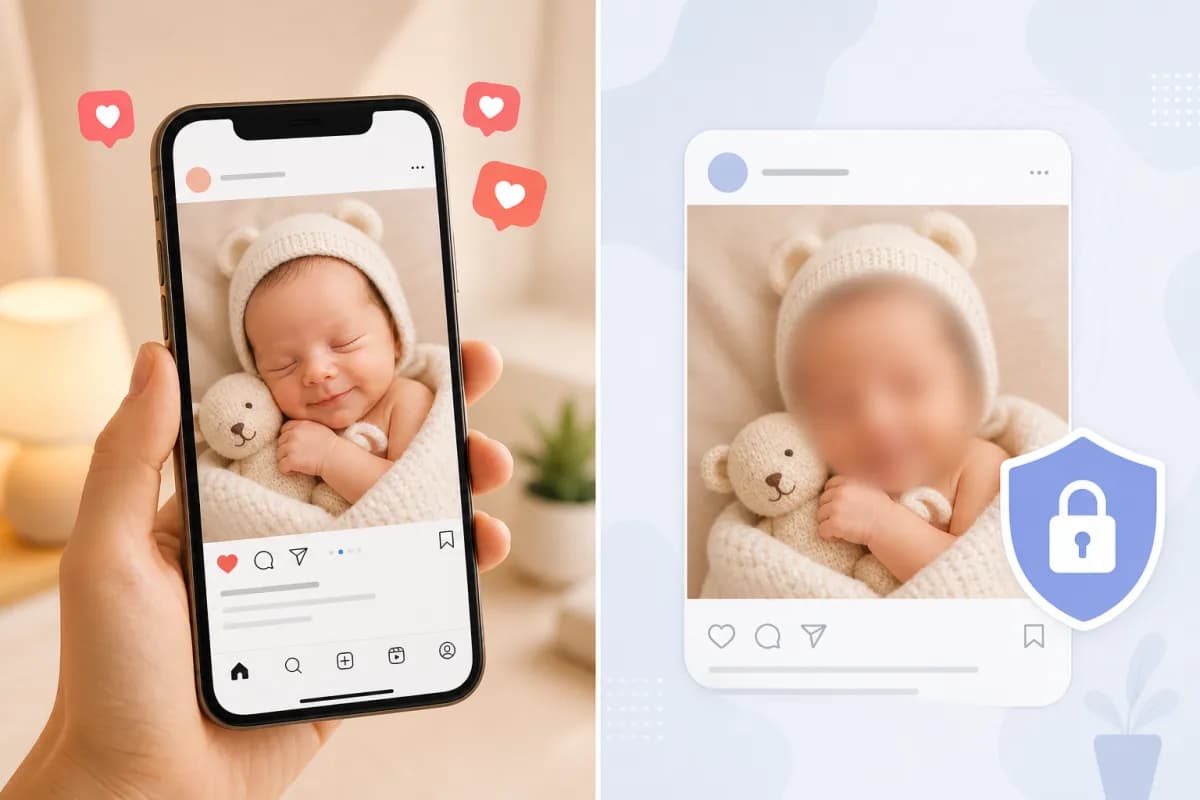
The moment your baby arrives, so does the urge to share — and so does the worry. Should you post that first bath photo? What happens when grandma shares the hospital room picture before you even get home? And is it really wrong to ask your family not to post your newborn's pictures on social media at all?
These are among the most searched parenting questions of 2026 — and the answers are more nuanced than a simple yes or no.
The short version: posting baby photos online carries real, documented risks — facial recognition data harvesting, digital kidnapping, permanent digital footprints, and identity fraud risks that begin at birth. But sharing precious moments with loved ones is also a deeply human instinct. You don't have to choose between the two.
BGBlur.com lets you share every milestone publicly — with your baby's face protected using natural blur or fun emoji overlays — so your memories stay yours while the moments stay shareable. This guide covers everything you need to make the right call for your family.
Is It Wrong to Tell My Family Not to Post My Newborn's Pictures?
No. And you're not alone in asking this question.
Asking family members — grandparents, aunts, uncles, friends — not to share photos of your newborn is a reasonable, loving, and increasingly mainstream parenting boundary. Yet it's one that can trigger guilt, conflict, and confusion, especially when relatives feel they're just celebrating a new life.
Here's why this boundary is not only valid but important:
Your child cannot consent. A newborn cannot agree to having their face, name, location, and personal details broadcast to potentially thousands of strangers. Every photo you or your family posts on their behalf makes a decision they'll live with for decades.
You are the legal guardian of their privacy. In most countries, parents hold the responsibility — and the right — to make decisions about their child's personal data. That includes what photos appear online and where.
Family members posting without permission is increasingly recognized as a violation. France updated its civil code in 2016 to allow children to sue parents for sharenting. The UK Online Safety Act 2023 gives children stronger rights over their digital image. In Germany, courts have ruled in children's favor in sharenting disputes. These legal shifts reflect a growing societal consensus: your child's image is not public property, even for family.
Saying "please don't post photos of the baby" is not an attack on family love. It's a privacy preference, like asking people not to share your home address. The most productive framing is: "We'd love to share photos ourselves — can we send them privately first?"
How to Have the Conversation With Family
Setting a "no public posting" rule is easier when you frame it positively:
- "We're keeping baby's social media footprint private until they're old enough to decide."
- "Could you share photos only in our family group chat instead of on your public feed?"
- "We'll send everyone great photos directly — we just want to be the first to share."
- "There are real privacy risks we've learned about — we're using a tool that lets us share safe versions publicly."
Most relatives respond well when they understand the reasoning isn't personal — it's protective.
The Hidden Risks of Posting Baby Photos Online
Many parents post newborn photos without realizing the full picture. Here are the documented risks that child privacy researchers and digital safety organizations are raising in 2026:
1. Facial Recognition Data Harvesting
Every photo you post on Meta (Facebook, Instagram), TikTok, or Google Photos is processed by AI systems that build facial recognition models. Your baby's face — even at a few days old — can be indexed and associated with their name, your location, and your social graph.
By the time your child starts school, platforms may already have years of facial data linked to their identity. The Internet Watch Foundation reports a significant rise in AI-generated content using real children's faces scraped from social media — a risk that didn't exist a decade ago.
2. Digital Kidnapping
Digital kidnapping occurs when strangers download photos of your child and repost them as their own — sometimes creating entirely fictional lives around your baby's image. It's more common than most parents realize. Accounts using stolen baby photos have accumulated hundreds of thousands of followers before being reported and taken down.
Public photos with a baby's face, name, and even partial birth details make digital kidnapping trivially easy.
3. Permanent Digital Footprint Without Consent
Studies cited by the UK's Children's Commissioner estimate the average child has 1,300+ photos posted online before their 13th birthday — most posted by parents and family members without the child ever being asked.
This means your child enters adulthood with a decade-plus archive of their image, milestones, struggles, and appearance — all posted before they could consent or curate their own identity.
4. Location and Routine Exposure
Photos posted from home often carry GPS metadata. Even without metadata, backgrounds reveal identifiable features — your neighborhood, school building, or regular park. Aggregated over time, this creates a pattern that reveals your child's daily routine to anyone watching.
5. Identity Fraud Starting in Infancy
Name + date of birth + city of birth is enough to begin building a fraudulent identity. These three pieces of information appear in countless birth announcement posts shared by well-meaning family members every day.
Child identity fraud is the fastest-growing segment of identity theft. Because credit checks for children are rare, fraud can go undetected for a decade.
6. Future Consequences the Child Never Agreed To
Embarrassing bath photos. Medical conditions mentioned in captions. Emotional struggles shared in parent posts. When these children turn 16 or 20 and search their own name, they may find years of intimate details they had no say in — and no easy way to erase.
For a deeper look at how laws are evolving to address these issues, read our post on how COPPA protects children's online privacy and how face blur tools help enforce it.
Thoughts on Posting Photos of Your Kids on Social Media
There's no one-size-fits-all answer. Parents navigating this question in 2026 tend to fall into four camps:
Total privacy advocates — No photos of children online, ever. Their reasoning: the child did not consent, and any public exposure carries risk. These parents share photos exclusively via direct message, private group chats, or printed albums.
Selective sharers — Photos are shared publicly, but faces are blurred or covered, location data is removed, and names and birthdates are never mentioned in captions. This is the fastest-growing approach among privacy-aware parents.
Private account sharers — Photos posted on locked, private accounts with a vetted followers list. The challenge: screenshots can still be taken, followers change, and platform privacy settings can change without notice.
Open sharers — Full photos, names, and captions shared publicly. Often driven by community, connection, and a belief that the risks are overstated. These parents are increasingly reconsidering as awareness grows.
The Middle Ground: Share the Moment, Protect the Face
The most sustainable approach for most families is sharing the moment while protecting the identity. This means:
- Posting the cozy blanket, the tiny hand, the proud older sibling's grin — without the baby's recognizable face
- Using BGBlur to quickly apply natural face blur or a fun emoji overlay before posting
- Keeping originals in a private family album or secure cloud folder
- Sending full unblurred photos directly to close family via WhatsApp, Signal, or email
This way you don't have to choose between preserving memories and protecting your child.
Should I Post Photos of My Baby on Social Media? A Decision Framework
Ask yourself these questions before posting:
1. Is my account public or private? Public accounts make photos searchable, indexable, and downloadable by anyone. Even "private" settings on major platforms are not airtight.
2. Does this photo show the baby's recognizable face? A face combined with name and location is a privacy risk. A cute blanket shot or a foot photo carries almost none.
3. What does the caption reveal? Avoid: full name, date of birth, city, hospital name, weight/health details. Prefer: vague, warm captions that celebrate the moment without identifying data.
4. Have I asked my co-parent? Both parents should agree on a sharing policy before the baby arrives, not in the hospital room.
5. Would I be comfortable if this photo existed permanently? The internet has a long memory. Post as though the photo will exist forever — because it likely will.
6. Am I posting for connection or validation? Honest self-reflection helps. Posts driven by genuine sharing tend to be more considered than posts driven by likes and performance.
How BGBlur Protects Your Baby's Identity in Every Photo and Video
BGBlur.com was built for exactly this situation: wanting to share beautiful moments without exposing your child's biometric face data to the public internet.
Natural Blur — Professional, Warm, Subtle
BGBlur's Gaussian blur option softens your baby's face with a smooth, natural effect. The result looks intentional and artistic — like a photographer's depth-of-field choice — rather than redacted or harsh.
Best for: Milestone photos, holiday cards, family blog posts, Instagram grids where aesthetic consistency matters.
Emoji Overlay — Playful, Fun, Instantly Shareable
BGBlur also supports emoji and sticker overlays that cover your baby's face with hearts, stars, flowers, suns, animals, and more. The result is genuinely cute — it adds character rather than removing it — and signals to followers that you're deliberately protecting your child's identity.
Best for: Casual social posts, birth announcements, "first birthday" posts, TikTok clips, stories, reels.
How It Works in 3 Steps
Using BGBlur to protect your baby's photos takes less time than writing a caption:
Step 1: Upload your photo or video Go to BGBlur.com and drag your photo or video into the upload area. Supports JPG, PNG, MP4, MOV, and more. Works directly in your mobile browser — no app to download.
Step 2: Choose your blur style Select Face Blur for automatic AI detection of all faces in the image. Then choose your style:
- Natural blur (Gaussian) — adjustable intensity from soft to strong
- Emoji overlay — pick from hearts ❤️, stars ⭐, flowers 🌸, animals 🐼, and more
BGBlur's AI detects even partially visible faces, faces at angles, and faces in motion (for videos).
Step 3: Download and share Preview the result, then download your privacy-protected photo or video. The original is never stored — BGBlur deletes all uploads after processing, keeping your family's images off any server.
What BGBlur Automatically Detects
- Baby faces at any angle (including profile views)
- Multiple faces in one photo (siblings, parents, grandparents — blur selectively or all at once)
- Faces in video frames (motion-tracked, so blur follows movement)
- Partially obscured faces
- Faces in low-light or high-contrast photos
For more on how AI face detection works for family photos, see our guide on how to blur faces in photos and videos with AI in 3 seconds.
Who Should Use BGBlur for Baby and Child Photos?
New parents who want to share birth announcements and newborn photos without exposing their child's face to facial recognition systems.
Parents with family members who overshare — send family members the blurred version to post publicly, keeping the real photo in a private family album.
Parents building a public presence — bloggers, creators, influencers, and public figures who share family content but want to protect their children's identities.
Families navigating custody or safety situations — where keeping a child's location and appearance off public platforms is a legal or safety requirement.
Grandparents and relatives who want to share proudly but respect the parents' privacy preferences — BGBlur gives them a way to still post something while honoring the rules.
Setting a Family Photo Policy That Actually Works
Before the baby arrives (or right now if they're already here), consider establishing a clear family photo policy:
Define who can share and where: Public social media? Private group chat only? Family WhatsApp? Direct messages?
Set rules for what the photo can include: Face or no face? Name in caption? Location tags?
Create a private sharing space: A dedicated private Google Photos album, a Signal group, or a family app like Tinybeans gives relatives a place to see full, real photos — without posting publicly.
Give family a tool to comply: Sending relatives a link to BGBlur.com along with your policy makes it easy for them to follow your rules even if they still want to post something publicly.
Revisit the policy as your child grows: A 1-month-old's privacy needs differ from a 5-year-old's. Update your approach as your child develops a sense of self and, eventually, opinions about their own image online.
For context on how laws around recording and sharing faces have evolved, see our overview of what rights you have when someone records and posts your face without consent.
The Digital Consent Question: When Your Child Gets a Say
One of the most important long-term considerations in the sharenting conversation is digital consent — the idea that children should eventually have a say in their online presence.
Some families have begun giving children this choice as young as 3-4, asking "Can I take a photo of you for Grandma?" before shooting. By age 7-8, many children have opinions about which photos they like and which they'd rather not share. By the teen years, retroactive embarrassment over sharented content is well-documented in psychological research.
Building a habit of privacy protection early — including using tools like BGBlur — makes it easier to transition into a more collaborative approach as your child grows. It also models healthy digital boundaries, which is exactly the kind of media literacy you'll want them to have.
Practical Tips for Safer Baby Photo Sharing
-
Turn off location tagging before photographing and posting. On iPhone: Settings → Privacy → Location Services → Camera → Never. On Android: Camera settings → Location tags → Off.
-
Remove metadata before sharing using a free tool or your phone's built-in export options. Metadata can contain GPS coordinates, device model, and timestamps.
-
Use a private family album app like Tinybeans, 23snaps, or a private Google Photos album instead of public social media for real, unblurred photos.
-
Use BGBlur for anything public-facing — Instagram, Facebook, TikTok, WhatsApp status, Twitter/X — so the face-protected version is what the public sees.
-
Ask relatives to text, not post — Frame it as a preference: "We'd love to get your photos in our group chat so we can see them too!" This makes compliance feel like inclusion, not restriction.
-
Review your social media privacy settings now — Even old posts from pregnancy can reveal patterns. Audit what's already out there and remove or restrict what you can.
For a broader look at how to protect privacy in photos and videos, see our complete guide on how to blur faces in photos online for free.
Conclusion
Should you post photos of your baby on social media? That's ultimately your decision — and it's one worth making thoughtfully rather than reactively.
The risks are real: facial recognition data, digital kidnapping, permanent digital footprints, identity fraud, and content your child will never be able to take back. But the desire to share joy, celebrate new life, and connect with loved ones across distances is just as real.
The answer doesn't have to be all or nothing. With BGBlur.com, you can share every milestone, every tiny foot, every proud sibling moment — with your baby's face protected by natural blur or a playful emoji overlay. In under 3 seconds, your photo goes from a potential privacy risk to something you can share with genuine peace of mind.
And telling your family not to post your newborn's pictures? That's not wrong. It's one of the most caring things a new parent can do.
Protect your baby's photos with BGBlur — free, no app needed →
Related Reading
- How COPPA Protects Children's Online Privacy in 2026 — The law behind child data protection and how blur tools help enforce it
- Can Someone Post My Face on Social Media Without Consent? — Your rights when photos go up without permission
- Blur Faces in Photos Online Free — Quick guide to face blur for photos
- Blur Faces in Photos and Videos with AI in 3 Seconds — How BGBlur's AI detection works
- AI Video Blur for Privacy Protection — Protecting faces in video content
Last updated: June 20, 2026
Update — September 24, 2026: See our new guide on Italy's Garante ruling on sharenting and both-parent consent.