Market Your Fitness Studio with Video Content 2026
Master fitness studio video marketing with proven strategies for client testimonials, class previews, social media content calendars, paid advertising, and essential privacy protection. Learn equipment recommendations, filming techniques, content batching workflows, and how to blur member faces for GDPR compliance before sharing gym footage publicly.
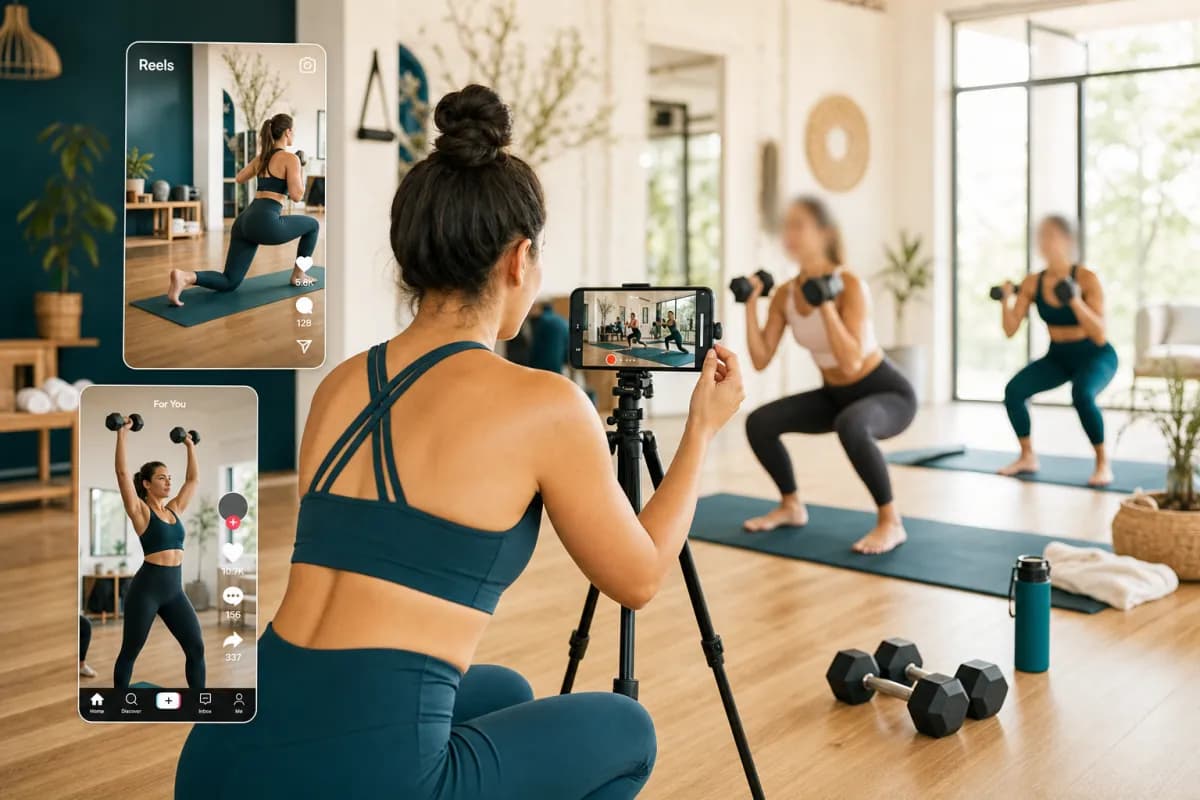
Video content is the most powerful marketing tool for fitness studios in 2026. Whether you're running a yoga studio, CrossFit box, Pilates center, or boutique gym, video marketing drives membership growth, builds community, and showcases your unique training environment better than any other medium.
This complete guide covers everything from filming client testimonials to creating class previews, social media strategies, and essential privacy protection for sharing gym footage publicly while staying GDPR-compliant.
Why Video Marketing is Essential for Fitness Studios in 2026
Before diving into strategies, understand why video content outperforms traditional marketing for gyms and fitness studios:
Video Marketing Statistics for Fitness Industry
- 86% of fitness consumers watch videos before choosing a gym
- Class preview videos increase conversion by 64% compared to text descriptions
- Instagram Reels and TikTok drive 3.5x more engagement than static posts
- Client testimonial videos are trusted 12x more than written reviews
- 73% of millennials prefer video content when researching fitness memberships
What Makes Fitness Video Content Compelling
Unlike retail products, fitness is experiential. Potential members need to see your studio atmosphere, feel your coaching energy, and visualize themselves in your classes before committing to membership.
Video accomplishes what photos and text cannot:
- Authentic studio environment and equipment quality
- Instructor personality and teaching style
- Class intensity levels and modifications offered
- Community vibe and member interactions
- Real results from actual clients
- Technique demonstrations and form coaching
Types of High-Converting Fitness Studio Videos
Different video formats serve distinct marketing goals. Build a content calendar combining these proven formats:
1. Client Transformation & Testimonial Videos
The most powerful marketing asset for any fitness business.
What to Include:
- Before/after progress (with client permission)
- Client's fitness journey story (1-2 minutes)
- Specific results achieved (weight loss, strength gains, injury recovery)
- Why they chose your studio over competitors
- Their favorite class or instructor
Filming Tips:
- Record in your studio environment (builds brand recognition)
- Natural lighting or professional studio lights
- Lavalier mic for clear audio (crucial for testimonials)
- Ask open-ended questions: "What was your biggest fitness challenge?" not "Do you like our classes?"
Privacy Protection: Clients featured prominently give explicit permission, but background members visible during filming require face blurring to comply with GDPR privacy laws. More on this below.
2. Class Preview Videos (Virtual Studio Tours)
Show potential members exactly what they're signing up for.
What to Film:
- Full class walkthrough (condensed 2-3 minute version of 45-60 min class)
- Warm-up sequence demonstration
- Main workout highlight reel (most energetic moments)
- Cool-down and stretching segment
- Instructor intro and class philosophy
Format Variations:
- Point-of-view camera (GoPro mounted on participant)
- Wide studio shots showing full class energy
- Close-ups of form corrections and coaching cues
- Split-screen comparisons (beginner modifications vs advanced)
Optimal Length:
- Instagram/TikTok: 30-90 seconds
- YouTube: 3-8 minutes
- Website landing pages: 2-4 minutes
3. Instructor Spotlight Videos
Humanize your coaching staff and build personal connections before first visit.
Content Ideas:
- Day-in-the-life of trainer/instructor
- Fitness philosophy and specialization
- Personal fitness journey (how they became a coach)
- Favorite exercises and why they work
- Quick workout tips or nutrition advice
Distribution:
- Feature on instructor bio pages
- Share on studio social media
- Include in email welcome sequences
- Boost high-performing ones with paid ads
4. Exercise Technique & Form Tutorials
Establish authority and provide value before selling.
Tutorial Topics:
- Common exercise mistakes and corrections
- Progression pathways (beginner to advanced)
- Injury prevention tips
- Equipment usage demonstrations
- Mobility and flexibility routines
- Home workout modifications
SEO Benefits: Tutorial videos rank well on YouTube search for queries like "how to deadlift properly" or "yoga poses for back pain"—attracting new audiences actively searching for fitness guidance.
5. Behind-the-Scenes Studio Content
Build community and make members feel part of something special.
What to Capture:
- Equipment deliveries and studio improvements
- Staff training and certification programs
- Community events and challenges
- Member milestones and achievements
- Holiday-themed workouts or charity events
- Cleaning protocols and facility maintenance
Platform Strategy: Perfect for Instagram Stories, Facebook Stories, and TikTok—casual, authentic, low-production-value content that humanizes your brand.
6. Results & Progress Tracking Videos
Social proof that your programming delivers measurable outcomes.
Tracking Formats:
- Month-over-month body composition changes
- Strength benchmark improvements (before/after lifts)
- Flexibility and mobility gains
- Endurance test results (mile time, max reps, etc.)
- Group challenge leaderboards and winners
Compliance Note: Always obtain written consent before sharing client-specific data. Consider anonymizing metrics (e.g., "Average member strength increased 23% in 12 weeks") for broader privacy.
7. Live Streaming Classes & Events
Real-time engagement during COVID accelerated adoption; hybrid models persist in 2026.
Live Streaming Benefits:
- Trial memberships can experience classes remotely
- Away members stay connected during travel
- Builds FOMO for non-members watching
- Recorded replays become evergreen content
Platforms:
- YouTube Live (best for long-term searchability)
- Instagram Live (best for immediate engagement)
- Facebook Live (best for local community reach)
- Zoom (best for private member-only classes)
Equipment Needed:
- Wide-angle camera (captures full studio)
- Quality microphone (crucial—viewers abandon poor audio)
- Stable internet (min 10 Mbps upload for 1080p)
- Tripod or ceiling mount (prevents shaky footage)
Video Equipment for Fitness Studio Marketing (Budget Tiers)
Beginner Budget ($200-500)
Camera: Smartphone (iPhone 13+, Galaxy S21+) with stabilizer Audio: Rode VideoMic Me or Shure MV88 Lighting: Neewer LED panel or ring light Editing: CapCut or InShot (mobile apps)
Intermediate Budget ($1,000-3,000)
Camera: Sony ZV-E10 or Canon M50 Mark II Audio: Rode Wireless GO II dual mic system Lighting: Aputure MC RGBWW light kit Editing: DaVinci Resolve (free) or Adobe Premiere Pro Accessories: Manfrotto tripod, ND filters, extra batteries
Professional Budget ($5,000-15,000)
Camera: Sony A7 IV or Canon R6 Mark II (4K 60fps) Audio: Sennheiser AVX wireless system Lighting: Aputure 300d II with softbox and grid Editing: Full Adobe Creative Cloud suite Accessories: Gimbal stabilizer, drone for aerial shots, multi-cam setup
Reality Check: Start with smartphone. Production quality matters less than authentic energy and valuable content. Upgrade equipment as ROI justifies investment.
Social Media Video Strategy for Fitness Studios
Platform-Specific Content Optimization
Different platforms reward different video formats and lengths.
Instagram Strategy
Reels (15-90 seconds):
- Quick workout tips and form tutorials
- Transformation reveals and progress updates
- Motivational quotes with workout B-roll
- Trending audio challenges with fitness twist
- Day-in-the-life instructor content
Posts (60-second video limit):
- Client testimonials
- Class highlights
- Community events recap
- New equipment or program announcements
Stories (15 seconds per clip):
- Behind-the-scenes daily content
- Polls and quizzes for engagement
- Countdown to events or challenges
- Swipe-up links to booking page (10k+ followers)
IGTV / Long-form (up to 60 minutes):
- Full class recordings for members
- Extended Q&A sessions with trainers
- Detailed workout programs and tutorials
TikTok Strategy
Winning Formats for Fitness:
- Before/after transformations with trending sounds
- "This vs That" exercise comparisons
- "What I eat in a day" (trainer nutrition)
- Myth-busting fitness misconceptions
- Workout challenges with branded hashtags
- Comedy sketches about gym culture
Growth Tactics:
- Post 1-3 times daily (algorithm favors consistency)
- Use relevant hashtags: #FitnessMotivation #GymTok #WorkoutRoutine
- Engage with comments within first hour (boosts reach)
- Duet/Stitch with popular fitness creators
- Jump on trending sounds early (first 12-24 hours)
YouTube Strategy
Channel Pillars:
- Weekly class previews (drives trial memberships)
- Tutorial series (SEO traffic from search)
- Member success stories (social proof)
- Facility tours and equipment reviews (local searches)
Optimization:
- Titles with keywords: "30-Minute HIIT Workout | [Your Studio Name] Class Preview"
- Thumbnails with faces and bold text overlays
- Detailed descriptions with timestamps and links
- End screens promoting membership or next video
- Playlists grouping content by class type or goal
Facebook Strategy
Best Performance:
- Community-focused content (member spotlights, events)
- Longer-form content (3-10 minutes performs better than Instagram)
- Local SEO benefit (geo-tagged posts reach nearby searchers)
- Facebook Groups for member-exclusive content
Posting Frequency Guidelines
Minimum Viable Strategy:
- Instagram: 4-7 Reels per week + daily Stories
- TikTok: 1 video per day
- YouTube: 1 video per week
- Facebook: 3-5 posts per week
Growth Optimization Strategy:
- Instagram: 1-2 Reels per day + 5-10 Stories per day
- TikTok: 2-3 videos per day
- YouTube: 2-3 videos per week
- Facebook: Daily posts + weekly Lives
How to Film Client Testimonials That Convert
Client testimonials are your highest-ROI marketing content, but poor execution makes them ineffective.
Pre-Filming Preparation
Client Selection:
- Choose diverse success stories (weight loss, strength, injury recovery, confidence)
- Recent results (within last 6 months) are most compelling
- Articulate, enthusiastic clients (not everyone is camera-comfortable)
- Range of demographics (age, gender, fitness backgrounds)
Legal Clearances:
- Signed video release form before filming
- Specific permission for use (website, ads, social media)
- Option to revoke consent (include expiration date)
- GDPR compliance if serving EU customers
Pre-Interview Questions: Send these 24 hours before filming so clients prepare thoughtful responses:
- What was your biggest fitness challenge before joining?
- Why did you choose our studio over other options?
- What specific results have you achieved?
- How has your life changed beyond physical fitness?
- What would you tell someone considering joining?
Filming Setup
Environment:
- Film in your studio (builds brand recognition)
- Background showing equipment or classes in action
- Clean, organized space (no clutter)
- Moderate background activity (not distracting but shows energy)
Camera Placement:
- Eye-level height (not looking up or down at subject)
- Rule of thirds composition (subject slightly off-center)
- Headroom: 10-15% of frame above head
- Clean background or shallow depth-of-field blur
Lighting:
- Three-point lighting (key, fill, backlight) for professional look
- Natural window light works if supplemented properly
- Avoid overhead gym lights creating shadows under eyes
- Test exposure before starting interview
Audio:
- Critical: Lavalier mic on client + backup recorder
- Test levels before rolling (gym music and AC noise are common issues)
- Monitor audio with headphones during recording
- Ask client to silence phone and avoid jewelry that rustles
Interview Techniques
Creating Authentic Responses:
- Ask open-ended questions: "Tell me about your fitness journey" not "Do you like our classes?"
- Follow-up probes: "Can you give me a specific example?"
- Silence is okay—let them think and formulate thoughts
- Re-ask if response feels scripted: "Forget the camera, just tell me like you're talking to a friend"
Capturing B-Roll: While interviewing or immediately after, film:
- Client working out in their favorite class
- Trainer correcting form or giving encouragement
- Before/after photos or measurement tracking
- Client interacting with other members
Editing Structure (2-3 minute final video):
- Hook (0-5 seconds): Most emotional or impressive quote
- Problem (15-30 seconds): Their fitness challenge before joining
- Solution (30-60 seconds): Why they chose your studio, what program they followed
- Results (45-60 seconds): Specific achievements and how life improved
- Call-to-action (10-15 seconds): Recommendation for potential members + studio contact info
Privacy Protection: How to Blur Faces in Fitness Studio Videos (GDPR Compliance)
Here's where many fitness studios unknowingly violate privacy laws. You cannot legally share videos with identifiable faces of non-consenting individuals in most jurisdictions.
Why Face Blurring is Required for Gym Videos
Legal Requirements:
- EU GDPR: Faces are personal data—sharing without consent risks fines up to €20 million
- UK GDPR: Post-Brexit UK maintains same strict privacy requirements
- California CCPA: Biometric data (faces) requires explicit opt-in
- Platform Policies: Instagram/TikTok may remove content violating privacy
Practical Scenarios Requiring Blur:
- Background members during class filming
- People visible in mirrors behind featured client
- Members entering/exiting frame during testimonials
- Crowded gym floor during peak hours
- Faces visible through studio windows from street
Who Doesn't Need Blur:
- Featured client with signed release form
- Staff and instructors (implied consent as employees)
- People explicitly consenting to appear (get written confirmation)
The BGBlur Solution for Fitness Studio Privacy
BGBlur automatically detects and blurs faces in your fitness studio videos, ensuring legal compliance while maintaining content quality:
How BGBlur Works for Gym Content:
- Upload your fitness studio video to BGBlur
- AI automatically detects all faces across every frame (even in mirrors and reflections)
- Choose blur settings:
- Gaussian blur (soft, natural)
- Pixelation (stronger anonymization)
- Full anonymization (maximum privacy)
- Selective blurring (keep featured client sharp, blur background members)
- Preview frame-by-frame to verify protection
- Download privacy-protected video ready for social media
What BGBlur Protects in Fitness Videos
- Background member faces during class filming
- Faces in mirror reflections (often missed manually)
- People through windows or doors
- Staff members who haven't signed releases
- Faces on posters, TVs, or screens in frame
Manual Blur vs AI Blur Comparison
| Method | Time (10-min video) | Accuracy | Cost |
|---|---|---|---|
| Manual blur (Premiere/Final Cut) | 6-10 hours | 75% (easy to miss faces) | $60-150/hour editor rate |
| BGBlur AI | 5-15 minutes | 98%+ detection | $5-15 per video |
Bottom line: BGBlur saves 6-10 hours per video and catches faces human editors miss (especially mirror reflections and motion blur).
Legal Privacy Requirements by Region
European Union (GDPR): Explicit consent required before capturing identifiable individuals on video. Sharing gym footage without blurring non-consenting members can result in fines up to €20 million or 4% of global revenue.
United Kingdom: Post-Brexit UK GDPR maintains identical requirements. Fitness studios must blur faces or obtain written consent.
United States: No federal requirement, but state-level privacy laws increasingly strict:
- California CCPA treats biometric data (faces) as protected
- Illinois BIPA requires explicit consent for biometric collection
- Social platforms may enforce stricter policies than law requires
Australia: Privacy Act 1988 recommends blurring identifiable individuals in recordings made in public or semi-public spaces like gyms.
Canada: PIPEDA (Personal Information Protection) treats faces as personal information requiring consent or anonymization.
Content Calendar Template for Fitness Studios
Consistency beats perfection. Use this monthly calendar structure:
Weekly Content Pillars
Monday - Motivation:
- Transformation highlights
- Member achievement spotlights
- Inspirational coaching messages
Tuesday - Technique:
- Exercise form tutorials
- Common mistake corrections
- Progression demonstrations
Wednesday - Wellness:
- Nutrition tips and meal prep
- Recovery and mobility work
- Mental health and mindfulness
Thursday - Throwback:
- Member progress comparisons
- Studio evolution (facility improvements)
- Long-term client journeys
Friday - Fun:
- Behind-the-scenes bloopers
- Staff challenges or competitions
- Weekend workout previews
Saturday - Social Proof:
- Client testimonials
- Review highlights
- Community events
Sunday - Sunday Setup:
- Week-ahead class schedule
- New program launches
- Special events announcements
Monthly Special Content
Week 1: New member welcome and intro offer Week 2: Instructor spotlight feature Week 3: Challenge announcement (4-week program, transformation contest, etc.) Week 4: Results showcase (progress photos, benchmark improvements)
Video Analytics: Measuring Marketing ROI
Track these metrics to optimize your video strategy:
Platform-Specific Metrics
Instagram:
- Reach and impressions (awareness)
- Saves and shares (content value)
- Profile visits (intent)
- Website clicks (conversion path)
- Comments asking about membership (hot leads)
TikTok:
- Watch time and completion rate (engagement)
- Follows from video (audience growth)
- Duets and stitches (virality)
- Link clicks (if 10k+ followers)
YouTube:
- Click-through rate (thumbnail/title effectiveness)
- Average view duration (content quality)
- Subscriber conversions (brand loyalty)
- Traffic sources (search vs suggested)
Facebook:
- 3-second vs 10-second video views
- Engagement rate (comments, shares, reactions)
- Link clicks to booking page
- Local reach (for geo-targeted content)
Business Impact Metrics
Conversion Tracking:
- Video views to website traffic (Google Analytics UTM tags)
- Booking page visits after video campaigns
- Trial membership redemptions (ask "How did you hear about us?")
- Member retention (do video-sourced members stay longer?)
Attribution Windows: Fitness buying cycles are longer than e-commerce:
- First touch: 14-30 days (initial awareness)
- Multi-touch: 30-90 days (research and comparison)
- Last touch: 7-14 days (final decision)
ROI Calculation:
Video Marketing ROI = (New Member LTV × Attributed Conversions) - Content Production Costs
                      ───────────────────────────────────────────────────────────────────
                                      Content Production Costs
Example:
- Average member LTV: $1,200
- Monthly video production cost: $800
- Attributed new members: 5
- ROI = ($1,200 × 5 - $800) / $800 = 650% ROI
Video Production Workflow for Busy Studio Owners
Most fitness studio owners wear multiple hats. Streamline video production with batching:
Content Batching Strategy
Monthly Batch Recording Day (one 4-hour session):
- Film 4 client testimonials (15 min each)
- Record 8 exercise tutorials (20 min total)
- Capture 12 quick tips (30 seconds each, 10 min total)
- Shoot 4 instructor spotlights (15 min each)
- B-roll of classes and equipment (30 min)
Editing Workflow:
- Batch edit all content over next 2-3 days
- Export with optimized settings (1080p H.264 for web)
- Privacy protection with BGBlur (30-60 min total)
- Create thumbnails and titles (Canva templates)
Scheduling Distribution:
- Upload to YouTube as unlisted (test before publishing)
- Schedule Instagram/TikTok posts via Later or Hootsuite
- Drip content weekly to maintain consistency
Time Investment:
- Filming: 4 hours/month
- Editing: 6-8 hours/month
- Distribution and engagement: 1 hour/week
Total: ~20 hours/month for 30+ pieces of video content
Outsourcing Options
DIY: $0 (your time) Freelance Editor: $300-800/month (Upwork, Fiverr) Marketing Agency: $2,000-8,000/month (full-service) Hybrid: Film in-house, outsource editing ($500-1,500/month)
Paid Video Advertising for Fitness Studios
Organic reach is declining. Amplify best-performing content with paid ads.
Platforms Worth Testing
Facebook/Instagram Ads:
- Best for local targeting (1-15 mile radius)
- Detailed demographics (age, interests, behaviors)
- Carousel ads showcasing multiple class types
- Lead forms for trial membership offers
YouTube Ads:
- In-stream ads (pre-roll before fitness content)
- Discovery ads (in search results for "yoga near me")
- Bumper ads (6-second non-skippable brand awareness)
TikTok Ads:
- Spark Ads (boost organic posts that already performed well)
- TopView ads (first ad when app opens—expensive but high reach)
Budget Recommendations
Testing Phase (Months 1-3):
- $500-1,000/month across platforms
- Test multiple ad variations
- Focus on cost-per-trial-signup metric
Growth Phase (Months 4+):
- Scale winners: $2,000-5,000/month
- Lookalike audiences based on current members
- Retargeting website visitors and video viewers
Ad Creative Best Practices
First 3 Seconds Matter:
- Hook with problem or result: "Lost 40 pounds in 6 months"
- Bold text overlay so it works without sound
- Movement and energy (static shots scroll past)
Call-to-Action:
- Clear next step: "Book Free Trial Class"
- Time-limited offers: "This Week Only: $0 Enrollment"
- Frictionless path: Link directly to booking calendar, not homepage
Troubleshooting Common Fitness Studio Video Issues
Lighting Problems in Gym Environments
Issue: Overhead fluorescent lights create harsh shadows
Solutions:
- Film during daytime near windows (natural light supplement)
- Add softbox or LED panels for key light
- Diffuse overhead lights with shower curtain material (budget hack)
- Shoot during off-peak hours when fewer lights are on
Audio Challenges in Loud Gym Settings
Issue: Background music, weights clanking, and HVAC noise
Solutions:
- Lavalier mics 6 inches from mouth (isolate speaker)
- Record in quieter studio areas (not main floor)
- Lower background music during filming (coordinate with staff)
- Noise reduction in post (Premiere's audio cleanup or Audacity)
Permission Management for Group Classes
Issue: Getting consent from 20+ members in class
Solutions:
- Post studio-wide filming policy at entrance and in membership agreement
- Announce before class: "We're filming today for marketing—if you prefer not to appear, we'll blur your face"
- Designate "no-film" areas in studio for privacy-preferring members
- Use BGBlur to automatically protect anyone who didn't explicitly consent
Shaky or Unstable Footage
Issue: Handheld filming during dynamic classes
Solutions:
- Gimbal stabilizer ($100-500 depending on model)
- Post-production stabilization (Premiere Warp Stabilizer)
- Tripod for static shots (most stable)
- Smartphone gimbals (DJI OM, Zhiyun Smooth)
Poor Video Quality from Smartphone
Issue: Grainy footage or poor low-light performance
Solutions:
- Clean camera lens (smudges dramatically reduce quality)
- Lock exposure and focus (tap screen before recording)
- Shoot in 4K 60fps for flexibility in post
- Use Filmic Pro app for manual controls (iOS/Android)
- Ensure adequate storage (video files are large)
Case Studies: Fitness Studios Winning with Video
Case Study 1: Boutique Yoga Studio (Austin, TX)
Challenge: New studio in competitive market needed differentiation
Video Strategy:
- Weekly "7-Minute Morning Flow" YouTube series
- Monthly member spotlights on Instagram
- Behind-the-scenes Stories 2-3x daily
Results (12 months):
- YouTube channel: 12,000 subscribers (58% local)
- Instagram growth: 3,200 to 15,600 followers
- 34% of new members cited video content as decision factor
- $47 average member acquisition cost (industry average: $120-180)
Key Takeaway: Consistent educational content builds authority and trust before selling.
Case Study 2: CrossFit Box (London, UK)
Challenge: GDPR concerns prevented posting class footage
Video Strategy:
- Adopted BGBlur for automatic face anonymization
- Posted daily WOD (Workout of the Day) recap videos
- Monthly transformation videos with client consent
Results (6 months):
- TikTok viral video: 2.3M views (gym tour with trending sound)
- 23 direct membership inquiries from viral video
- Privacy compliance eliminated legal risk
- Member retention improved (community pride in shareable content)
Key Takeaway: Privacy protection doesn't limit marketing—it enables ethical, compliant content.
Case Study 3: Multi-Location Chain (Melbourne, Australia)
Challenge: Maintain brand consistency across 7 locations
Video Strategy:
- Standardized video templates for each location
- Centralized editing team processing all footage
- BGBlur integration in workflow (every video auto-blurred)
- Location-specific Instagram accounts + master YouTube channel
Results (18 months):
- 840+ videos published across locations
- Combined social reach: 180,000+ followers
- 12% year-over-year membership growth (vs 4% industry average)
- Video-attributed revenue: $340,000 (tracked via UTM parameters)
Key Takeaway: Scalable systems enable small teams to produce high-volume content.
Advanced Video Marketing Tactics
User-Generated Content (UGC) Programs
Member Ambassador Program:
- Invite engaged members to create content
- Provide filming guidelines and branded hashtag
- Feature best submissions on official channels
- Reward with merch, free months, or discounts
Benefits:
- Authentic content at near-zero cost
- Increased member engagement and retention
- Diverse perspectives and demographics
- Continuous content pipeline
Video Email Marketing
Why It Works:
- "Video" in email subject lines increases open rates by 19%
- Embedding video thumbnails boost click-through by 65%
- Personalized video messages build stronger relationships
Use Cases:
- Welcome sequence for new members (personal intro from owner)
- Re-engagement campaigns for inactive members
- Birthday messages from trainers
- Anniversary milestone celebrations
Tools:
- Loom (screen recording + webcam)
- Vidyard (email analytics integration)
- BombBomb (sales-focused video email)
Shoppable Video Content
Fitness Retail Integration:
- Showcase equipment with direct purchase links
- Workout apparel featured in class videos
- Supplement recommendations with affiliate links
- Branded merchandise promotions
Platforms Supporting Shoppable Video:
- Instagram Shopping (tag products in videos)
- YouTube Shopping (product shelves below videos)
- TikTok Shopping (in-video product links)
Legal Considerations & Best Practices
Video Release Forms
Essential Elements:
- Explicit permission for use (social media, ads, website)
- Geographic scope (worldwide or specific regions)
- Duration of consent (perpetual or time-limited)
- Right to revoke consent (process for requesting removal)
- No compensation clause (or specific payment terms)
Sample Clause:
"I grant [Studio Name] perpetual, worldwide rights to use my likeness, voice, and performance in video content for marketing purposes across digital platforms including but not limited to social media, website, and advertising. I understand this is voluntary and I may revoke consent in writing with 30 days notice."
Music Licensing in Fitness Videos
Copyright Risks: Gyms pay blanket licenses (ASCAP, BMI) for in-facility playback, but those licenses do NOT cover video distribution.
Solutions:
- Royalty-free music libraries: Epidemic Sound, Artlist, AudioJungle
- Platform-native libraries: Instagram music (Stories only), TikTok sounds
- Mute background music in editing (replace with licensed track)
- Original compositions (if you have musical staff or members)
Cost:
- Free: YouTube Audio Library (limited selection)
- $15/month: Epidemic Sound (unlimited downloads)
- $200-500/year: Premium libraries (AudioJungle, Soundstripe)
Privacy Policies & Disclosures
Required Notices:
- Signage at entrance: "Recording in progress for marketing purposes"
- Membership agreement: "I acknowledge video recording may occur in public areas"
- Opt-out option: "Designated no-film zones available upon request"
- Data retention: "How long we store footage and how to request deletion"
FAQ: Fitness Studio Video Marketing
How often should I post fitness videos on social media?
Minimum viable: 3-4 times per week on Instagram, daily on TikTok if using that platform. YouTube can be weekly. Consistency matters more than frequency—establish a sustainable schedule you can maintain long-term.
Do I need expensive cameras to create effective gym marketing videos?
No. Modern smartphones (iPhone 13+, Samsung Galaxy S21+) shoot professional-quality 4K video. Invest in good lighting ($100-300) and audio ($150-400) before upgrading cameras. Content quality and consistency outperform production quality.
How do I get clients comfortable on camera for testimonials?
Pre-interview via text or email so they can formulate thoughts. Start with casual conversation before recording. Film multiple takes. Reassure them you'll edit out awkward pauses and filler words. Show examples of past testimonials. Don't force camera-shy clients—written testimonials are fine alternatives.
What's the best video length for social media fitness content?
Instagram Reels: 30-60 seconds. TikTok: 15-60 seconds (engagement drops after 1 minute). YouTube: 3-12 minutes depending on content depth. Facebook: 2-5 minutes. Longer isn't better—deliver value quickly.
Can I use music from Spotify in my gym videos?
No. Spotify licenses (and ASCAP/BMI gym licenses) cover in-facility playback only. Using copyrighted music in videos will cause Instagram/TikTok/YouTube to mute or remove your content. Use royalty-free music libraries (Epidemic Sound, Artlist) or platform-native music options.
How do I blur faces in gym videos without spending hours editing?
Use BGBlur AI face detection. Upload your video, the system automatically identifies all faces (including mirror reflections), and you download the privacy-protected version. Saves 6-10 hours of manual editing per video.
Do I need permission from everyone in my gym to post videos?
Legally: Yes, under GDPR (EU/UK) and increasingly in other jurisdictions. Practically: Post signage notifying of filming and include consent in membership agreements. Use BGBlur to automatically protect anyone who hasn't explicitly consented. Featured clients need signed release forms.
What's a realistic budget for fitness studio video marketing?
DIY: $500-1,500 upfront (equipment) + $100-300/month (music licensing, editing tools) Outsourced editing: $800-2,000/month Full-service agency: $3,000-10,000/month Start DIY, outsource editing as ROI justifies, scale to agency when growth plateaus.
How do I measure if video marketing is actually bringing in members?
Track: (1) Website traffic from social platforms (Google Analytics UTM parameters), (2) Booking page visits after posting videos, (3) Ask new members "How did you hear about us?" during onboarding, (4) Create unique promo codes for video CTAs ("Use code INSTAVIDEO for $0 enrollment"), (5) Monitor engagement spikes correlated with membership inquiries.
Should I hire a professional videographer or do it myself?
Start DIY to learn what content resonates. Once you identify winning formats and have 90-day proof of ROI, consider hiring professionals for high-stakes content (facility tour videos, flagship testimonials). Many studios use hybrid: film in-house with phones/basic cameras, outsource editing for polish.
Related Resources
Essential Tools for Content Creators
Our comprehensive guide: [Top 10 Tools for Fitness Content Creators] covers complete workflows from filming to publication, including editing software, compression tools, and platform optimization.
Privacy and Compliance
Learn complete privacy protection: GDPR Video Content Face Blurring Compliance Guide explains EU privacy law as applied to gym and fitness facility footage.
Video Editing Tutorials
Master the basics: [How to Edit Videos for Social Media] with step-by-step guides for creating engaging content that converts viewers into members.
Conclusion
Video marketing is no longer optional for fitness studios—it's the primary way potential members research, compare, and choose where to invest their health and fitness goals in 2026.
Key Takeaways:
- Start simple: Smartphone, decent lighting, and lavalier mic get you 80% there
- Consistency beats perfection: Weekly posting schedule outperforms sporadic professional shoots
- Privacy matters: GDPR compliance isn't optional—use BGBlur for automatic face anonymization
- Testimonials convert: Real member success stories outperform any other marketing content
- Measure everything: Track attribution from video views to membership conversions
- Batch production: Monthly filming sessions create 30+ days of content efficiently
The fitness studios winning in 2026 aren't necessarily the biggest or most funded—they're the ones consistently showing up in potential members' feeds with authentic, valuable, privacy-protected video content.
Start creating today: Film your first client testimonial this week, protect privacy with BGBlur's automatic face detection, and share your fitness studio's unique energy with the world.