Zoom & Meet Recording Leaks: Workplace Privacy Guide [2026]
Zoom and Google Meet recordings routinely capture employee faces, home addresses on shared screens, and client data — creating serious GDPR, HIPAA, and CCPA liability when shared externally. This guide covers the full legal framework for recording privacy and shows how to blur faces, backgrounds, and sensitive screen content before sharing recordings as training videos, client deliverables, or social media content.
A healthcare company published a webinar recording to YouTube as a marketing asset. The recording was an internal training session that had been repurposed — and it contained clearly identifiable faces of clinical staff, a patient name visible on a shared screen for approximately four seconds, and a home address visible on an envelope in the background of one participant's home office. The company discovered this three months later when a former employee complained. The HIPAA penalty review that followed cost more than the year's entire video budget.
This is not an unusual story in 2026. Zoom and Google Meet have become the backbone of professional communication, and meeting recordings have become routine business assets. Training libraries, client deliverables, social media clips, compliance archives — recordings serve dozens of purposes. But the journey from "recorded" to "shared externally" crosses legal and ethical lines that most teams do not think about until something goes wrong.
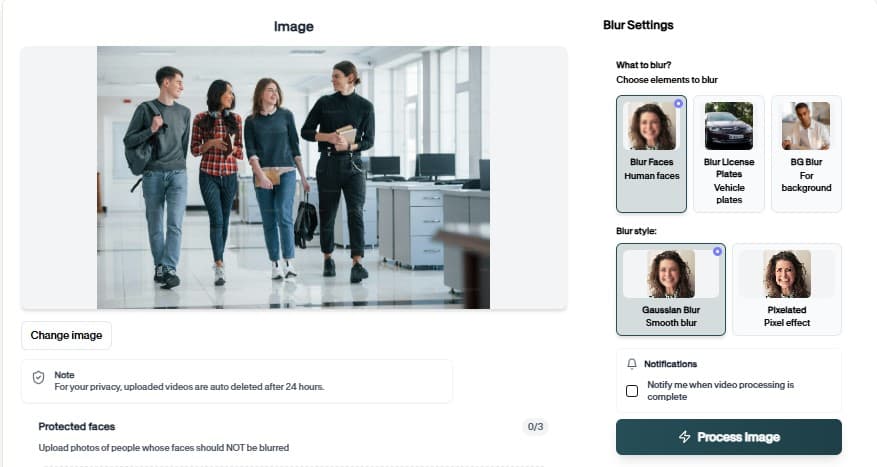
This guide covers the full landscape of recording privacy risks, the legal obligations that apply, and a practical workflow for processing recordings with BGBlur before they leave your organization.
The Recording Leak Risk Landscape
What Gets Captured in a Typical Meeting Recording
The average enterprise video call generates approximately 45 minutes of recorded content. In that recording, depending on the participants and the meeting type, the following personal data is routinely captured:
Biometric data: Faces are processed by AI systems for every participant. Under GDPR, UK GDPR, Illinois BIPA, and Texas CUBI, facial images are sensitive or biometric personal data requiring heightened protection and, often, explicit consent.
Home interior details: Post-pandemic hybrid work means a significant portion of meeting participants join from home. Home office backgrounds routinely reveal:
- Mail and packages with residential addresses
- Family photographs identifying family members (including children)
- Religious symbols, political materials, or other indicators of protected characteristics
- Medical devices or medications visible in the background
- Neighborhood or building identifiers visible through windows
Screen content: Screen shares during meetings capture everything on the presenter's screen — email inboxes, file directories, financial dashboards, CRM records, client names, confidential documents. This content appears in recordings even when participants forget they are screen sharing.
Audio identifiers: Voice, names spoken during introductions, and identifying statements ("I'm joining from our Chicago office," "my team at Pfizer") create a rich personal data profile.
Common Leak Scenarios
Training video repurposing: An internal meeting recording is recut as an onboarding video and uploaded to a learning management system accessible to contractors and third parties. Participants were not told their image would be used in this way.
Client webinar publishing: A client-facing webinar is posted publicly on YouTube or Vimeo. Employees who appeared as presenters had not consented to public disclosure; a client who appeared in a Q&A segment had not consented at all.
Social media clips: A marketing team clips a 90-second highlight from a conference call for LinkedIn. Three background participants are clearly identifiable in the clip.
Medical context: A telehealth provider records patient consultations for quality assurance. A recording is accidentally attached to a training email sent to 200 staff. The patient is identifiable from the video.
Academic research: A university records Zoom focus group sessions. A graduate student uploads a clip to a conference presentation platform without redacting participant faces. IRB approval covered the recording but not the public disclosure.
Privacy Legal Obligations for Sharing Recordings
GDPR and UK GDPR
Under the General Data Protection Regulation (EU) 2016/679 and its UK equivalent, meeting recordings containing identifiable faces or voices are personal data. Processing this data — which includes storing, editing, sharing, or publishing — requires a lawful basis under Article 6 (and Article 9 for special categories such as biometric data processed for identification purposes).
When you share a recording externally:
- The original lawful basis (e.g., performance of a contract, legitimate interest for internal use) may not extend to the new purpose
- A new lawful basis assessment is required
- In most cases, the practical lawful basis for external sharing of facial recordings is explicit consent from each identifiable individual
- Consent must be freely given, specific, informed, and unambiguous
Practical implication: Blurring faces before sharing eliminates the need for a new lawful basis for facial data, because the recording no longer contains identifiable facial images.
The GDPR video content face and license plate blurring compliance guide covers the full GDPR framework for video processing in detail.
HIPAA (Healthcare)
Any meeting recording from a covered entity or business associate that captures Protected Health Information (PHI) — including patient faces, patient names, or discussion of specific patient cases — is subject to HIPAA's Privacy and Security Rules.
Key obligations:
- Recordings must be stored with appropriate access controls and encryption
- Disclosure for training purposes requires either de-identification or patient authorization
- De-identification under HIPAA's "Safe Harbor" method requires removing 18 specific identifiers, including faces and voices
- A BAA must be in place with Zoom or Google if those platforms store recordings containing PHI
CCPA and US State Privacy Laws
California's CCPA and its equivalents in Colorado, Virginia, Connecticut, and other states treat meeting recordings as personal information when they contain identifiable individuals. Employees in these states have privacy rights regarding their likenesses in workplace recordings.
The CCPA California video privacy compliance guide covers state-specific obligations in detail.
BIPA and Biometric Privacy
Illinois' Biometric Information Privacy Act (BIPA) defines "biometric identifiers" to include "retina or iris scan, fingerprint, voiceprint, or scan of hand or face geometry." Recording and storing facial scans — which is what facial recognition processing of meeting recordings constitutes — requires written disclosure and consent under BIPA. Non-compliance has resulted in class action settlements in the hundreds of millions of dollars.
For any organization with Illinois employees or residents, meeting recording practices require careful attention.
Step-by-Step: Process a Zoom or Meet Recording with BGBlur
For Zoom Recordings
Step 1: Download the recording
- Cloud recordings: Log in to the Zoom portal → Recordings → find your recording → Download the MP4 file
- Local recordings: Find the recording in your Zoom local recording folder (typically Documents/Zoom on Windows/Mac)
Step 2: Upload to BGBlur Go to bgblur.com and upload your MP4 file. The Free tier supports up to 720p; the Pro tier ($12/month) supports 1080p; the Business tier ($29/month) supports up to 4K.
Step 3: Select redaction options
Choose from:
- Face Blur: AI automatically detects and tracks all faces throughout the recording, applying a consistent blur
- Background Blur: Blurs everything except the detected foreground speaker(s), removing home office details
- Object/Region Blur: Manually select screen areas containing sensitive content (spreadsheets, client names, email content) and BGBlur applies the blur consistently wherever that region appears
- Voice Anonymization: Modulates voices to prevent identification by voice, while preserving speech intelligibility
Step 4: Review and download BGBlur returns the processed video. Review a sample of the output to verify face detection accuracy. Download the redacted MP4.
Step 5: Share safely Upload the redacted version to your training platform, YouTube, LMS, or send to clients. The original unredacted recording remains in your Zoom cloud archive with appropriate access controls. BGBlur deletes your uploaded source file within 24 hours.
For Google Meet Recordings
Google Meet recordings are saved to Google Drive. Download the recording as an MP4 from Drive and follow the same process above. The Google Meet recording format is standard MP4, fully compatible with BGBlur.
Use Case Matrix: When to Blur What
| Use Case | Face Blur | Background Blur | Screen Redaction | Audio Anonymization |
|---|---|---|---|---|
| HR training videos (internal → external) | Recommended | Optional | If screens shown | Optional |
| Client webinar publishing | Required (non-consenting staff) | Recommended | Required (client data) | Optional |
| Telehealth recording for training | Required (patient) | Required | Required (patient data) | Required (patient) |
| Educational / academic recordings | Required (participants) | Optional | If sensitive content | Optional |
| Conference keynote recordings | Optional (public figures) | Not needed | If sensitive content | Not needed |
| Sales call recordings for training | Required (client faces) | Optional | Required (client info) | Optional |
| Social media clips from meetings | Required | Recommended | Required | Optional |
Tips for a Recording-Privacy-First Meeting Culture
1. State the recording purpose at the start of every call "This call is being recorded for [X purpose]. If you have questions about how the recording will be used, please speak to [contact]."
2. Distinguish recording purposes in your system Tag recordings at capture time with intended use: "internal archive only," "potential training use," "client deliverable." This prevents accidental misuse months later.
3. Obtain written consent for recordings used as training assets A simple email or form signature — "I consent to my appearance in the [date] session recording being used for [specific purpose]" — provides a clear lawful basis.
4. Default to blurring before sharing Treat external sharing of any recording as requiring a processing step. Integrate BGBlur into the workflow: download → blur → share.
5. Establish retention schedules Most GDPR and US privacy frameworks require that personal data not be retained longer than necessary. Set automatic deletion for meeting recordings after the retention period expires (typically 90 days for operational recordings, 1 year for compliance archives).
6. Review Zoom and Meet settings for default recording behavior Zoom's host settings and Google Workspace admin console both offer controls over who can record, where recordings are stored, and who can access them. Configure these at the organizational level rather than leaving them to individual hosts.
For organizations that need to blur backgrounds specifically in the Zoom/Meet interface (before recording, not after), see the how to blur background in Zoom and Google Meet recordings guide.
Industry-Specific Compliance Notes
Legal firms: Attorney-client privilege considerations mean that meeting recordings with clients should be treated with the same confidentiality as written communications. External sharing — even for internal training — requires careful privilege analysis.
Financial services: Recordings may be subject to FINRA, MiFID II (for EU-connected firms), or state financial regulator requirements in addition to privacy law. Client faces and voice recordings in financial service contexts are financial records as well as personal data.
Education (K-12 and higher ed): FERPA protections may extend to recordings of classes or student meetings. Student faces in educational recordings require FERPA-compliant treatment, which generally prohibits disclosure without consent.
Government agencies: Public records laws may require disclosure of some meeting recordings while privacy laws require redaction before disclosure. This is a parallel situation to the body cam footage FOIA problem — the same BGBlur workflow applies.
For organizations operating across multiple jurisdictions, the India DPDP and global privacy laws video redaction guide covers non-US frameworks including India's DPDP Act and South Africa's POPIA that may apply to multinational meeting recordings.
The Bottom Line: Default to Blur
The safest default position for any organization sharing meeting recordings externally is: if in doubt, blur. The cost of running a recording through BGBlur (minutes of processing time, fractions of a cent in compute cost) is trivially small compared to the cost of a GDPR enforcement action, a HIPAA breach investigation, or a BIPA class action.
Building the blur step into the recording workflow — as automatic as the step of downloading the file — removes the need for case-by-case legal judgment about whether specific participants have consented to specific uses. The recording becomes safe to share regardless.
For related coverage, see face anonymization vs face blur for a technical comparison of blurring approaches, and full body anonymization complete privacy protection guide for situations where face blur alone is insufficient.
Update — September 24, 2026: See our new guide on how to blur faces in video without uploading it.