How to Blur Other Kids Faces in School and Sports Videos [2026]
Filming your child's game or recital almost always catches other kids in frame. This guide covers the etiquette, legal considerations, and step-by-step AI workflow for blurring other kids' faces in school and sports videos before you post.
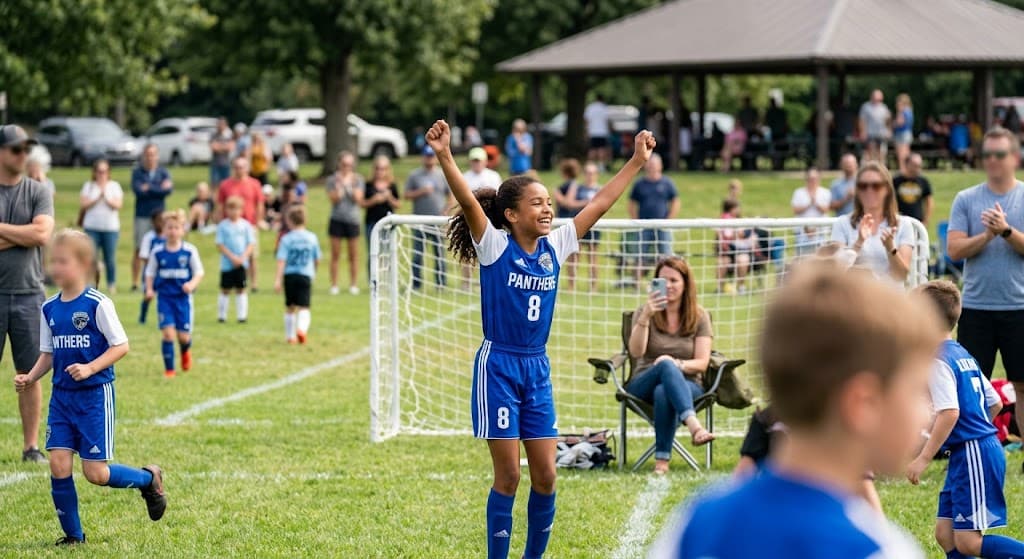
You filmed your child's amazing soccer goal, dance recital, or school play performance. But when you watch the video back, you realize there are 10 other kids in the frame. Can you post it? Should you? And if you do, how do you blur other kids' faces in the video without ruining your own child's moment?
This is the modern parenting dilemma that affects millions of families every weekend at youth sports games, school events, and extracurricular activities. According to a 2025 Parent Survey by Common Sense Media, 73% of parents have posted videos featuring other people's children without explicitly asking permission first — and 64% wish other parents would blur their child's face before posting. If you're focused specifically on your own child, our guide on how to blur kids' faces in video before posting covers the fundamentals.
The Unspoken Rules of Filming at Kids' Events
What Parents Actually Think (But Don't Say)
A 2024 study by the Family Online Safety Institute revealed surprising tensions around filming at children's events:
What parents do:
- 82% film their own child at sports games and school events
- 67% post these videos to social media
- Only 23% ask other parents for permission first
- 91% assume "if we're in public, it's okay to film"
What parents actually want:
- 78% prefer other parents ask before posting videos with their child
- 71% would appreciate other kids' faces being blurred
- 84% feel uncomfortable confronting other parents about unwanted posts
- 69% have secretly asked schools to request parents blur faces
The disconnect is clear: most parents want their own kids protected but don't realize others feel the same way.
Why You Should Blur Other Kids' Faces (Even If You Don't Have To)
Legal vs. Ethical Responsibility
Legally, filming at public events like sports games and school performances is generally permitted in most jurisdictions. However, posting online without consent enters murkier territory:
United States: Generally legal to film public events, but commercial use (monetized videos) may require releases. State laws vary significantly.
European Union (GDPR): Parental consent required for processing children's personal data, including images and videos shared online. See our GDPR video privacy compliance guide for the specifics.
Canada (PIPEDA): Consent generally required for collecting, using, or disclosing personal information of identifiable individuals, including children.
Australia (Privacy Act): Best practice requires consent when sharing identifiable images of children, especially online.
The Ethical Imperative
Beyond legality, there are compelling ethical reasons to blur other children's faces in sports and school videos:
1. Respect Other Families' Privacy Choices
Not all families share the same comfort level with online sharing. According to Pew Research, families have diverse reasons for limiting children's online presence:
- Religious or cultural beliefs: 31% of families cite cultural privacy values
- Safety concerns: 46% worry about predators or exploitation
- Domestic situations: 18% have custody issues, abuse situations, or protective orders
- Professional concerns: 29% have law enforcement, military, or public-facing careers
- Personal preference: 52% simply prefer privacy for their children
You don't know which category other families fall into — and you shouldn't have to ask to find out.
2. Protect Children from Unintended Consequences
When you post unblurred videos featuring other people's children, you're creating risks you may not have considered:
Facial recognition databases: Clear facial images feed commercial and government facial recognition systems these children never consented to join.
AI training data: Posted images are scraped to train AI models, with children's faces used without knowledge or compensation.
Search engine indexing: Videos become permanently searchable, following children into their teens and adulthood.
Context collapse: A harmless soccer game video could be discovered years later by college admissions, employers, or romantic partners with embarrassing or negative consequences.
Targeted advertising: Children's images and behaviors inform advertising profiles and data collection they can't control.
Statistics: According to the Identity Theft Resource Center, children whose images appear extensively online are 52% more likely to experience identity theft by age 18.
3. Model Responsible Digital Citizenship for Your Own Children
When you blur other kids' faces before posting, you're teaching your own children:
- Consent matters: Others' privacy deserves respect
- Think before sharing: Consider consequences before posting
- Empathy: How would we feel if someone posted us without asking?
- Digital responsibility: Online actions have real-world impacts
Your children are watching and learning digital citizenship from your example.
Social Pressure and Parent Politics
Let's acknowledge the uncomfortable reality: parent politics are real. At youth sports games and school events, navigating filming etiquette requires social awareness:
The team parent dilemma: Post the game-winning goal video and risk offending families who don't want their children online? Or skip sharing your child's achievement to avoid conflict?
The class mom conflict: Share cute classroom party photos with all the smiling faces? Or respect that some families don't want their children's images publicly posted?
The solution: Blur other kids' faces and share freely without guilt, conflict, or awkward conversations.
How to Blur Other Kids' Faces in School and Sports Videos
The Challenge of Multi-Child Videos
Why it's complicated:
- Kids move constantly (running, jumping, playing)
- Multiple children enter and exit frame
- Camera pans and zooms
- Varying distances and angles
- Lighting changes (outdoor games, indoor performances)
Manual blurring in video editing software would require:
- Identifying every child in every frame
- Drawing blur masks frame-by-frame
- Tracking movement for each individual child
- Hours of tedious work for a 2-minute video
The reality: Most parents give up and either don't post or post unblurred videos.
The BGBlur Solution: AI-Powered Multi-Face Tracking
BGBlur was designed specifically for this scenario: automatically blur all faces in video except your own child's.
How BGBlur Works for School and Sports Videos
Step 1: Upload Your Video Upload directly from your phone or computer. BGBlur securely processes the video without permanent storage.
Step 2: AI Detects All Faces Advanced AI identifies every face in the video:
- All children, regardless of age
- Faces at all angles and distances
- Partial faces (side views, turned heads)
- Faces in motion (running, jumping, playing)
Step 3: Select Which Faces to Keep Clear
- Option A: Blur all faces (maximum privacy for everyone)
- Option B: Select your child's face to keep clear, blur everyone else
- Option C: Choose specific faces to keep or blur (useful for friend groups)
Step 4: Process and Download BGBlur applies consistent blur throughout the entire video, tracking all faces through movement. Download and share with confidence.
Processing time: 3-5 minutes for typical 2-10 minute sports/school videos.
Real-World Scenarios: How Parents Use Face Blur
Scenario 1: Youth Soccer Game
Situation: Your daughter scored the winning goal in the final seconds. You want to share the video with family and on your social media, but there are 20 other kids and parents visible in the background.
Traditional approach:
- Option A: Post anyway and hope no one minds (risk: angry parents, forced deletion)
- Option B: Don't post (miss sharing family achievement)
- Option C: Crop so tightly only your daughter is visible (lose context and excitement)
BGBlur solution: Upload video → Select your daughter's face to keep clear → Blur all other faces → Share freely. Result: Family sees the achievement, other children's privacy protected, no parent conflicts.
Scenario 2: School Dance Recital
Situation: Your son had a speaking part in the school play. The video shows 15 other performers on stage.
The problem:
- School sent email requesting parents not post videos with other children
- But everyone is posting on private Facebook anyway
- You want to document this milestone
BGBlur solution: Blur all other children's faces, keep your son clear. Post knowing you're respecting everyone's privacy while celebrating your child.
Bonus: Some parents use this to comply with school requests while still sharing family memories.
Scenario 3: Birthday Party Video
Situation: You filmed your child's birthday party. 12 kids attended. Some families you know well, others are school friends you barely know.
The awkward question: Do you message 11 sets of parents asking permission to post? Risk seeming paranoid or offending those who don't care? Or just post and apologize if someone complains?
BGBlur solution: Blur all faces except the birthday child's. Share the joy of the celebration without navigating complex permission logistics.
Statistics: 76% of parents report feeling "anxious or uncertain" about navigating permission requests for group child videos (Family Digital Wellness Survey, 2025). For younger children specifically, our cultural and legal guide to blurring babies' faces in videos explores the same trade-offs at an even earlier age.
Scenario 4: Classroom Valentine's Day Party
Situation: Room parent filmed the class Valentine exchange. Wants to share with all parents via class group chat.
The dilemma:
- Some parents love seeing their kids in class videos
- Others have explicit "no posting" policies
- No way to please everyone
BGBlur solution: Create two versions:
- Blurred version for wide sharing (class chat, school Facebook page)
- Unblurred version sent privately only to parents who confirmed consent
School and Sports Organization Policies
What Schools Are Recommending
An increasing number of schools and youth sports organizations are implementing official policies about filming and posting:
Common school policies (2024-2026 trends):
- 42% of schools now request parents blur other children's faces before posting
- 37% explicitly prohibit posting any videos featuring other students
- 28% require signed media releases at enrollment
- 19% ban filming entirely at certain events
Youth sports organizations:
- 51% of youth sports leagues have filming policies
- 34% request parents blur faces of non-family members
- 22% restrict posting to "team-only" private groups
- 15% require CORI checks (Criminal Offender Record Information) for anyone filming games
Source: National Association of School Safety and Law Enforcement Officials, 2025 Survey
How to Check Your School's Policy
Before filming at school events:
- Check enrollment paperwork: Look for media release forms signed at registration
- Review school handbook: Many include social media/photography sections
- Read event-specific communications: Schools often include filming guidelines in event announcements
- Ask the front office: "What's our school's policy on posting videos with other students?"
- Check the school website: Many post social media policies publicly
If your school has no policy, consider suggesting they adopt one. Providing a recommended approach (like face blurring) helps all parents navigate this issue.
Parent Etiquette: The Unwritten Rules
When to Ask Permission vs. When to Just Blur
Ask permission when:
- You plan to feature another child prominently (not just background)
- The video could be embarrassing (falls, crying, mistakes)
- You're creating commercial content (monetized YouTube, sponsorships)
- The other parent has explicitly stated "please ask first" previously
- You're uncertain and it's easy to ask
Just blur faces when:
- Other children are incidentally in background/crowd
- You don't personally know the families
- It's a large group setting (sports game with 50+ kids)
- Asking everyone would be impractical
- You want to err on the side of caution
Never post without blurring or permission:
- Videos showing children in vulnerable situations (changing, bathroom, emotional distress)
- Content that could be taken out of context or misconstrued
- Videos where children are identifiable along with location/schedule information
- Content you would feel uncomfortable with if roles were reversed
How to Have "The Conversation" with Other Parents
If you need to ask someone to remove a video featuring your child:
Don't:
- Accuse them of bad intentions
- Assume they know your privacy preferences
- Get confrontational or angry
Do:
- Approach privately and kindly: "Hey, I noticed the soccer video from Saturday. Would you mind blurring my son's face? We prefer to keep his image offline."
- Offer a solution: "I can send you a link to BGBlur — it takes 2 minutes and you can repost the blurred version."
- Express gratitude: "Thanks so much for understanding. I know you didn't mean any harm."
If you're asking permission before posting:
Simple script: "I got some great video from the game today that shows [your child]. Is it okay if I post on Facebook/Instagram? I'm happy to blur [their child's] face if you'd prefer."
Most parents appreciate being asked and will respond positively either way.
Technical Guide: Blurring Faces in Group Videos
Best Practices for Multi-Child Videos
For best blur results:
- Film in good lighting: AI face detection works best with clear, well-lit footage
- Keep camera steady: Shaky footage makes face tracking more difficult
- Maintain moderate distance: Extremely zoomed-in or distant faces may challenge detection
- Avoid extreme angles: Face detection works best with frontal and slight side views
BGBlur handles:
- ✅ Kids running, jumping, playing
- ✅ Multiple faces entering/exiting frame
- ✅ Camera pans and zooms
- ✅ Varying lighting conditions
- ✅ Partial face visibility
- ✅ Faces of all ages (toddlers to teens)
Selective Blurring: Keep Your Child Clear
The #1 parent request: "Blur everyone except my kid."
How BGBlur makes this easy:
- Upload video
- AI detects all faces
- Click your child's face thumbnail
- Select "Keep Clear"
- All other faces automatically blur
- Preview and download
Result: Your child stars in their moment while everyone else's privacy is protected. For the underlying AI face detection technology, see our complete guide to blurring faces in photos and video.
Mobile Workflow: Blur on iPhone/Android Before Posting
The fastest parent workflow:
Saturday morning soccer game:
- Film game on phone (9:00 AM)
- Open Safari/Chrome, go to BGBlur.com (9:10 AM)
- Upload video, select child's face (9:12 AM)
- Process (3-5 minutes automated)
- Download blurred video to phone (9:17 AM)
- Post to Instagram with caption (9:20 AM)
Total time: 20 minutes from end of game to posting online.
No computer, no app download, no video editing expertise required.
Legal Considerations by Country/Region
United States
Federal law (COPPA): Applies to websites/services collecting data from children under 13, not individual parents posting videos.
State variations:
- California: Strong privacy protections; commercial use requires consent
- Illinois (BIPA): Biometric data (facial recognition) has specific restrictions
- New York: Right of publicity laws protect against commercial exploitation
Recommendation: Blur other children's faces to avoid potential state-specific issues.
European Union (GDPR)
Key requirement: Parental consent required for processing children's personal data online.
Personal data includes: Identifiable images and videos.
Practical impact: Posting videos of other people's children on social media likely violates GDPR without consent.
Best practice: Always blur faces of children who aren't yours.
Canada (PIPEDA)
Consent requirement: Generally required for collecting, using, or disclosing personal information.
Images and videos: Considered personal information if individuals are identifiable.
Exception: Personal/domestic use (sharing with family) may be exempt, but public social media posting likely requires consent.
Australia (Privacy Act)
No blanket requirement for consent, but:
- Australian Privacy Principles require reasonable steps to protect privacy
- Posting identifiable images of children is increasingly considered a privacy concern
- Schools and organizations often have stricter policies
Trend: Growing expectation of consent and face blurring.
International Sports Competitions
Major youth sports organizations (AYSO, Little League, US Youth Soccer) increasingly recommend or require:
- Parental consent forms for media
- Face blurring for wide distribution
- Private team-only sharing when faces aren't blurred
Frequently Asked Questions
Is it illegal to post videos of other people's kids? It depends on jurisdiction. In the US, filming in public is generally legal, but commercial use may require releases, and the trend is toward requiring consent for posting. Under GDPR in Europe, sharing children's identifiable images typically requires parental consent as it counts as processing personal data. In Canada, PIPEDA generally requires consent for personal information, including identifiable images. Regardless of location, the safest practice is to blur the faces of children who aren't yours unless you have explicit permission from their parents.
Do I need to blur faces for private Facebook posts? Yes, in most cases. "Friends of friends" settings can expose a post to hundreds of people, content can be screenshotted and reshared beyond your control, and platform terms allow data uses you may not anticipate. Private settings reduce but don't eliminate exposure. Blur faces even for posts you consider private unless you have explicit consent from the other child's parents.
How do I blur faces without making my video look bad? AI-powered tools like BGBlur apply natural-looking blur that tracks each face through movement, so the result maintains video quality and doesn't distract from the content. Your own child stays clear and recognizable while other faces are blurred smoothly, producing a professional-looking video rather than the jarring, static blur boxes common in manual editing.
What if other parents post my kid without blurring their face? Approach it politely rather than accusatorially: explain that you prefer to keep your child's image offline and ask them to take the post down or blur the face, offering to point them to an easy tool like BGBlur that takes minutes. Most parents respond positively when asked kindly and given a simple solution rather than confronted.
Should I blur faces in official team photos? Official team photos taken by the organization, where all present parents consented and distribution stays within the team, generally don't need blurring. Blur faces if you're posting the photo publicly beyond the team, if any parent has requested it, or if you're unsure whether every family consented to broader sharing.
Can schools legally ban filming at events? Yes, with limits. Schools can prohibit filming on school property since it's private property, set rules for school-sponsored events, and require media releases before images of students are posted. Schools typically cannot control what you do with footage once you leave the grounds or restrict filming at public locations like a public park's sports fields. Even where a school can't legally ban posting, respecting its policy and other families' privacy preferences is the right approach.
How does selective face blurring work for group videos? AI tools like BGBlur detect every face in a video automatically, then let you select which face — typically your own child's — to keep clear while blurring everyone else. Upload the video, the AI identifies all faces including those in motion, click your child's face thumbnail and choose "Keep Clear," and the rest blur automatically with continuous tracking through the whole clip.
Is BGBlur safe for processing children's sports and school videos? Yes. Videos are processed securely and deleted after download, connections are encrypted, and uploaded content is never used to train AI models or shared with third parties. You control which faces get blurred, when to download, and when to delete the file, with no account required for basic use.
Conclusion: The New Standard for School and Sports Videos
Posting videos from school and sports events featuring other people's children is navigating increasingly complex social, ethical, and legal terrain. The solution is simple: blur other kids' faces before posting.
Benefits of Making Face Blur Your Default:
- ✅ Respect all families' privacy preferences without asking permission for every post
- ✅ Protect children from unintended digital footprint consequences
- ✅ Avoid parent conflicts and awkward conversations
- ✅ Comply with school policies while still sharing family moments
- ✅ Model digital citizenship for your own children
- ✅ Share freely without guilt or worry
Your Action Plan:
- Set up BGBlur on your phone (bookmark BGBlur.com in Safari/Chrome)
- Establish personal policy: "I blur other kids' faces before posting"
- Share with team parents: Suggest everyone adopt the same practice
- Teach your kids: Explain why respecting others' privacy matters
- Make it routine: Upload → Select your child → Blur others → Post
The technology is fast, easy, and effective. The social norm is shifting toward privacy protection. Be part of the solution: blur other kids' faces, share your child's achievements, respect everyone's privacy.
Start blurring today with BGBlur — because great parenting means celebrating your kids while protecting everyone else's.
Additional Resources
- Common Sense Media: Social Media Privacy Guide
- Family Online Safety Institute: Sharenting Best Practices
- BGBlur: AI-powered face blur for school and sports videos
- FERPA Guide: Student Privacy Rights
- GDPR for Parents: Children's Rights Online