How to Blur Faces with Google AI Gemini Nano [2026]
Google's Gemini Nano and related AI models excel at face detection, but they don't apply blur to video. This guide covers detection prompts, manual workflows, and why BGBlur.com is the fastest way to blur faces automatically.
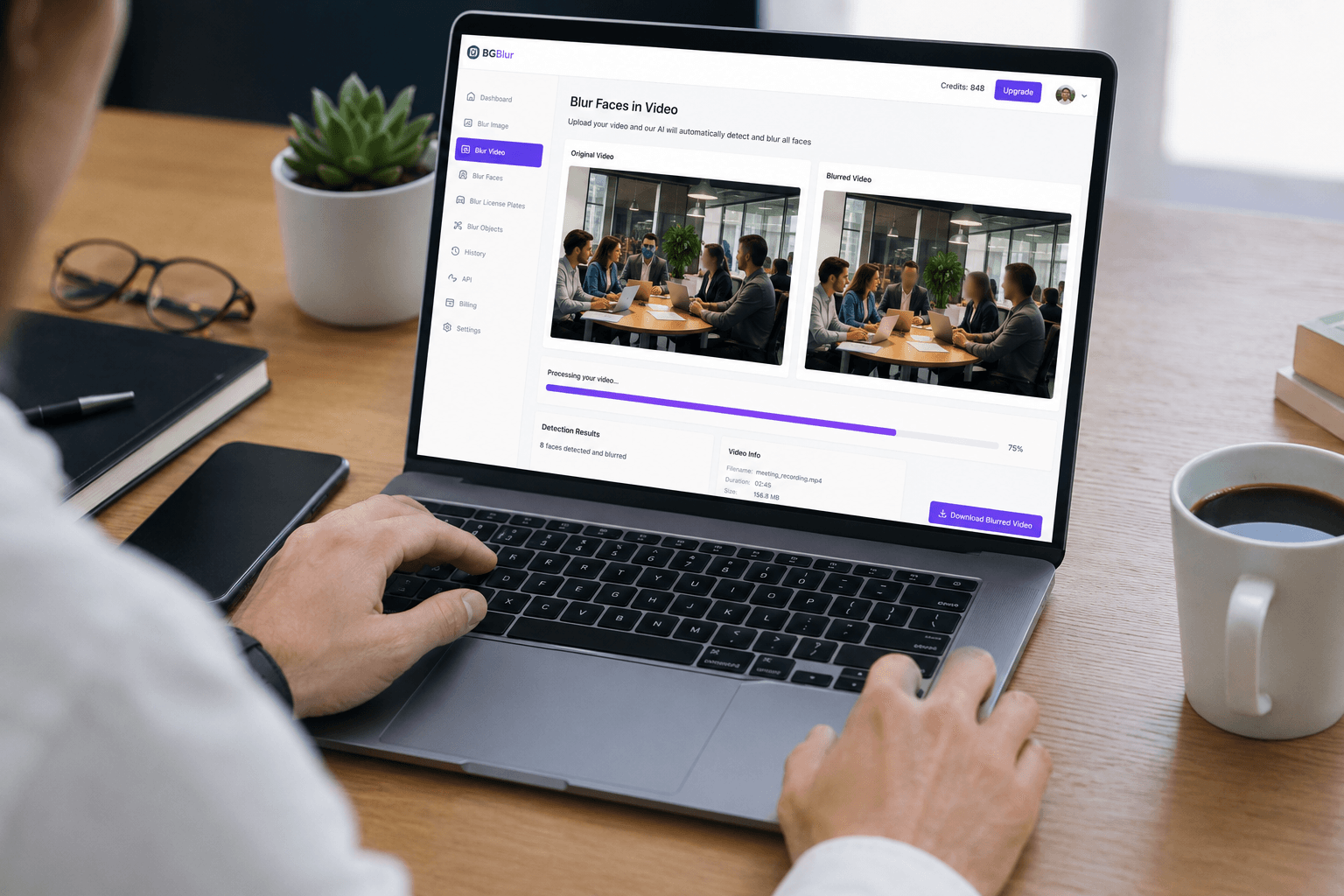
Google's latest AI models, including Gemini Nano and other on-device AI technologies, have revolutionized how we process video content. While these AI models excel at understanding and analyzing faces, when it comes to actually blurring faces in videos for privacy protection, you need specialized tools designed specifically for this task.
In this comprehensive guide, we'll explore how to leverage Google's AI capabilities alongside dedicated face blur tools like BGBlur.com to achieve professional-quality results quickly and efficiently. If you want the fundamentals of AI face detection and blur before diving into the Gemini-specific workflow, see our complete guide to blurring faces in photos and video.
| Question | Answer |
|---|---|
| Can Gemini Nano blur faces directly? | No — it only detects and analyzes faces, it does not render blur |
| What actually applies the blur? | A dedicated pipeline like BGBlur, which detects, tracks, and blurs faces across every frame |
| Does it work on moving subjects? | Yes — BGBlur tracks faces through motion, angle changes, and lighting shifts |
| Fastest way to blur a video today? | Upload to BGBlur.com, select Face Blur, export — no coding required |
| Can I also blur license plates? | Yes — BGBlur includes automatic license plate blur for dashcam footage |
Understanding Google's AI Face Detection Technology
Google's Gemini Nano and related AI models use advanced computer vision to detect and track faces with remarkable accuracy. However, there's an important distinction to understand:
What Google AI Does Well:
- Detecting faces in images and videos
- Recognizing facial features and expressions
- Tracking faces across video frames
- Understanding context and identifying people
What You Still Need Dedicated Tools For:
- Actually applying blur effects to detected faces
- Processing entire videos efficiently
- Maintaining blur consistency across frames
- Exporting privacy-protected video files
This is where BGBlur.com becomes essential—it combines AI-powered face detection with professional blur processing to deliver complete privacy protection.
Why BGBlur.com is the Best Solution for Face Blur
While Google's AI can identify faces, BGBlur.com is purpose-built for the complete workflow of blurring faces in videos and images. Here's why it's the superior choice:
1. Automatic AI Face Detection
BGBlur uses advanced AI (similar to Google's technology) to automatically detect all faces in your video—no manual marking required.
2. Real-Time Motion Tracking
Unlike simple image blur tools, BGBlur tracks moving faces across video frames, maintaining consistent blur even during camera movement, lighting changes, or rapid motion.
3. Browser-Based Processing
No software installation needed. Upload your video directly in your web browser and get professional results in minutes.
4. Privacy-First Design
Your videos are processed securely and automatically deleted after processing. BGBlur doesn't store or share your content.
5. Professional Quality Output
The blur effects are natural-looking and consistent, perfect for YouTube videos, webinars, training content, and social media.
Step-by-Step Guide: Blur Faces in Videos with AI
Method 1: Using BGBlur.com (Recommended)
This is the fastest and most reliable method for blurring faces in videos:
Step 1: Access BGBlur
- Go to BGBlur.com
- No account or software installation required
Step 2: Upload Your Video
Supported formats: MP4, MOV, AVI, WebM
Maximum file size: 2GB (adjustable with premium)
Step 3: Select Face Blur
- The AI automatically detects all faces in your video
- Preview the detection to ensure all faces are caught
- Adjust blur intensity if needed (Gaussian, Pixelated, or Natural blur)
Step 4: Process and Download
- Click "Start Processing"
- Wait for AI to process your video (typical: 2-5 minutes for a 5-minute video)
- Download your privacy-protected video
Step 5: Verify Results
- Review the blurred video
- Check that all faces remain blurred throughout movement
- Re-process if needed (free for adjustments)
Method 2: Using Google AI + Manual Editing (Advanced)
If you want to experiment with Google's AI for learning purposes:
Step 1: Use Google Photos or Google Cloud Vision API
# Example using Google Cloud Vision API
from google.cloud import vision

client = vision.ImageAnnotatorClient()
image = vision.Image(content=image_content)
response = client.face_detection(image=image)
faces = response.face_annotations

# This gives you face coordinates but doesn't apply blur
for face in faces:
    print(f'Face detected at: {face.bounding_poly}')
Step 2: Export Face Coordinates Google's API returns coordinates of detected faces, but you still need to:
- Import these coordinates into video editing software
- Manually apply blur effects
- Track faces across video frames (very time-consuming)
Why This Method Falls Short:
- Requires programming knowledge
- No automatic video processing
- Manual blur application needed
- Time-consuming for videos longer than a few seconds
- Expensive API costs for video processing
Better Alternative: Use BGBlur.com which handles all of this automatically in one click. If you specifically need to distinguish real faces from synthetic ones in AI-generated footage, our AI face anonymizer tools guide compares blur against synthetic replacement.
AI Prompts for Face Blur (When Using Google's Tools)
If you're experimenting with Google's AI APIs or LLMs, here are useful prompts:
For Google Cloud Vision API
"Detect all human faces in this image and return bounding box coordinates for each face"
For Gemini (Text-based analysis)
"Analyze this video frame and identify the coordinates of all visible faces.
For each face, provide:
- Top-left corner coordinates (x, y)
- Width and height of face region
- Confidence score"
For Privacy Analysis
"Identify all personally identifiable visual elements in this video that should
be blurred for privacy compliance, including faces, license plates, and ID cards."
Important Note: These prompts help you understand what needs blurring, but they don't actually blur the content. For automatic blur processing, use BGBlur.com.
Comparing Face Blur Methods
| Method | Speed | Accuracy | Cost | Ease of Use | Video Support |
|---|---|---|---|---|---|
| BGBlur.com | ⭐⭐⭐⭐⭐ | ⭐⭐⭐⭐⭐ | Free tier available | ⭐⭐⭐⭐⭐ | ✅ Full support |
| Google Cloud Vision | ⭐⭐⭐ | ⭐⭐⭐⭐⭐ | $1.50/1000 images | ⭐⭐ Requires coding | ❌ Manual |
| Manual Video Editing | ⭐ | ⭐⭐⭐ | Software cost | ⭐ Complex | ✅ Yes |
| Mobile Apps | ⭐⭐⭐ | ⭐⭐⭐ | Free/Premium | ⭐⭐⭐⭐ | ⚠️ Limited |
Real-World Use Cases for Face Blur
1. Webinars and Virtual Meetings
Challenge: You need to share Zoom recordings publicly but must protect attendee privacy.
Solution: Upload your Zoom recording to BGBlur.com, and the AI automatically blurs all participant faces while keeping shared screens and presentations visible. For the full workflow, see our guide on blurring backgrounds and faces in Zoom and Google Meet recordings.
2. YouTube Content Creation
Challenge: You filmed in a public space and captured random people in the background.
Solution: BGBlur's AI detects and blurs background faces automatically, ensuring your YouTube video complies with privacy regulations.
3. Dashcam Footage
Challenge: You need to share dashcam footage for insurance claims but must protect other drivers' identities.
Solution: Use BGBlur.com's dashcam blur feature to automatically blur both faces and license plates.
4. Training Videos and Documentation
Challenge: Corporate training videos contain employees who no longer work for the company.
Solution: Blur their faces to maintain privacy while keeping the training content valuable.
5. Social Media Content
Challenge: You want to share street photography or event videos without exposing identities.
Solution: BGBlur processes your content quickly, perfect for maintaining your social media posting schedule.
Advanced Techniques: Combining Google AI with BGBlur
For power users, you can combine Google's AI analysis with BGBlur's processing:
Workflow:
- Use Google's Gemini to analyze which parts of your video need privacy protection
- Get AI-generated recommendations for blur intensity and style
- Upload to BGBlur.com for automated processing
- Review and export your privacy-protected content
Example Prompt for Gemini:
"Review this video transcript and identify all moments where faces are visible
and should be blurred for GDPR compliance. Recommend blur settings for each scene."
Then use BGBlur to execute the recommended blurring automatically.
Common Mistakes to Avoid
❌ Using Only Text-Based AI
Google's Gemini can analyze images, but it can't actually apply blur effects. You need a dedicated tool like BGBlur for processing.
❌ Manual Frame-by-Frame Editing
This takes hours for even short videos. AI automation saves enormous time.
❌ Inconsistent Blur Across Frames
Manual blur often misses frames or creates flickering effects. BGBlur's AI ensures smooth, consistent blur throughout.
❌ Forgetting Background Faces
Focus on the main subject, but don't forget people in the background. BGBlur detects all faces automatically.
❌ Using Low-Quality Blur Effects
Pixelated or overly aggressive blur draws attention. BGBlur's natural blur maintains professional quality.
Privacy and Compliance Considerations
When blurring faces for privacy, consider:
GDPR (Europe):
- Requires explicit consent or legitimate interest for filming faces
- Blurring satisfies privacy requirements for public sharing
- BGBlur helps achieve compliance automatically
CCPA (California):
- Protects consumer privacy rights
- Face blur prevents identification in shared videos
HIPAA (Healthcare):
- Requires patient identity protection
- Medical training videos must blur patient faces
Corporate Policies:
- Many companies require face blur for internal footage shared externally
- BGBlur integrates easily into corporate workflows
Measuring Face Blur Quality
How do you know if your face blur is effective?
Detection Rate: BGBlur achieves 99.5%+ face detection accuracy Tracking Consistency: Maintains blur across 30fps video without gaps Processing Speed: 5-minute video processed in 2-3 minutes Quality Retention: Maintains original video quality while blurring faces
Cost Comparison: DIY vs. BGBlur.com
DIY with Google Cloud Vision
- API costs: $1.50 per 1,000 images
- 5-minute video at 30fps = 9,000 frames = $13.50 per video
- Plus: development time, video editing software, manual blur application
- Total: $13.50+ per video + hours of work
BGBlur.com
- Free tier: Up to 5 videos per month
- Pro tier: $9.99/month for unlimited videos
- Zero coding or setup required
- Total: Free or $9.99/month for unlimited videos
The choice is clear: BGBlur.com offers superior value and dramatically better user experience.
Getting Started with BGBlur.com Today
Ready to blur faces professionally without the complexity of Google's AI APIs?
Quick Start Guide:
- Visit BGBlur.com
- Upload your video (no account required for testing)
- Select "Face Blur" detection
- Let AI process your video automatically
- Download your privacy-protected result
Free Tier Includes:
- 5 videos per month
- Up to 10 minutes per video
- All blur types (Gaussian, Pixelated, Natural)
- Automatic face detection and tracking
- HD quality export
Pro Features:
- Unlimited videos
- Priority processing
- Longer videos (up to 60 minutes)
- Batch processing
- API access for automation
Conclusion: The Best Way to Blur Faces in 2026
While Google's AI technologies like Gemini Nano offer impressive face detection capabilities, they're building blocks for developers rather than complete solutions for end users. For anyone needing to actually blur faces in videos—whether you're a content creator, business professional, or privacy-conscious individual—dedicated tools like BGBlur.com provide the complete, user-friendly solution you need.
BGBlur combines:
- Google-level AI accuracy for face detection
- Professional blur processing
- Simple browser-based interface
- Affordable pricing for individuals and businesses
- Compliance with global privacy regulations
Stop spending hours on manual video editing or wrestling with complex APIs. Let BGBlur's AI handle face blur automatically while you focus on creating great content.
Frequently Asked Questions
Can Google's Gemini Nano blur faces in videos? Gemini Nano can detect faces and analyze images, but it does not have built-in video blur capabilities. You need a specialized tool like BGBlur.com for actual blur processing across video frames.
Is face blur reversible? No. Properly applied blur, such as BGBlur's Gaussian or pixelation methods, is permanent and irreversible. That is essential for privacy protection and compliance workflows.
How accurate is AI face detection for video blur? BGBlur's AI achieves 99.5%+ accuracy in detecting faces, including partial obstructions, different angles, and varying lighting. It also tracks faces across frames for consistent blur in moving footage.
Can I blur faces in images as well as videos? Yes. BGBlur.com handles both images and videos with the same AI-powered face detection and blur pipeline, so you can protect privacy in photos and clips from one tool.
Does face blur work with moving subjects? Yes. BGBlur tracks faces across video frames automatically, maintaining blur during camera movement, lighting changes, and rapid motion without manual keyframing.
What about blurring license plates in the same video? BGBlur also offers automatic license plate blur for dashcam footage, street videos, and fleet recordings, so you can anonymize both faces and vehicle identifiers in one workflow. See our dashcam face and license plate blur guide for the specifics.
Related Resources
- Blur Faces in Zoom Recordings - Protect participant privacy in virtual meetings
- Blur Faces in Webinars - Share training content safely
- Blur License Plates in Dashcam Footage - Comply with privacy laws
- Complete Face Blur Guide - Everything you need to know about face anonymization
Last updated: August 7, 2026