Swap Faces in Videos with AI on BGBlur for Privacy
Learn instant AI face swap with BGBlur. Replace faces in footage without reshoots or complex compositing, keeping expressions and lip sync.
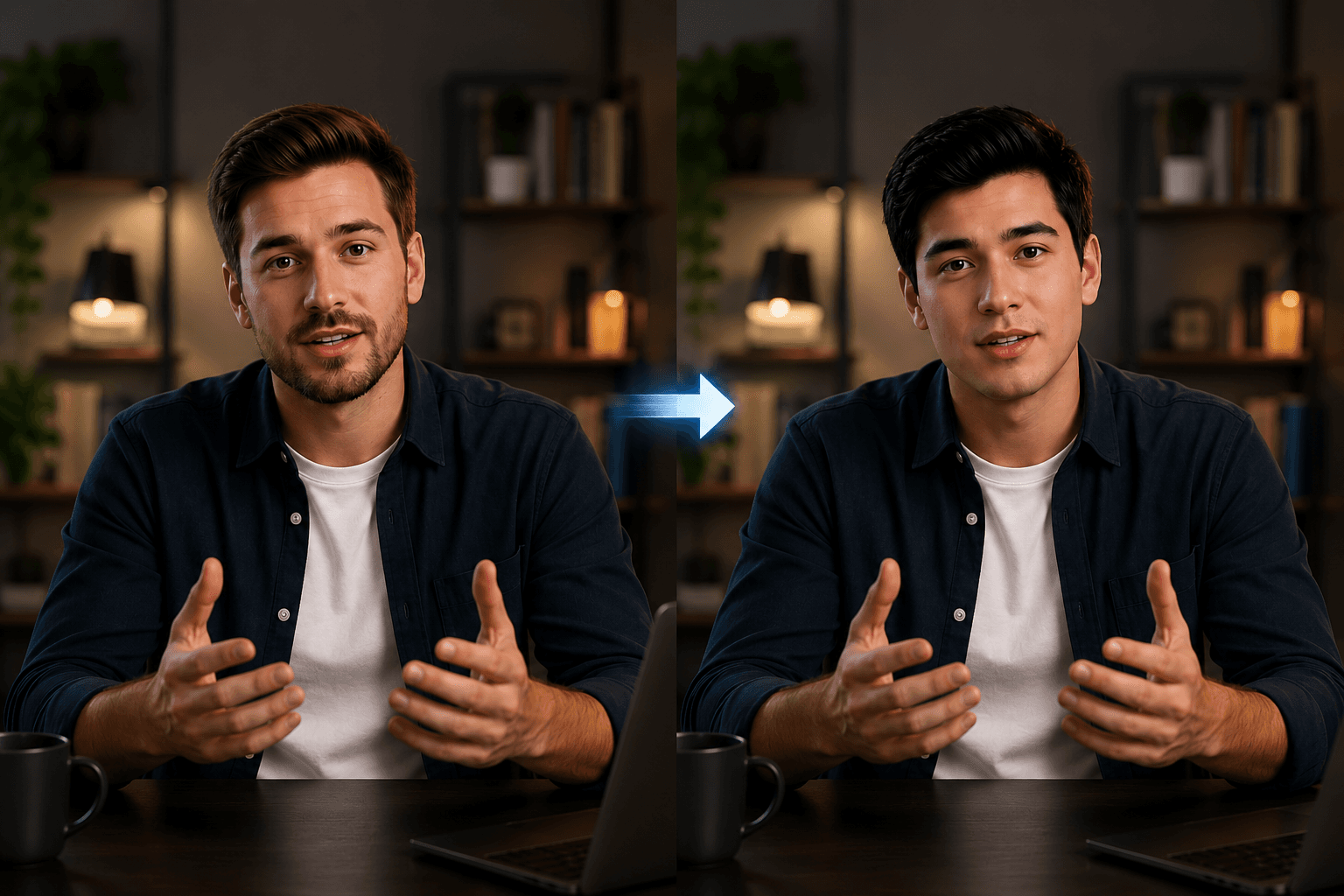
Reshooting a video every time the cast changes, a spokesperson leaves office or a brand decides to use a different face can cost thousands of euros and days of production. AI Video Face Replacement technology completely eliminates this problem, allowing you to replace any face in a video clip without touching a camera. Whether you're a content creator, ad agency, or corporate marketing manager who wants to know how to replace faces in videos using AI, this guide covers everything you need to know, from how the technology works to a walkthrough with one of the most trusted browser-based tools available today.
What is AI Video Face Replacement?
AI Video Face Replacement is the process of automatically detecting a person's face in a video and replacing it with a different face, while preserving the original person's expressions, movements, and lip sync. Unlike manual compositing in editing software, which requires frame-by-frame masking and hours of rotoscoping, faceswap AI automatically handles the heavy lifting using deep learning models trained on facial geometry and motion data.
Modern AI video face replacement systems track the key facial landmarks in each frame—eyes, nose, mouth, jaw—and warp the replacement face to match the pose and lighting of the original. The result is a continuous, temporally coherent replacement that feels like the new face was always there. The key thing is that the instrument preserves timing, expressions and lip sync, so you don't lose any of the energy of the original performance.
If you're wondering "what's the best way to replace a face in a video without reshoots in 2026," the answer is a browser-based ai faceswap tool like bgblur, which is fast, accurate, and requires no installation.
Why Use AI Video Face Replacement?
The use cases for AI video face replacement technology have expanded significantly beyond novelty. That's why creative and marketing teams are adopting it at scale.
Eliminates Expensive Additional Filming
When a spokesperson changes or approval comes after production ends, pivoting is rarely an option. AI Video Face Replacement allows you to replace talent without touching the original footage, saving production budgets and delivery times that could otherwise extend for weeks.
Create Large Scale Advertising Variations
A single video shot with a talent can become multiple advertising variations aimed at different audiences, simply by replacing faces. For performance marketing teams running A/B tests, this multiplies creative output without multiplying costs. A face swap video workflow that once required full production now takes just minutes per variant.
Localization and Market Adaptation
An ad that works in one market may need a different face, someone who seems local, to resonate in another. faceswap AI makes it trivial to adapt content for regional campaigns without separate productions, which is especially valuable for global brands launching campaigns in multiple territories at once.
Privacy Protection and Identity Obscuration Sometimes the goal is not to replace a face with a real one, but to replace it with a neutral or anonymized face for privacy compliance, useful in documentary, research, journalism and healthcare contexts where the subject's identity must be protected. Pair this with face blurring tools for even more robust anonymization workflows.
Cast Changes Without Playback
If a client changes their mind about the talent after production, or a rights deal lapses, faceswap AI means the footage doesn't go to waste. You can reassign the role in post-production without a single additional day of shooting, something that simply wasn't possible before deep learning made this technology accessible.
How to Replace Faces in Videos Using AI, Step by Step Guide
bgblur's video face swap tool works entirely in your browser, no installs, no plugins. Here is a walkthrough of the complete process.
Step 1: Upload Your Video
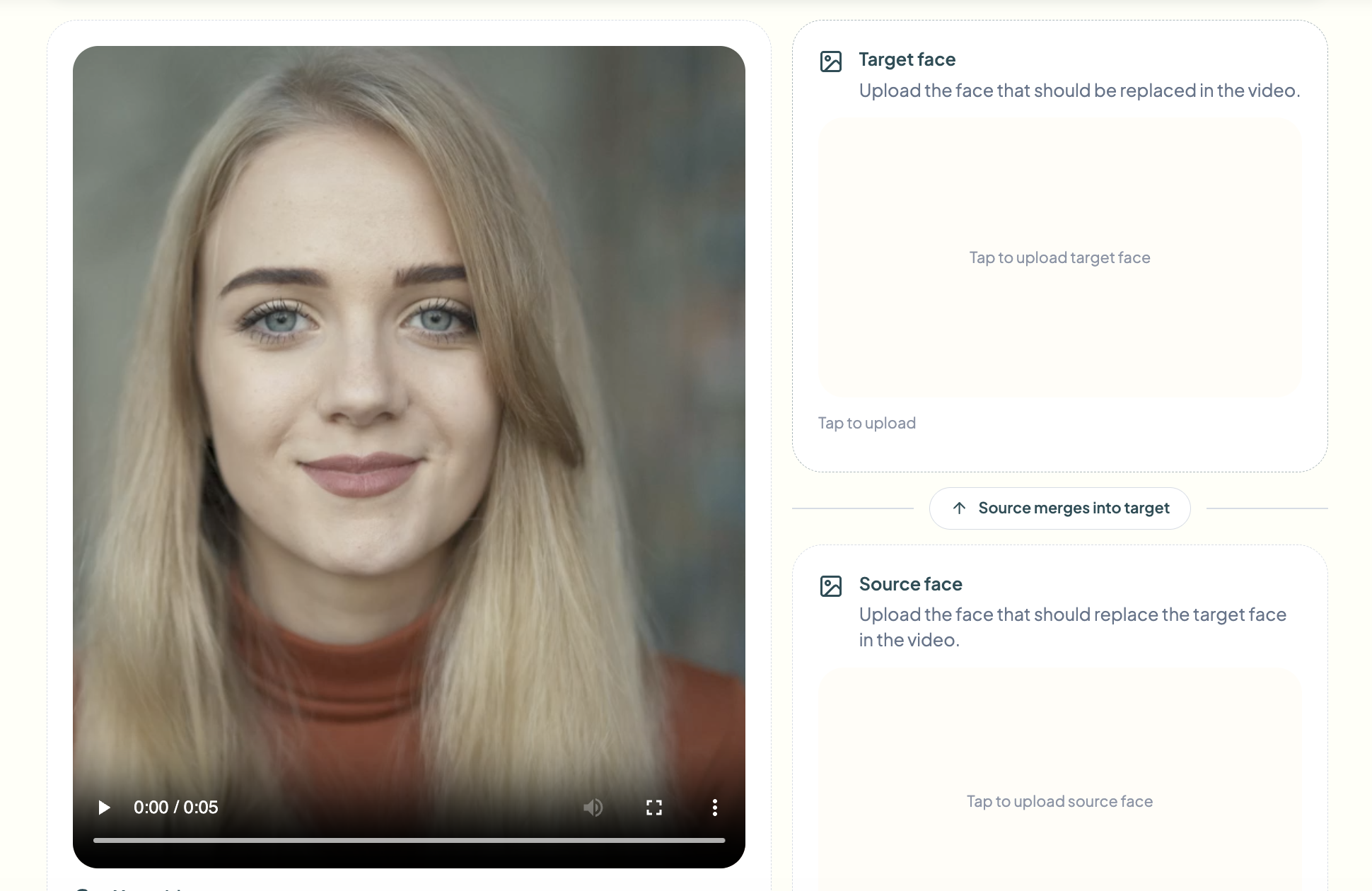
Go to the bgblur face swap tool and click Try Face Swap Video. Drag and drop your video file into the upload area, or click to browse. bgblur accepts common formats including MP4, MOV and WebM. Once uploaded, the AI automatically scans the footage for faces and prepares them for replacement. For the fastest AI video face replacement results, trim the clip to just the segment you need before uploading.
Step 2: Provide the Reference Image You Want to Replace
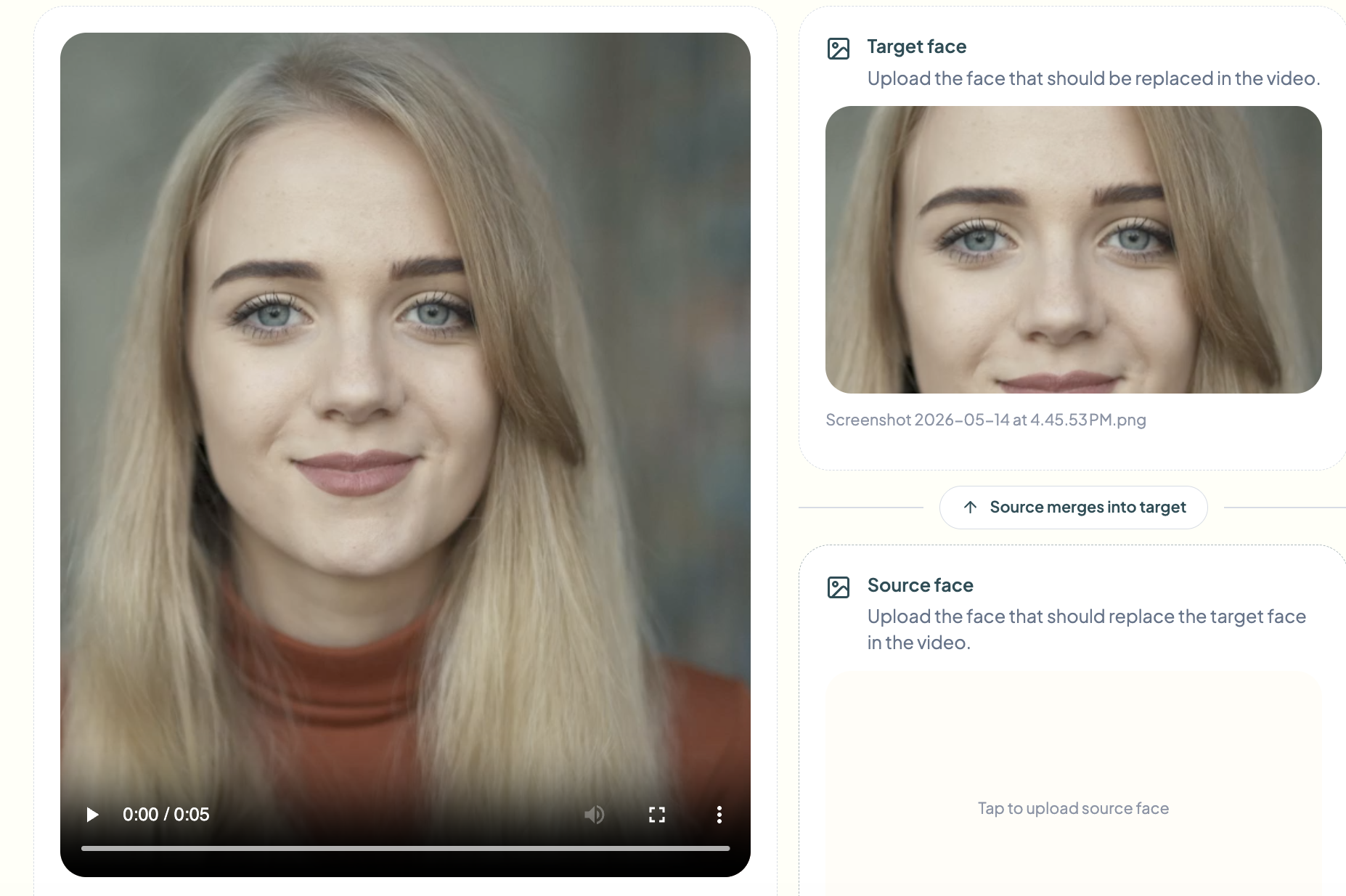
Next, upload the reference image of the face you want to locate, this is the person already in your video whose face will be replaced. bgblur's faceswap AI uses this image to lock onto the correct face in your footage, especially useful in multi-person scenes where you need to ensure the right subject is detected and tracked in every frame.
Step 3: Provide the Source Image You Want to Insert
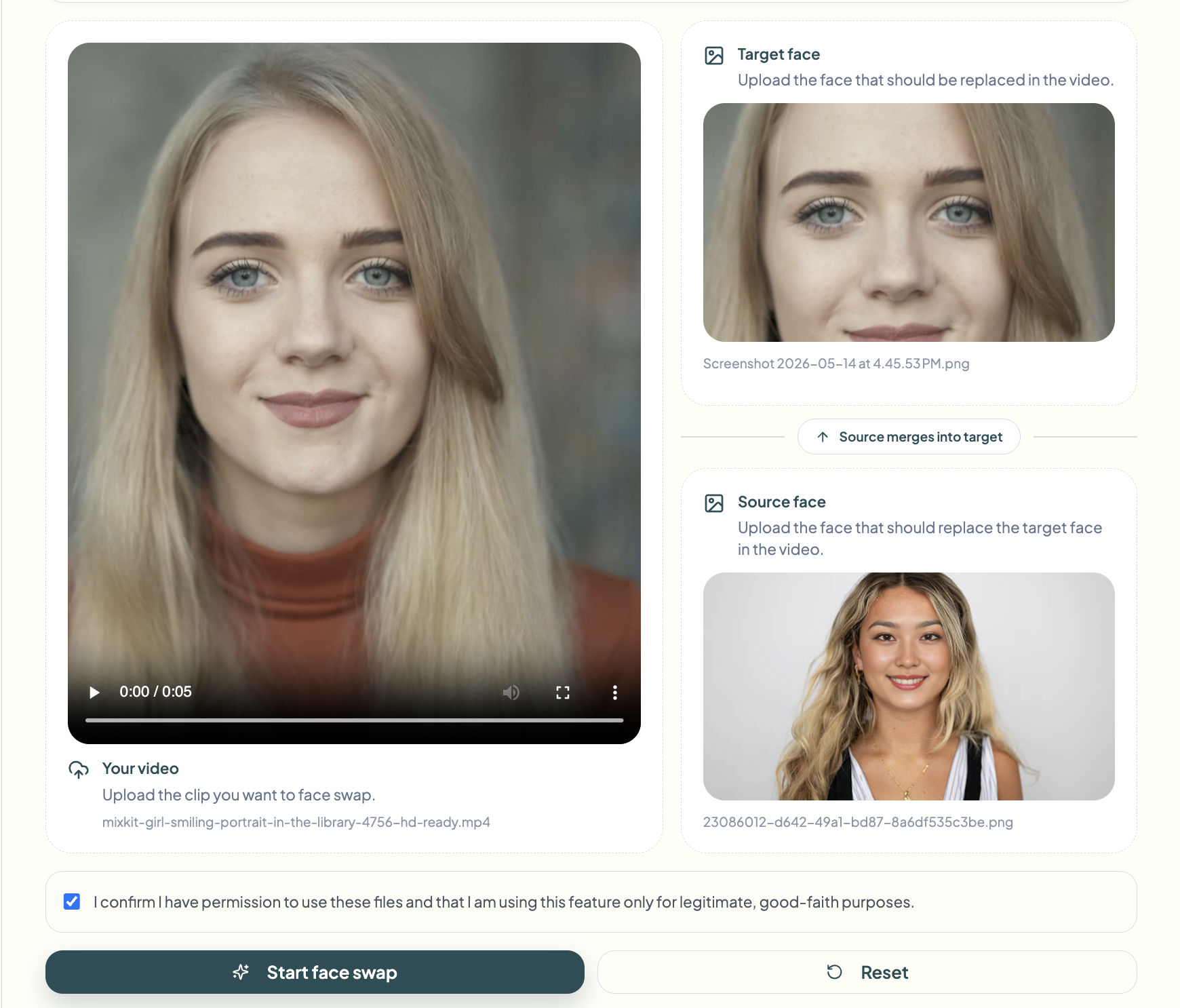
Now load the source image, the face you want to insert as a replacement. Use a clear, frontal, well-lit photo with no obstructions such as sunglasses, hats or heavy shadows. bgblur's faceswap AI extracts facial geometry and texture from this image and maps it to the identified face throughout the clip. The sharper this photo is, the more natural the final result of video face replacement will look.
Step 4: Click on Start Face Swap and Download the Result
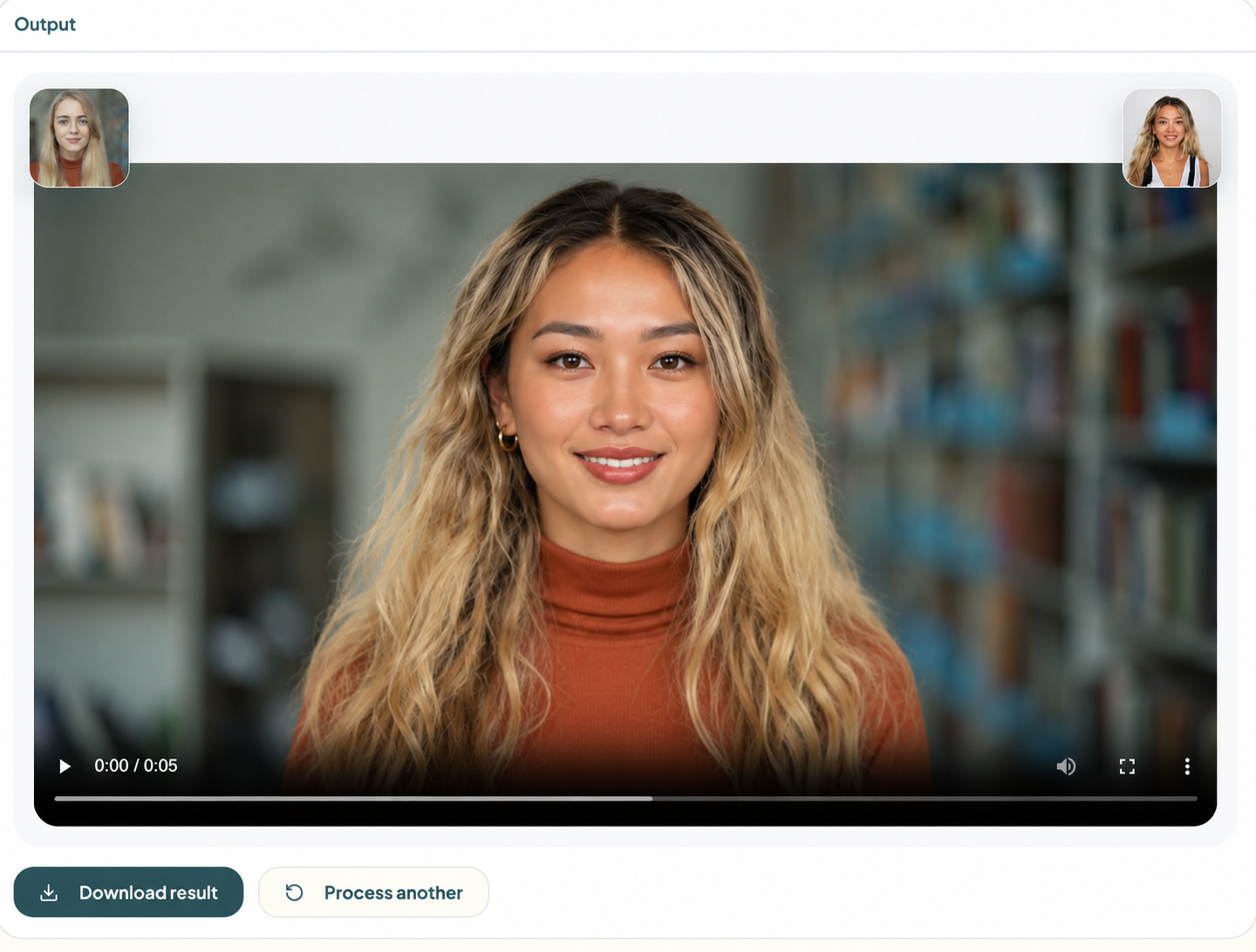
With the video loaded, the reference face located, and the source face ready, press the Start Face Swap button. bgblur's AI video face replacement engine kicks into action, detecting facial landmarks in each frame, warping the source face to match the original's pose, expression and lighting, and cleanly compositing throughout the clip. Once processing is complete, click Download to save the finished video. The original resolution, frame rate, audio and lip sync are all fully preserved.
How to Choose the Right AI Face Replacement Tool for Your Use Case
Not all AI video face replacement projects are created equal, and matching the right tool to your workflow is important. Here's a practical breakdown based on what you're actually trying to accomplish.
If you're changing a spokesperson without twisting, or creating multiple ad variations with different talent, the Video Face Replacement feature in bgblur is exactly what you need, it's designed specifically for face replacement in full videos with motion tracking. If you're working on a still photo or thumbnail, the Face Replacement Tool in Images handles single-frame replacements more efficiently.
For teams focused on identity protection rather than creative casting, face anonymization replaces faces with neutral representations rather than specific reference faces, ideal for GDPR-compliant content. If the goal is to simply blur rather than replace, the face blur tool handles this with automatic detection. And for vehicles, license plate blanking automates the blanking of license plate numbers in footage.
Corporate and agency teams processing large volumes of video should also explore bgblur's bulk processing options, loading and processing multiple clips in a single batch with consistent faceswap AI settings applied to all.
Common Mistakes to Avoid with AI Video Face Replacement
Use a Low Quality Reference Image
The most common cause of a poor AI video face replacement result is a low-quality source photo. Blurry, profile, or dimly lit reference images give the AI model too little information to work with. Always use a high resolution, frontal and well-lit photo as a reference face, the quality of the replacement is directly proportional to the quality of the input image.
Upload Long Videos Without Cutting Them First
Loading a 30 minute raw shot when you only need a 90 second segment wastes processing time and can introduce inconsistencies into the faceswap AI output. Trim your video to the exact clip you need before uploading.
Ignore Multiple Face Detection
If your video has multiple people in the frame and you only want to replace one, not specifying which face to locate can lead to unwanted replacements. Always use the face selection feature to confirm that the tool is identifying the correct subject in your video face replacement project.
Skip the Preview Step
Exporting directly without reviewing the preview is a time-wasting mistake. Rapid motion, profile angles, and complex lighting transitions are potential weaknesses in any AI video face replacement output. Always scroll through the entire clip in the preview before downloading the final file.
Neglecting Consent and Legality
Using someone's likeness without explicit permission, even with AI, can raise legal and ethical questions. For commercial use, always ensure you have the appropriate talent releases and usage rights before distributing any faceswap AI content.
Frequently Asked Questions
What is AI face swap and how does it work? AI faceswap is the automated process of detecting a face in a video clip and replacing it with a different face using deep learning. The AI analyzes the facial landmarks—eyes, nose, mouth, jaw—in each frame, then warps and blends the replacement face to match the pose, expression, and lighting of the original. Tools like bgblur handle all of this entirely in the browser, without requiring manual typesetting or technical skills.
Do I have to reshoot my video to change the person on screen?
No, that's exactly what video face replacement technology is designed to solve. With bgblur, you upload your existing footage and a reference photo of the new face, and the AI handles the replacement automatically. No crew, no studio, no additional shots needed. This is one of the most common questions from marketing managers who ask "how do I replace faces in a video without reshooting everything?"
What type of reference image works best for AI video face replacement?
For the best AI video face replacement results, your reference image should be high-resolution, frontal, well-lit with no strong shadows, free of obstructions such as sunglasses or hats, and taken against a relatively plain background. The more clearly the AI can read the facial geometry from the reference, the more realistic and consistent the replacement will be.
Does face replacement preserve original expressions and lip sync?
Yes. Modern faceswap AI systems like bgblur completely preserve the original person's facial expressions, head movement and lip sync. The replaced face conforms to the movements of the original, it does not replace the performance, only the identity. Any voiceovers or on-screen dialogue remain perfectly synchronized after replacement.
Is it legal to use face replacement in commercial videos?
It depends on how the replaced face is used and whose likeness is involved. For legitimate commercial use, such as replacement with a talent who has consented and signed a release, AI video face replacement is generally permitted. You should never use someone's likeness without their explicit consent, and distributing face-replaced content featuring real people for deceptive purposes may violate platform policies or local laws. Always consult a legal professional for your specific case.
Conclusion
AI video face replacement is no longer a niche technology, it is a true production tool that saves time, reduces costs and multiplies creative output. Whether you need to replace a spokesperson, adapt content for a new market, or protect someone's identity, the workflow has never been simpler or more accessible.
bgblur stands out because it works directly in your browser without installation, automatically handles face detection and tracking, and delivers clean, export-ready output in minutes. If you've been putting off an AI video face replacement project because it seemed too technical or expensive, now you have no reason to wait.