Smart AI Tool

AI-Powered Face Blur for Android — Google Play for Images & Videos

Automatically process images and videos using advanced AI detection and editing workflows. Face Blur for Android — Google Play reduces manual work while delivering clean, professional, and privacy-ready results.

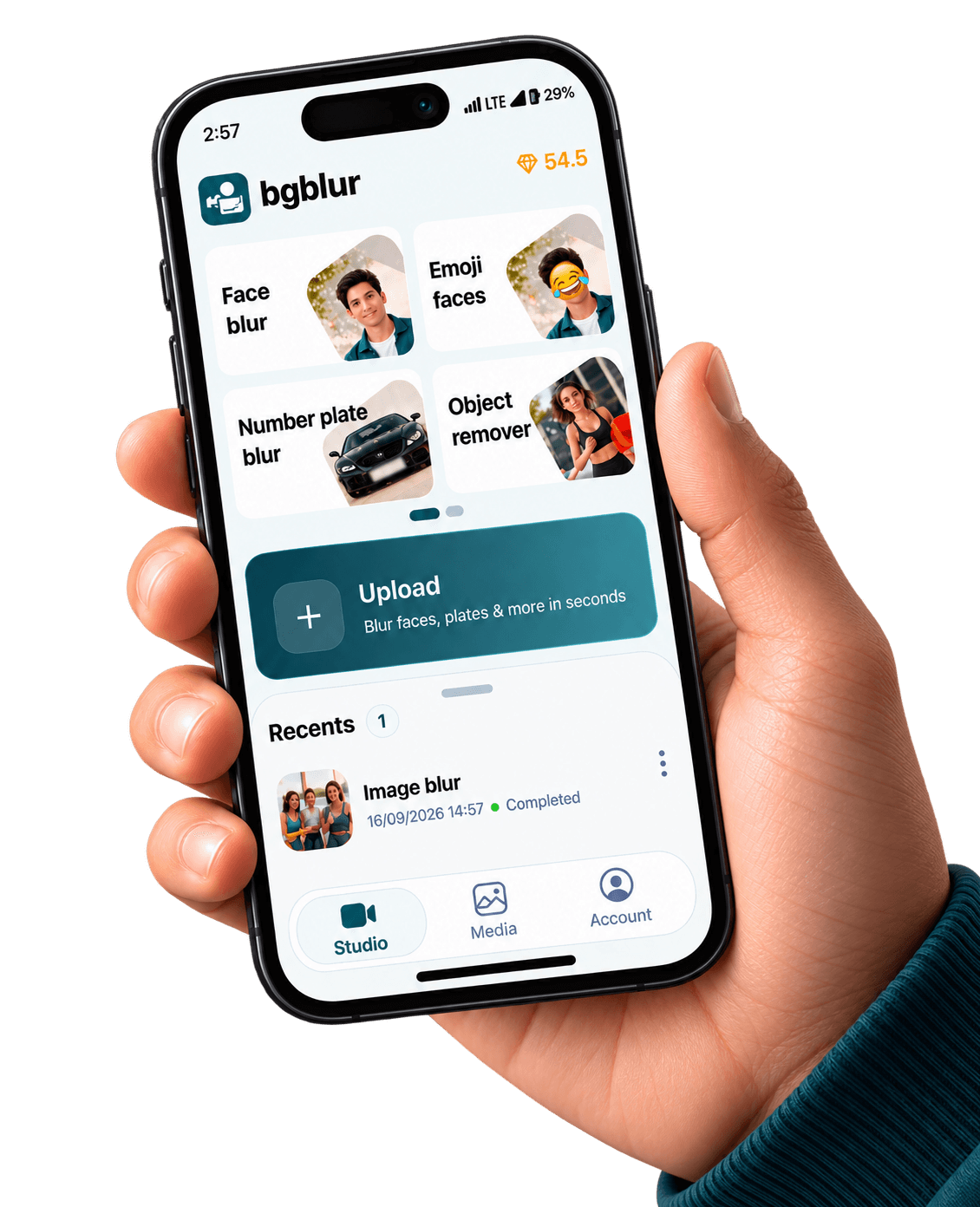
Face Blur for Android — Google Play preview
BGBlur Android face anonymization controls on a portrait clip

On-device capture · cloud-grade models

Screenshots come straight from public/images/mobile — the same creative kit we use for merchandising — paired below with stills from our web feature funnels so visitors see one consistent BGBlur story.

Get it on Google Play

Face blur on Android should feel as routine as color correction: upload or record, select privacy mode, confirm detections, export. BGBlur aligns mobile capture with the same models you trust on the web.

Studies on Generative Engine Optimization (GEO) show that combining fluent explanations with concrete details improves how often sources are cited by AI assistants (Aggarwal et al., 2023, arXiv:2311.09735)—apply the same clarity when documenting your blur workflow for legal or newsroom reviewers. Aggarwal et al., GEO: Generative Engine Optimization (2023).

Also on iPhone — App Store.

When is mobile face blur mandatory?

School events, protests, hospitals, and workplaces routinely require consent or redaction. Even when local law seems permissive, platform monetization policies may still expect identifiable minors or bystanders to be masked.

Bystander coverage

Wide shots hide dozens of faces—automation beats missing one person in a crowd.

Consistent oval masks

Reduce flicker by letting temporal models stabilize blur boundaries frame to frame.

Journalism workflows

Export evidence-friendly copies for editors while publishing a redacted public cut.

Play distribution

Google Play updates roll out without sideload friction for newsroom contractors.

Same visuals as our web product pages

The stills below are pulled from the same CloudFront galleries we use on license blur, face blur, blur anything, and background blur — adapted here to show what your Android exports can match.

Before and after face blur on subjects in frame
Portrait optics from the face-blur product story — now on Android.
Group scene with consistent face redaction
Multi-face timelines: stable ovals beat manual keyframes.
Combined privacy pass showing blurred face adjacent to vehicle context
Pair face blur with plate blur when shoots mix cab and curb.

AI editing features

More than a Face Blur Android Google Play tool

Privacy tooling that respects how Android creators actually shoot, edit, and publish. Face Blur Android Google Play is built for video privacy protection, automatic blur, motion-aware editing, object redaction, secure export, and faster browser-based video workflows.

Smart AI Face Blur Android Google Play video workflow

Face Blur Android Google Play helps creators edit videos faster with AI-powered blur, masking, tracking, redaction, privacy protection, and browser-based automation.

Motion-aware AI automation

Use AI assistance to reduce manual keyframes, repeated masking, frame-by-frame blur work, object selection, and privacy edits across clips and social videos.

Video privacy protection

Face Blur Android Google Play helps hide faces, plates, backgrounds, objects, text, body details, and sensitive visual information before videos are published or shared.

Fast browser-based processing

Upload a video, apply the tool workflow, review the result, and export edited content without installing heavy video software or switching between apps.

Flexible editing controls

Adjust blur style, intensity, selected areas, tracking, masking, and export decisions depending on the footage, audience, platform, and privacy requirement.

Export publish-ready videos

Prepare cleaner videos for YouTube, TikTok, Instagram, training libraries, client review, education, journalism, real estate, automotive content, and compliance workflows.

What Our Users Say

Join thousands of satisfied users who trust our tools

We shoot vérité on Pixel phones. Mobile face blur means our subjects get credibly protected before drives hit the edit bay.
SL
Samira L.
Field producerIndie doc collective
Arena crowds are chaotic. BGBlur shortens the ‘panic mask’ step after every LAN weekend.
NT
Noah T.
Community managerEsports league
We teach students to default-blur faces in public demos—it keeps IRB-aligned storytelling scalable.
PK
Priya K.
Comms directorUniversity innovation lab
4.9/5from 3+ reviews

Frequently asked questions

Answers to common questions about using Face Blur Android Google Play for image and video editing, privacy protection, export quality, and browser-based AI workflows.

Does Google Play allow face blur utilities?

Yes, provided the app complies with Google Play policy (clear disclosures, appropriate content labeling, and privacy disclosures). BGBlur is positioned as a privacy utility—not circumvention ware.

Can I combine face blur with plate blur?

Most real-world shoots need both. Use the face-focused Play landing page for hero messaging, then stack plate tools from the companion listing or the web dashboard.

How accurate is automatic detection?

Accuracy depends on lighting, codec sharpness, and occlusions. Always spot-check eyes-off moments before publication—automation handles the bulk, humans approve the edge cases.

What is Face Blur Android Google Play?

Face Blur Android Google Play is an AI-powered BGBlur workflow for editing images and videos faster. It helps automate privacy, blur, masking, or cleanup tasks so creators can finish content without manual frame-by-frame work.

Can I use Face Blur Android Google Play for both images and videos?

Yes. BGBlur workflows are designed around common image and video use cases, including uploads for photos, short clips, social content, product footage, screen recordings, and longer privacy review workflows.

How does Face Blur Android Google Play save editing time?

The tool uses AI-assisted detection and automation to reduce repetitive selection, masking, and redaction steps. You can start with an upload, review the result, adjust settings when needed, and export a finished file.

Is Face Blur Android Google Play good for privacy protection?

Yes. It is built for privacy-first editing tasks such as hiding sensitive details, reducing identifiable information, and preparing content before it is shared publicly, with clients, or inside a team.

Do I need professional editing software?

No. BGBlur runs in the browser, so you do not need a desktop video editor, plugin setup, or complex timeline workflow for common AI blur and privacy edits.

Will Face Blur Android Google Play keep my export quality clear?

The goal is to keep the important parts of your image or video visible while applying the selected privacy or blur effect only where it is needed. Final quality can depend on the uploaded file and export settings.

Can I review the result before downloading?

Yes. You should review the AI result before export, especially for crowded scenes, fast motion, low light, reflections, small objects, or footage with partial occlusion.

Who uses Face Blur Android Google Play?

Creators, marketers, educators, journalists, real estate teams, automotive teams, compliance reviewers, and social media editors use BGBlur tools to prepare safer publish-ready media faster.

Does Face Blur Android Google Play work on mobile and desktop?

BGBlur is web-based, so it is designed for modern browsers on desktop and mobile devices. Larger video files are usually easier to review and export from a desktop browser.

What should I check before publishing?

Check every sensitive frame or image area, confirm the blur or mask covers the intended subject, preview the final export, and keep an original backup if you may need to revise the edit later.

Start with BGBlur

Smart AI Install BGBlur for Android for Images & Videos

Install BGBlur for Android helps creators edit images and videos faster with smart AI-powered automation. Upload your file, choose the privacy or blur workflow you need, and export polished content without manual frame-by-frame editing.

Google Play listing — swap in your production package URL anytime

Open Google Play
Free to startBrowser workflowPrivacy-first export
BGBlur video privacy editor interface