AI Video Object Remover
Eliminar objetos no deseados, personas, texto, logos o marcas de agua de tus vídeos con precisión AI. Borrar cualquier cosa sin costura mientras mantiene intacta tu filmación.
Cómo quitar objetos del vídeo en 3 pasos
Tres sencillos pasos para borrar cualquier cosa de tus vídeos
Paso 1: Sube el vídeo
Sube el vídeo con objetos no deseados. Admite MP4, MOV, y todos los formatos de vídeo comunes.
Paso 2: Seleccione objetos para eliminar
Utilice la herramienta de pincel para pintar sobre objetos que desea borrar. Ajuste el cronograma para cubrir la duración completa donde aparece el objeto.
Paso 3: Quitar & Descarga
Elija su método de eliminación (Gaussian Blur, Smooth Fill o Clone Patch) y descargar su vídeo limpio al instante.
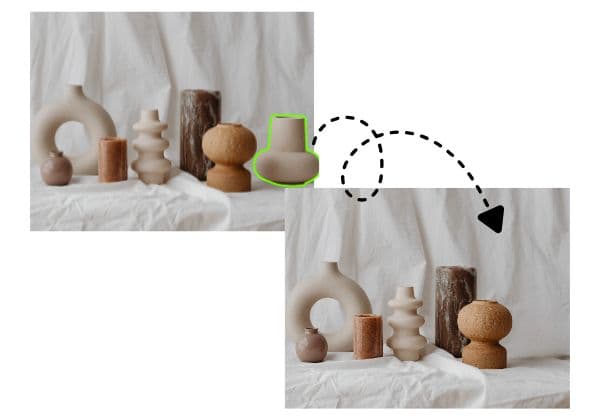
Eliminación de objetos en potencia
La avanzada tecnología AI detecta y elimina automáticamente objetos, personas y artículos de vídeo. Borrar elementos no deseados, eliminar marcas de agua, eliminar logotipos o dejar claros antecedentes de distracción con precisión profesional—no se requiere una edición manual de marco por marco.
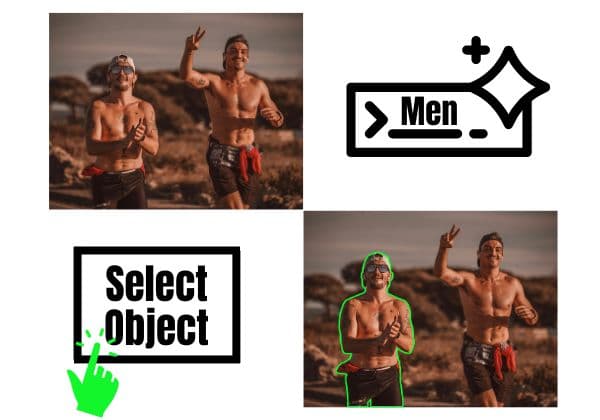
Múltiples métodos de eliminación
Elija entre múltiples técnicas de eliminación de AI: Gaussian Blur para mezcla natural, Smooth Filling para parches sin costura, Color Filling para combinar fondos, o Clone Patch para copiar píxeles cercanos. Cada método garantiza resultados limpios y sin artefactos adaptados a su escena.
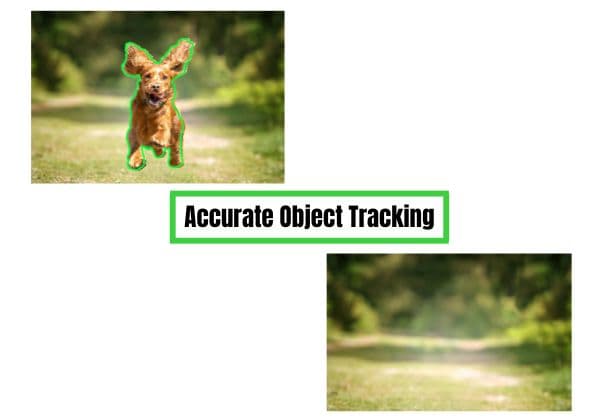
Moving Object Tracking
Eliminar objetos móviles con seguimiento de movimiento inteligente. Nuestra AI sigue y borra automáticamente objetos a lo largo de su clip mientras se mueven, giran o cambian de tamaño, perfecto para eliminar personas caminando, logotipos en vehículos móviles o cualquier elemento dinámico.

Watermark & Logo Removal
Eliminar permanentemente marcas de agua, logotipos, marcas de tiempo y mensajes de texto de tus vídeos. Limpiar las imágenes de stock, eliminar marcas de agua TikTok, borrar logotipos de YouTube o eliminar cualquier elemento de marca mientras mantiene la calidad de vídeo.
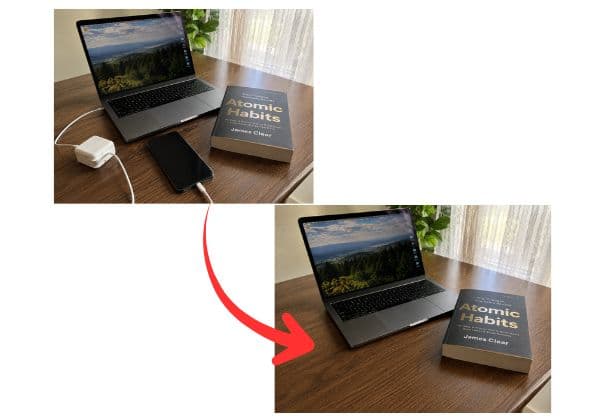
Funciona en cualquier objeto
Retire todo lo que vea: personas, vehículos, animales, texto, signos, polos, alambres, fondos no deseados, o cualquier distracción visual. Seleccione el objeto con una herramienta de cepillo y deje que AI maneje el resto con la eliminación precisa de marco.
Elimina Personas de un Video Gratis
¿Necesitas eliminar una persona de un video, o quitar personas de un video por completo — alguien que arruina la toma, un desconocido que cruza el encuadre, una multitud de fondo? Este borrador de objetos de video con IA lo hace en línea y gratis, sin software de edición. Sube tu clip, selecciona a la persona o personas a eliminar, y la IA rellena el espacio detrás de ellas usando las imágenes circundantes, fotograma a fotograma.
Elimina Objetos No Deseados de un Video en Línea Gratis
Desde un cable suelto en el encuadre hasta flujos de eliminar objeto no deseado de video en línea gratis para creadores con presupuesto limitado, esta herramienta cubre el mismo terreno que un borrador de objetos de video dedicado, sin una app aparte. Funciona para un solo objeto no deseado, desorden de fondo recurrente, o cualquier cosa que normalmente requeriría un editor profesional.
Eliminar cualquier cosa del vídeo con la precisión AI
BGBlur hace la eliminación de objetos de vídeo simple y profesional. Use AI para borrar personas, marcas de agua, logotipos, texto, vehículos, animales o cualquier elemento no deseado directamente en su navegador, sin necesidad de software complejo.
Seleccione objetos con una herramienta de cepillado, elija su método de eliminación (azul, relleno o clon), y obtenga resultados limpios en minutos. Perfecto para creadores de contenido, videografos, marketers y cualquier persona que necesite una rápida limpieza de vídeo. Pruébalo en /ai-video-object-remover.
Powered by BGBlur
AI Video Object Remover FAQ
Subir el vídeo, utilizar la herramienta de cepillo para pintar sobre los objetos que desea eliminar, ajustar la línea de tiempo para cubrir cuando aparezca el objeto, seleccionar el método de eliminación y descargar el vídeo limpio.
Sí. BGBlur utiliza el seguimiento de movimiento AI para seguir y eliminar automáticamente los objetos mientras se mueven a través de su vídeo. Seleccione el objeto una vez, y AI lo rastrea a través de todos los marcos.
Sí. Puede eliminar marcas de agua TikTok, logotipos de YouTube, marcas de tiempo, marcas de agua o cualquier superposición de texto. Pintar sobre la marca de agua, seleccionar el relleno liso o el parche clon, y exportar su vídeo limpio.
BGBlur ofrece múltiples métodos: Gaussian Blur (colores naturales con fondo), Smooth Filling (fills perfectamente), Color Filling (pantallas de fondo), y Clone Patch (copias cercanas píxeles). Elija el método que funciona mejor para su escena.
Usted puede eliminar personas, animales, vehículos, texto, logos, marcas de agua, postes, alambres, signos, fondos no deseados, o cualquier elemento visual. Si puedes verlo, puedes quitarlo.
BGBlur conserva su resolución original de vídeo y calidad. Sólo las áreas seleccionadas son procesadas, mientras que el resto de su filmación permanece prístino.
Sí. Puede seleccionar y eliminar múltiples objetos en un solo pase. Cada objeto puede utilizar diferentes métodos de eliminación para obtener resultados óptimos.
La eliminación de objetos borra completamente los elementos de su vídeo, mientras que el borrón sólo los oscurece. Elija la eliminación cuando desea imágenes limpias sin trazas, o borre cuando necesita proteger la privacidad mientras mantiene el área visible.
No. BGBlur funciona completamente en su navegador. Subir, eliminar objetos y descargar—sin instalación, sin plugins, sin editores complejos necesarios.
El tiempo de procesamiento depende de la longitud de vídeo y el número de objetos. La mayoría de los vídeos se procesan en minutos. Usted puede rastrear el progreso en tiempo real y descargar inmediatamente cuando está listo.
AI Video Object Remover admite videos MP4 y MOV de hasta 1 GB. El flujo de trabajo de eliminación de objetos actual acepta clips de hasta 10 segundos por carga.
Sí, la IA de BGBlur rastrea automáticamente objetos, rostros y vehículos en movimiento. No es necesario enmascarar manualmente cada fotograma; el rastreador adaptado al movimiento mantiene el desenfoque fijo en el sujeto mientras se mueve.
BGBlur es una herramienta completamente basada en la web. Puede cargar cualquier video o imagen, seleccionar la herramienta de desenfoque de rostros y aplicar la pixelación o el desenfoque instantáneamente dentro de su navegador sin descargar aplicaciones ni complementos.
Absolutamente. Nuestra IA está entrenada específicamente para detectar y desenfocar matrículas en videos de conducción, dashcams y videos de vista de calle, ayudando a cumplir con las leyes de privacidad.
Su privacidad es nuestra prioridad. BGBlur aprovecha tecnologías avanzadas del lado del cliente para procesar videos de manera segura. Sus archivos se procesan localmente en su navegador y nunca se cargan ni se almacenan permanentemente en servidores externos.
¡Sí! BGBlur es completamente responsivo y está optimizado para navegadores móviles. Puede desenfocar fácilmente el fondo de un video o pixelar rostros directamente en su teléfono iPhone, iPad o Android.
Los límites dependen de la característica. Las herramientas de desenfoque de video estándar, como desenfoque de rostro, desenfoque de matrícula, desenfoque de fondo, desenfoque de cualquier cosa, desenfoque de pantalla, desenfoque NSFW y anonimización de rostros, admiten hasta 500 MB y 5 minutos en el plan gratuito, o hasta 1 GB y 10 minutos en los planes pagos. Object Remover admite videos MP4 y MOV de hasta 1 GB y 10 segundos por clip. Las cargas directas de Voice Anon admiten hasta 100 MB, mientras que el flujo de trabajo de carga/URL admite archivos de audio o vídeo de hasta 500 MB y menos de 10 minutos.
User Reviews
Share your experience and help others make informed decisions
Write a Review
Community Score
0.0
/ 5
Based on 0 reviews
All Reviews (0)
No reviews yet
Be the first to share your experience and help others make informed decisions!
¿Listo para difuminar tu contenido de video?
Comienza a proteger la privacidad y crear efectos de difuminado de video profesionales hoy con nuestra herramienta impulsada por IA. No se requieren descargas - difumina directamente en tu navegador.
Comenzar a Difuminar Ahora