AI Item Remover: Instantly Clean Up Video & Photos
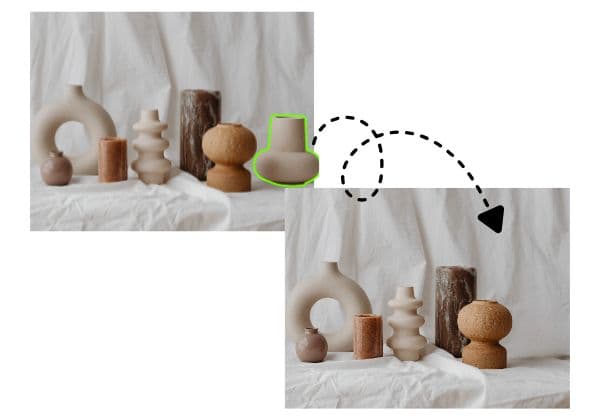
Remove unwanted objects, clutter, and distractions from any video or photo with AI. Clear the clutter, reveal a cleaner shot — no editing skills, no reshooting needed.
如何模糊视频背景
Get started with our simple 3-step process
1. 上传文件或粘贴链接
上传视频或粘贴链接即可开始。
2. 模糊背景
选择视频并启用背景模糊效果。
3. 导出并分享
导出视频并分享或下载。
是什么让BGBlur不同?
BGBlur是为基于浏览器的AI视频编辑而构建的:上传一个剪辑,选择隐藏或软化的内容,并在没有学习时间表软件的情况下导出隐私准备的镜头.
AI 视频模糊
自动视频模糊的工作流程减少人工遮掩面部,板块,背景,屏幕,以及敏感对象.
基于浏览器
从桌面或移动方式在线编辑视频,而不安装专业视频编辑软件.
注重隐私
BGBlur的设计是为了更安全的出版,编辑,匿名化,以及符合规定的视频共享.
选择性控制
选择目标模糊,背景模糊,面部匿名,或者根据镜头选择对象模糊.
快速工作流程
简单的上传,预览,处理和导出步骤帮助创建者和团队快速完成编辑.
多种格式
使用BGBlur跨越常见的视频和图像工作流程进行社会,法律,培训和创作内容.
自动模糊视频背景
BGBlur致力于让视频隐私和增强向所有人开放. 我们的工具使用高级AI来帮助你模糊面孔,车牌,物品,屏幕,以及您的浏览器中迅速和安全的背景.
特征包括自动面部模糊,车牌模糊,背景模糊,物体模糊,以及AI辅助匿名. 上传您的视频,选择您需要的隐私效果,预览结果,并导出不下载或高级软件.
由BGBlur提供动力
常见问题
Select the item you want gone. For video, BGBlur's AI tracks that item across every frame automatically; for photos, it removes the item in a single pass. Either way, the AI reconstructs the background behind it so the removal blends naturally with the rest of the shot.
Yes. You can select and remove multiple items — objects, people, clutter, or distractions — from the same video or photo. Each item is removed independently so the rest of the shot stays untouched.
No. BGBlur reconstructs the area behind the removed item within the original frame, so your resolution, aspect ratio, and composition stay exactly as they were.
Instead of physically tidying and reshooting, upload your photo to BGBlur's AI item remover, select the clutter you want gone, and the AI removes it and rebuilds the background so the room looks clean and natural — useful for listings or before you sell.
BGBlur supports common video formats like MP4 and MOV, plus common image formats like JPG and PNG. Upload directly in the browser — no software installation required.
可以,BGBlur 的 AI 能够自动跟踪移动的物体、人脸和车辆。您不需要手动为每一帧应用遮罩,运动感应追踪器会在主体移动时自动保持模糊锁定。
BGBlur 是一款完全基于网页的工具。您只需上传任何视频或图像,选择“人脸模糊”工具,即可在浏览器中立即应用模糊或像素化,无需下载任何应用或插件。
当然可以。我们的 AI 专门针对驾驶画面、行车记录仪和街景视频中的车牌进行过检测和模糊训练,帮助创作者和车队遵守隐私法规。
保护您的隐私是我们的首要任务。BGBlur 利用先进的客户端技术安全地处理视频。您的文件在浏览器本地进行处理,绝不会上传或永久存储在外部服务器上。
可以!BGBlur 采用全响应式设计,并对移动浏览器进行了深度优化。您可以轻松地直接在 iPhone、iPad 或 Android 手机上模糊视频背景或像素化人脸。
限制取决于功能。标准视频模糊工具(例如面部模糊、车牌模糊、背景模糊、任何内容模糊、屏幕模糊、NSFW 模糊和面部匿名化)在免费计划中支持高达 500MB 和 5 分钟,在付费计划中支持高达 1GB 和 10 分钟。 Object Remover 支持高达 1GB 的 MP4 和 MOV 视频,每个剪辑 10 秒。 Voice Anon 直接上传支持高达 100MB,而上传/URL 工作流程支持高达 500MB 且时间不超过 10 分钟的音频或视频文件。
User Reviews
Share your experience and help others make informed decisions
Write a Review
Community Score
0.0
/ 5
Based on 0 reviews
All Reviews (0)
No reviews yet
Be the first to share your experience and help others make informed decisions!